An AI documentary video generator is a tool that turns a topic or a script into a narrated, researched video built from footage, graphics and music, with no presenter on camera. For most YouTube documentary channels, VidGenn is the best pick: it uses licensed real footage instead of AI clips, puts a graphic on every fact, keeps a credits file of every source and costs from $0.63 a minute. VidRush is the choice for documentaries longer than 20 minutes, and Subscribr for research-heavy scripting.
VidGenn publishes this guide, so we've tried to judge every tool on the same documentary criteria and to say where the others do better. Unlike our broader faceless video generator comparison, this one ignores avatars and Shorts. It asks one question: which tool makes a documentary that viewers trust and YouTube will monetize?
How we checked: every price, length and feature comes from each vendor's own pricing page, homepage or FAQ, read on 18 November 2026 in US dollars with monthly billing. We read their pages; we didn't make test videos with the competitors. Where a page doesn't state something, we say “not stated” rather than guess.
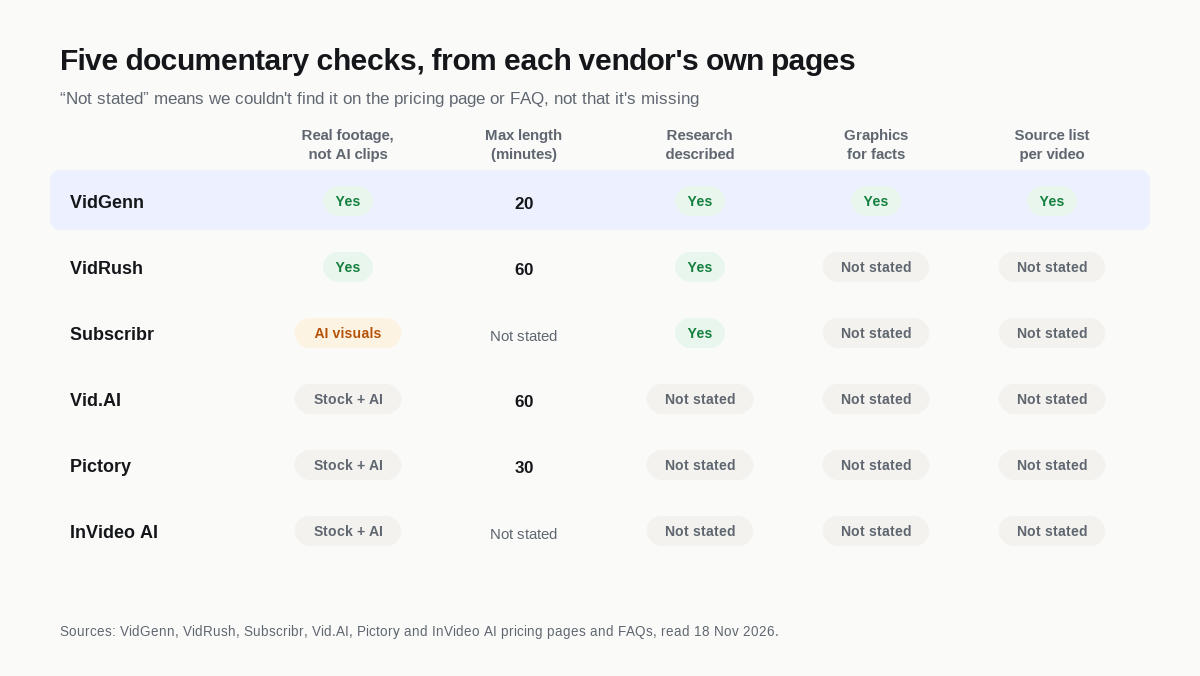
Key takeaways: (1) Only VidGenn and VidRush say they use real footage rather than AI-generated clips. (2) VidGenn has the lowest price per finished minute here: $0.63 on Starter, $0.30 on Studio. (3) VidRush goes to 60 minutes but starts at $99 a month (about $2.20 a minute). (4) Whatever the tool, you still fact-check the script: none of these vendors promises accuracy on its pricing page.
What makes a good AI documentary generator?
A documentary makes claims about the real world, so it is judged more harshly than a list video or a story. We scored each tool on six things:
- Real or archive footage vs AI clips. A documentary about a real event should show the real place, animal or object. An AI-generated “realistic scene that didn't occur” is something YouTube asks you to label, and viewers spot it fast.
- Research and accuracy. Does the tool research the topic, and can you edit every line before rendering? A wrong date costs you comments and trust.
- Length. Most documentary channels run 8 to 20 minutes; some run an hour.
- Graphics for facts. Numbers, dates and maps land better on screen than in narration alone.
- A credits and licensing trail. If a claim or Content ID dispute comes, you need to know where every clip came from. See copyright-safe documentary footage.
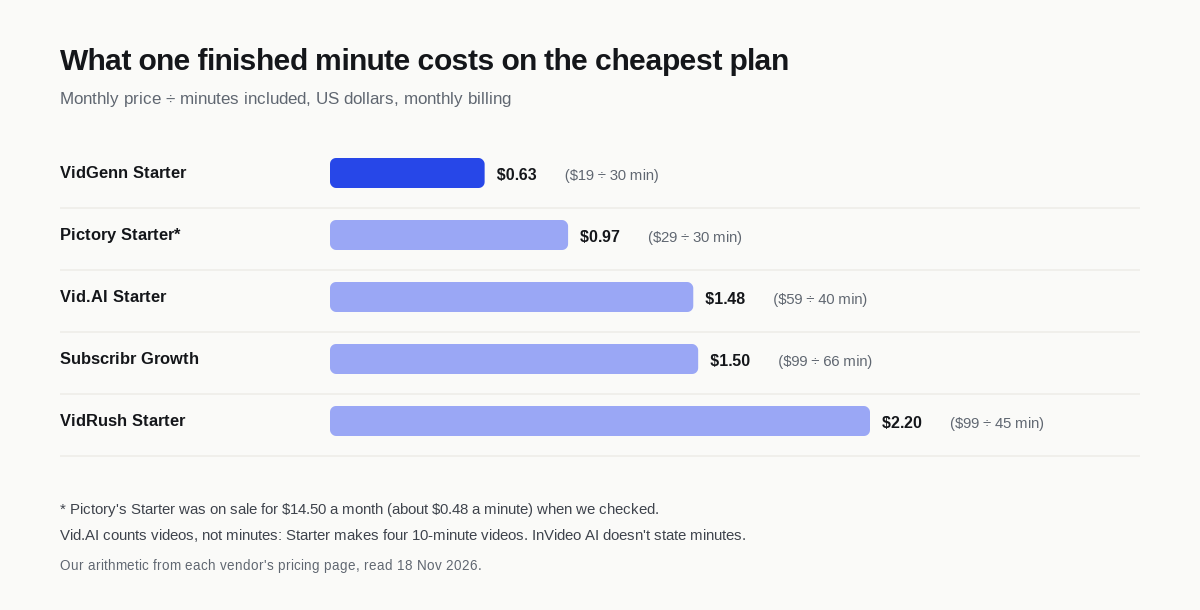
- Price per finished minute. The fairest way to compare plans that count credits, videos and minutes differently.
Real footage or AI clips: which suits a documentary?
This is the biggest split between the tools, and it matters more for documentaries than for any other format. Real footage shows the actual thing: the real Mauna Kea, the real Voyager probe, the real Everglades. AI clips show what a model imagines the thing looks like.
| Real or archive footage | AI-generated clips | |
|---|---|---|
| Accuracy | Shows the real subject, if the clip matches the claim | Can invent wrong details (the wrong uniform, the wrong species) |
| YouTube label | Not needed for real footage | Needed when a realistic scene didn't happen |
| Licensing trail | Clear when the library and license are logged | Depends on the tool's terms |
| Best for | Nature, space, science, geography, modern history | Ancient history, the deep past, what-if scenes |
Many good channels mix the two: real footage for the facts, and a clearly styled AI or illustrated scene for the moments no camera saw. The rule of thumb is simple. If a viewer could mistake an AI scene for a real recording of a real event, label it.
The six tools compared
| Tool | Visuals | Longest video | Cheapest plan | Price a minute |
|---|---|---|---|---|
| VidGenn | Licensed real footage + a graphic on every fact | 20 min | $19 for 30 min | $0.63 (Studio $0.30) |
| VidRush | Real footage (CC and public domain, stock or web) | 60 min | $99 for 45 min | About $2.20 |
| Subscribr | AI-generated visuals in 14 styles | Not stated | $99 for 66 min | $1.50 |
| Vid.AI | AI video models + stock footage | 20 min (60 on Plus) | $59 for 4 ten-minute videos | About $1.48 |
| Pictory | Getty and Storyblocks stock + AI visuals | 30 min | $29 for 30 min (on sale at $14.50) | $0.97 |
| InVideo AI | Stock + AI generation | Not stated | $9 for 190 credits | Not stated |
1. VidGenn: best overall for documentary channels
VidGenn is built only for faceless documentaries and explainers. Give it a topic and it writes title options and a researched script, or paste your own script and it reads it word for word. Every line is editable before anything renders. One of 24 ElevenLabs narrators reads it, in English, Portuguese, Spanish, French, German or Italian.
The documentary strengths are the footage and the paper trail. Every sentence gets licensed real footage from NASA, Wikimedia Commons, the Internet Archive, Pexels and Pixabay (plus Openverse for images), not AI-generated clips. Every fact gets a motion graphic from 184+ designs: counters, maps, timelines and checklists. A credits file lists every source for your description.
- Good: real footage, fact graphics and a credits file in every video; an editor to swap shots and graphics, and edits or re-renders don't use minutes; a failed video gives its minutes back.
- Watch out: 20 minutes is the maximum; no free plan or trial; no avatars, Shorts or thumbnails, and it doesn't upload to YouTube for you.
- Price: Starter $19 for 30 minutes ($0.63 a minute), Creator $38 for 60, Pro $79 for 180 ($0.44) and Studio $149 for 500 ($0.30). See plans.
2. VidRush: best for documentaries over 20 minutes
VidRush makes long documentaries and Top 10 videos, from 6 to 60 minutes, in English (VidRush pricing). Its FAQ says “nothing is AI-generated footage”: clips are matched to real footage. Its homepage says the documentary mode is “researched from primary sources” and promises videos “publish-ready in under an hour”.
One feature documentary makers should like: you can choose “CC & Public Domain Only” sources, as well as commercial stock or “General Web Crawling”. If you care about licensing, stick to the first. The site doesn't describe a per-video source list or fact graphics.
- Good: the longest real-footage documentaries here (60 minutes); a public-domain-only source setting.
- Watch out: the price. Starter is $99 for 45 minutes, about $2.20 a minute by our arithmetic (the page itself shows $2.18 and $2.27).
- Price: Starter $99 for 45 minutes, Creator $239 for 136, Pro $639 for 409; yearly billing saves 20%.
Side by side: VidGenn vs VidRush, or see VidRush alternatives.
3. Subscribr: best for research and scripts
Subscribr started as a YouTube research and scripting tool, and that's still its strongest side. Its Ideation Bot “mines a 35M+ video database”, and paid plans list a Research Assistant for videos, PDFs and articles (Subscribr pricing). Its FAQ says scripts run “from about one minute to three hours”.
For finished documentaries, the catch is the visuals: faceless videos use “AI-generated visuals in 14 visual styles”, not real footage. That suits stylised explainers better than a documentary about a real shipwreck. Neither its pricing page nor its FAQ states a maximum finished-video length.
- Good: the deepest research and scripting features here; a free plan for ideas and research searches.
- Watch out: AI visuals rather than archive footage; no per-video maximum stated.
- Price: Growth $99 for 66 minutes ($1.50 a minute), Pro $249 for 185 ($1.35), Max $499 for 415 ($1.20).
Compare: VidGenn vs Subscribr and Subscribr alternatives.
4. Vid.AI: best for cinematic AI scenes
Vid.AI makes long videos and Shorts with AI video models: Seedance and Wan on Starter, plus Veo 3.1, Seedance 2.5 and Kling 2.5 on Plus and Pro (Vid.AI pricing). Stock footage is included too. Starter makes videos up to 20 minutes; Plus and Pro go to an hour.
AI scenes are good for things no camera filmed, such as ancient battles or the deep past. For documentaries, two cautions apply. A realistic AI scene of a real event must be labelled on YouTube, and an invented scene can show details that are simply wrong. The pricing page doesn't describe research features.
- Good: cinematic AI visuals for scenes that were never filmed; up to 60 minutes on Plus.
- Watch out: generated pictures of real events need labelling and careful checking; it counts in videos and credits, not minutes.
- Price: Starter $59 for four 10-minute videos, Plus $99 for twelve, Pro $199 for thirty (shown against a struck-through $299).
Compare: VidGenn vs Vid.AI and Vid.AI alternatives.
5. Pictory: best if you write your own script
Pictory turns a script, article or link into a video with stock footage from Getty Images and Storyblocks: 5 million+ clips on Starter, 18 million+ on Professional (Pictory pricing). It's a general video tool, not a documentary tool, so the research is yours. Videos run up to 30 minutes.
- Good: a large licensed stock library; a 14-day trial (300 credits, 5-minute videos, 720p), which VidGenn doesn't offer.
- Watch out: stock footage is generic, so a documentary about a specific person or place may get lookalike shots; no research or fact graphics described.
- Price: Starter is normally $29 for 30 minutes ($0.97 a minute) and Professional $59 for 90 minutes. When we checked, a sale had them at $14.50 and $29.50 billed monthly.
Compare: VidGenn vs Pictory, Pictory alternatives, our Pictory AI review and Pictory vs InVideo.
6. InVideo AI: best for general video editing
InVideo AI is a general AI video editor with stock media and AI generation models such as Seedance (InVideo pricing). It's flexible, with seats for a team, but it isn't built around documentaries. Its pricing page shows credits, not minutes, and doesn't state a maximum video length or describe research.
- Good: a low entry price and a broad editor; Pro and Ultra include guest seats.
- Watch out: you can't tell from the pricing page how many finished minutes a plan makes, so price per minute can't be compared.
- Price: Basic $9 for 190 credits, Pro $30 for 1,000, Ultra $80 for 3,000 (per seat, monthly).
Compare: VidGenn vs InVideo, InVideo alternatives, our InVideo AI review and InVideo AI pricing.
Worked example: a month of 15-minute documentaries
Say you publish four 15-minute documentaries a month, 60 finished minutes in all, and pick each tool's cheapest plan that covers them. Our arithmetic, from each pricing page:
| Tool | Cheapest plan that fits 60 minutes | Price a month | Per video (÷ 4) |
|---|---|---|---|
| VidGenn | Creator, 60 minutes | $38 | $9.50 |
| Pictory | Professional, 90 minutes (Starter's 30 is too few) | $59 ($29.50 on sale) | $14.75 |
| Subscribr | Growth, 66 minutes | $99 | $24.75 |
| Vid.AI | Plus, about 120 minutes (Starter's 20-minute cap and four 10-minute videos fall short) | $99 | $24.75 |
| VidRush | Creator, 136 minutes (Starter's 45 is too few) | $239 | $59.75 |
| InVideo AI | Minutes not stated | Not stated | Not stated |
At this volume VidGenn's Creator plan fits exactly, with no minutes to spare. If you also redo videos, edits and re-renders don't use minutes in VidGenn, but a fifth video would need Pro ($79 for 180 minutes). For a full month-by-month view, try the cost calculator.
How to keep an AI documentary accurate
No vendor in this list promises accuracy on its pricing page, and AI scripts can state wrong dates or numbers with total confidence. Whatever tool you use, the checking stays with you:
- Check every number, date and name against two independent sources before you render.
- Prefer primary sources: a museum, a university, NASA or a government agency over a listicle.
- Match the footage to the claim. The right species, the right decade, the right place. Swap any clip that doesn't fit.
- Don't show AI pictures as real events. If you use them, label them on screen and when you upload.
- Put your sources and credits in the description. It builds trust and helps if a claim is ever disputed.
This is also what keeps a channel monetizable: YouTube refuses mass-produced, templated content, and real research is the clearest sign a video isn't that. Our tutorial on how to make a documentary with AI walks through the fact-check step by step.
Which AI documentary generator should you choose?
- A documentary channel at 8 to 20 minutes: VidGenn, for real footage, fact graphics, a credits file and the lowest price per minute.
- Documentaries of 30 to 60 minutes: VidRush, with its public-domain-only source setting.
- Research first, visuals second: Subscribr, and accept AI-styled visuals.
- Scenes no camera filmed: Vid.AI, with labels and careful checks.
- You write every word yourself and want a trial: Pictory.
- A general editor for many kinds of video: InVideo AI.
For length alone, see the best AI for long YouTube videos. For niche picks, see our guides for history, nature and true crime.
Common questions
What is the best AI documentary video generator for YouTube?
For most channels making 8 to 20-minute documentaries, VidGenn: licensed real footage, a graphic on every fact, a credits file and $0.63 a minute or less. For longer documentaries, VidRush goes to 60 minutes at about $2.20 a minute on Starter.
Can AI make a documentary with real footage?
Yes. VidGenn uses licensed footage from public-domain and freely licensed libraries such as NASA and Wikimedia Commons, and VidRush says it uses real footage too. Subscribr and Vid.AI lean on AI-generated visuals. See free stock footage sites for YouTube for the libraries themselves.
Are AI documentaries allowed on YouTube?
Yes. YouTube allows AI tools; it refuses mass-produced and reused content, and it asks you to label realistic AI scenes. Original research and licensed footage are what pass review. More in can you monetize AI documentaries on YouTube.
Which AI documentary generator is cheapest per minute?
VidGenn, of the tools that state minutes: $0.63 on Starter and Creator, $0.44 on Pro and $0.30 on Studio. Pictory's Starter is $0.97 at its normal price. InVideo AI doesn't state minutes, so we couldn't compare it.
Do I still need to fact-check an AI documentary?
Yes, always. Check every number, date and name against two sources and edit the script before rendering. The documentary script guide shows how to structure the research.