InVideo AI is worth it in 2026 if you edit your own footage, make short ads, or want many AI models in one subscription. It's a weaker buy for long faceless YouTube videos. It sells credits per AI clip and image, and a 10-minute video made only of AI clips can use more than a month of its biggest plan. InVideo AI is an agentic video editor: you describe the edit or paste a script, and an AI agent builds the video. It uses stock footage, AI images, AI clips and AI voices, paid for with monthly credits.
This review covers what InVideo AI is now, its plans and credits, what a credit actually buys, video length, voices, the "Use my script" mode, the licence and refund terms, and who should and shouldn't buy it. VidGenn, which publishes this guide, makes long faceless documentaries, so we compete with InVideo for some buyers. We've kept the comparison to its own published numbers. For the side-by-side, see VidGenn vs InVideo AI.
How we checked: we read InVideo's pricing page, plan limits page, help centre, docs and terms of service on 18 November 2026. We didn't buy a plan or test the product hands-on; every InVideo number below comes from its own pages and is linked. Prices are in US dollars, per seat. Where InVideo doesn't publish a number, we say so.
Key takeaways: (1) Plans are Basic $9, Pro $30 and Ultra $80 a month per seat, with 190, 1,000 and 3,000 credits; yearly billing halves the price. (2) On Pro, 1,000 credits buy about 17 five-second Seedance 2.5 clips at 720p, or about 400 Nano Banana Pro images. (3) InVideo doesn't state a maximum video length or how many minutes of finished video a plan makes. (4) Its terms allow a refund only within 24 hours and only if no credits were used.
What is InVideo AI in 2026?
InVideo started as a template editor. Today its homepage calls it "the agentic video editor for serious creatives" (InVideo). The pieces are:
- An editing agent (Agent Two) in Lite, Pro and Ultra tiers. You upload footage or give it a prompt or script, describe what you want, and it cuts the video. Basic gets Lite only.
- A multitrack timeline editor for fixing what the agent did. InVideo says timeline edits and exports use no credits.
- Generative models from other companies: Seedance 2.5, Kling 4.0, Google Veo 3.1, MiniMax and Wan for video; Nano Banana Pro, GPT Image 2.5, Flux 2 and others for images; ElevenLabs and others for voice and music.
- Stock footage, with a "premium stock footage" allowance of 45, 150 or 180 depending on the plan.
- Outside agents: you can connect Claude, ChatGPT, Grok or Gemini to drive the editor.
That's a wide toolbox. It also means InVideo is a general editor, not a documentary maker: it doesn't promise a researched script, a source list or a fixed price per finished video. If those matter to you, our guide to AI tools for a faceless YouTube channel covers the other kinds of tool.
What a YouTube video looks like in InVideo, step by step
- Write a prompt ("a 6-minute explainer on how bees make honey") or paste your own script.
- Pick the media type: stock footage, AI images or AI video. This choice decides most of the credit cost.
- Let the agent build the first cut, then ask for changes in chat or fix shots on the timeline.
- Swap in your own clips or stock where the AI shot is wrong. Timeline edits use no credits.
- Export and upload to YouTube yourself. Exports are free.
The steps are quick. The cost is set in step 2, which is why the rest of this review spends so long on credits.
InVideo AI plans and credits
There are three self-serve plans. Each price is per seat, and InVideo's pricing page lists no free plan (InVideo pricing).
| Plan | Monthly billing | Yearly billing (per month) | Credits a month | Seats | Agent |
|---|---|---|---|---|---|
| Basic | $9 | $4 (or $5) | 190 | Up to 5 | Lite only |
| Pro | $30 | $15 | 1,000 | Up to 10, plus 10 guest seats | Lite, Pro, Ultra |
| Ultra | $80 | $40 | 3,000 | Up to 20, plus 20 guest seats | Lite, Pro, Ultra |
Its plan limits page also lists bigger tiers (Pro 2x, Ultra 2x and 3x with 2,000 to 9,000 credits) and team plans called Team and Scale, but without prices on that page (plan limits). Three rules matter for budgeting. Unused plan credits don't roll over. Extra credits you buy expire when your plan ends or after a set period. And InVideo says credit costs can change "at any time, without prior notice". We break down every number in our InVideo AI pricing guide.
What does a credit buy?
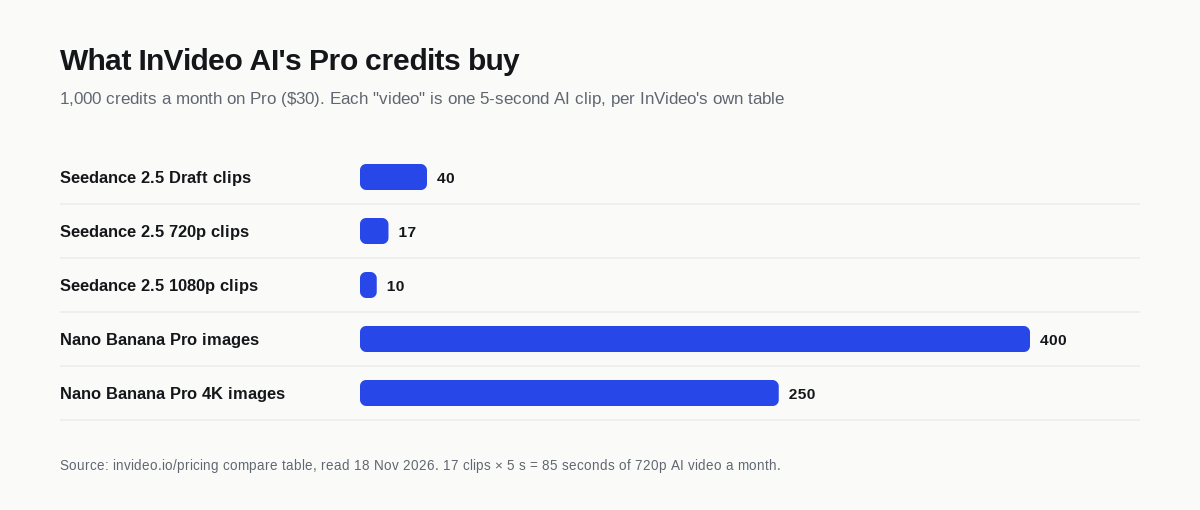
Credits pay for AI generation, voice, transcripts and paid stock. Editing and exporting are free (InVideo credits). Video models charge per second, and the rate depends on the model and resolution. InVideo's own compare table gives these estimates:
| What you generate | Credits (approx.) | Pro: 1,000 credits | Ultra: 3,000 credits |
|---|---|---|---|
| Seedance 2.5 clip, 5 s, Draft | 24.5 | 40 clips | 122 clips |
| Seedance 2.5 clip, 5 s, 720p | 56 | 17 clips | 53 clips |
| Seedance 2.5 clip, 5 s, 1080p | 96 | 10 clips | 31 clips |
| Nano Banana Pro image | 2.5 | 400 images | 1,200 images |
| Nano Banana Pro image, 4K | 4 | 250 images | 750 images |
| GPT Image 2.5 Sunburst image | 0.4 | 2,500 images | 7,500 images |
Images are cheap. AI video is not. Basic can't use Seedance 2.5 at all; it gets Seedance 2.0 Fast and 2.0 Mini only. InVideo's plan limits page gives the range: a Kling 2.6 Standard clip "might cost 5 credits", while a Veo 3.1 4K clip with audio can cost 100 or more.
Worked example: AI video minutes per month on Pro
Our arithmetic, from InVideo's own estimates: Pro gives 1,000 credits. At about 56 credits per 5-second Seedance 2.5 clip at 720p, that's 1,000 ÷ 56 = 17 clips. And 17 × 5 seconds = 85 seconds of AI-generated video a month for $30. On Ultra, 3,000 ÷ 56 = 53 clips, or about 4.4 minutes. Voice credits come on top, and InVideo doesn't publish the voice rate on the pages we read.
How long can an InVideo AI video be?
InVideo doesn't state a maximum length for a finished video on its pricing, plan limits or credits pages. Its own blog explains that "real long-form is assembled shot by shot". Each AI model makes a short clip (Veo 3.1 makes 4 to 8 seconds per pass, Kling 3.0 makes 15), and the agent sequences them (InVideo blog).
So length is limited by credits, not by a setting. A video built from stock footage and AI images can run long on few credits. A video where every shot is AI-generated costs credits for every 5 seconds. If 10 to 20-minute videos are your format, read our InVideo AI alternative for long YouTube videos.
Voices and voice cloning
InVideo offers AI voices, including ElevenLabs, and says its text-to-speech covers "50+ languages" (InVideo text to speech). It doesn't publish an exact voice count. Voice generation uses credits.
You can clone your own voice: in the prompt box, open "AI twins", choose "Create voice clone" and upload an .mp3, .wav or .m4a file (InVideo help). That's a real plus for creators who want their own voice on a faceless channel without recording every script. If voice quality is your main concern, see our guide to ElevenLabs for YouTube videos.
The "Use my script" mode
If you already write your scripts, InVideo has a mode for that. On the prompt page, choose Use my script, paste the script, set media type, music, subtitles and language, then click Proceed. Or start any prompt with "Create a video using exactly this script:" and, in InVideo's words, it "makes a video from that exact script" (InVideo docs).
Two things to know. InVideo doesn't state a word or minute limit for the script. And in Agent Two workflows, the agent "chats with you while it builds the video" rather than making it in one shot, so plan for some back and forth. We compare script-in tools in script to video AI.
Licence, commercial use and refunds
Can you monetize InVideo AI videos on YouTube?
InVideo's terms assign you its rights in your outputs "to the extent we are able" and give you a perpetual, worldwide, royalty-free licence that includes commercial use (InVideo terms). Stock is narrower: your rights in outputs that include stock "are subject to the licence terms" of the stock provider, and you get no exclusivity. The terms don't mention YouTube.
YouTube's side is separate. AI is allowed, but mass-produced or templated videos aren't monetizable under its "inauthentic content" rule, and realistic AI content must be labelled when you upload (YouTube monetization policies, AI disclosure). Our guide on monetizing AI documentaries covers this in detail.
Refunds
The terms say fees are non-refundable, with one exception: you can ask within 24 hours of a first purchase or renewal, and only if you "have not used any credits or premium features" in that period. There are no partial refunds, and credits are "non-refundable, non-redeemable and non-transferable". InVideo's help centre adds that each request is reviewed at its discretion (refunds help). App Store purchases are refunded by Apple.
Strengths and weaknesses
| Strengths | Weaknesses |
|---|---|
| Lowest entry price of the big tools: $9 a month, $4 to $5 yearly | Sells credits, so the price of a finished video isn't stated |
| Many top models in one plan: Seedance, Kling, Veo, Nano Banana, ElevenLabs | AI video is expensive: about 85 seconds of 720p Seedance 2.5 a month on Pro |
| Edits and exports don't use credits | No stated maximum video length |
| Works on your own footage, not only generated video | Unused credits don't roll over |
| Voice cloning and 50+ narration languages | Refund window is 24 hours, and only if unused |
| Seats and free guest seats for teams on Pro and Ultra | Credit prices can change without notice, per its own FAQ |
Who should buy InVideo AI?
- Editors with their own footage. The agent cuts talking-head videos, podcasts and vlogs, and edits and exports cost nothing.
- Ad and short-form makers who need a handful of striking AI shots each week. Pro's 17 clips at 720p, or Ultra's 53, go further in a 30-second ad than in a 10-minute video.
- Teams that want several seats and many AI models under one bill.
- Script-first creators on a budget who are happy with stock footage and AI images instead of AI video in every shot.
Who shouldn't buy it: long documentaries
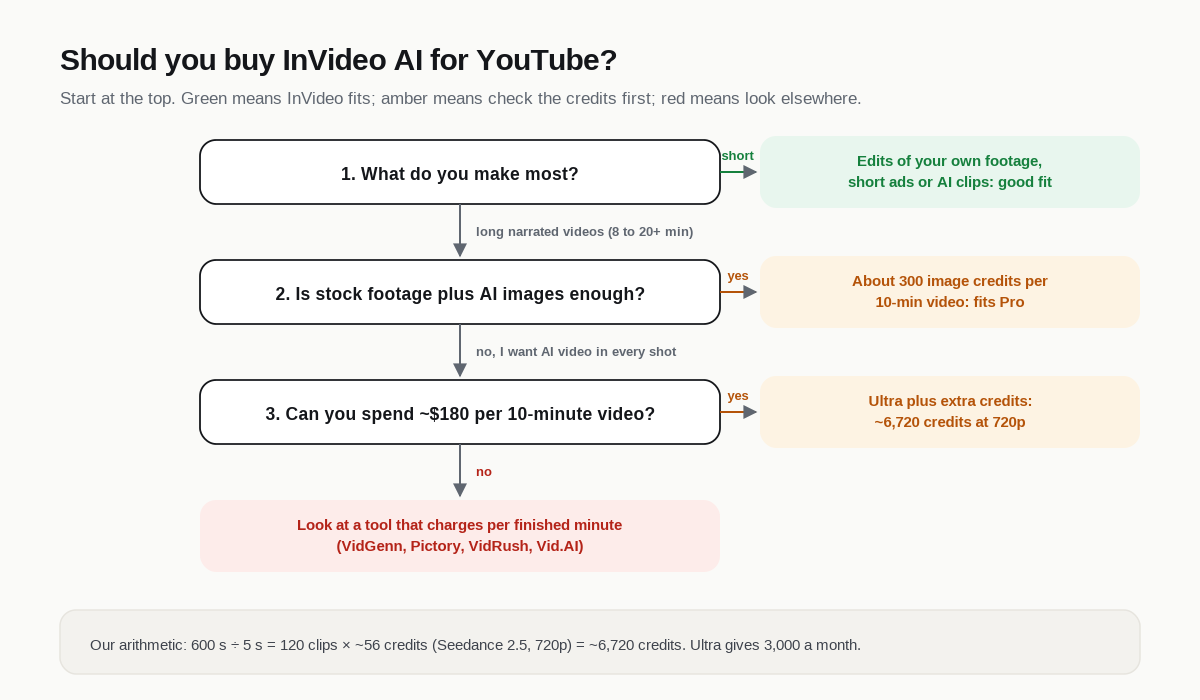
If you run a faceless documentary channel with 10 to 20-minute videos, InVideo's credit model works against you. You can't tell what a video will cost before you make it, and AI video in every shot costs far more than one plan gives.
Worked example: a 10-minute AI-video documentary
Our arithmetic from InVideo's pricing page: 10 minutes is 600 seconds, or 600 ÷ 5 = 120 clips. At about 56 credits per Seedance 2.5 clip at 720p, that's 120 × 56 = 6,720 credits. Ultra gives 3,000 credits for $80, so one video needs more than two months of Ultra. At Ultra's rate ($80 ÷ 3,000 = $0.0267 a credit), that's about $179 in visual credits alone, before narration. Built from AI images instead (one Nano Banana Pro image per 5 seconds), the same video needs about 120 × 2.5 = 300 credits, roughly $9 on Pro.
VidGenn is built for this job instead. A topic or your own script becomes a finished 3 to 20-minute documentary with licensed real footage from NASA, Wikimedia Commons, the Internet Archive, Pexels and Pixabay. It adds a motion graphic on every fact and a credits file. You pay for minutes of finished video, so a 10-minute video costs about $6.30 on Starter ($19 for 30 minutes) or $3.00 on Studio. There's no free plan or trial, it doesn't make Shorts, avatars or thumbnails, and it doesn't upload to YouTube for you. InVideo is the better tool if you edit your own footage. More options are on our InVideo alternatives page.
Verdict: is InVideo AI worth it?
For editing, ads and short videos with a few AI shots, yes. InVideo puts many of 2026's best models behind one cheap entry price, and editing doesn't eat credits. For long faceless YouTube videos, it's a gamble: credits vanish fast on AI video, the length and per-video cost aren't stated, and the refund window is one day. If that's your format, compare it with Pictory vs InVideo or the tools in best AI for long YouTube videos before you subscribe.
Common questions
Is InVideo AI free?
Its pricing page lists no free plan on 18 November 2026. Plans start at $9 a month per seat, or $4 to $5 a month billed yearly. See InVideo AI pricing for every plan.
Is InVideo AI good for YouTube?
Good for edited, short and ad-style videos, and for script-to-video with stock footage and images. Less good for long videos where every shot is AI-generated, because a 10-minute video can need about 6,720 credits at 720p. For long documentaries, see our InVideo alternatives.
Can I use my own script in InVideo AI?
Yes. Choose "Use my script" on the prompt page, or start your prompt with "Create a video using exactly this script:". InVideo doesn't state a script length limit. VidGenn also reads your script word for word, up to 20 minutes; see VidGenn vs InVideo.
Does InVideo AI give refunds?
Only within 24 hours of a purchase or renewal, and only if you haven't used any credits or premium features, according to its terms of service. Credits themselves are non-refundable.
Can I monetize InVideo AI videos?
InVideo's terms allow commercial use of your outputs, with stock limited by the stock licence. YouTube still decides monetization: original, non-templated videos qualify, and realistic AI content must be labelled. Read how to get monetized on YouTube.