InVideo AI costs $9, $30 or $80 a month per seat for its Basic, Pro and Ultra plans, or $4 to $5, $15 and $40 a month billed yearly. Each plan gives credits (190, 1,000 or 3,000 a month) that pay for AI clips, AI images, voices and premium stock. InVideo AI pricing is credit-based: the plan price is fixed, but the cost of a finished video depends on the AI models you use. InVideo doesn't state how many minutes of video a plan makes.
Below are every plan, what a credit costs on each one, what a clip, an image and a minute of AI video cost in credits, and a worked 10-minute video. Then we compare the cost per finished minute with Pictory and VidGenn. VidGenn publishes this guide and sells minutes of finished documentary, so we've stuck to each company's own published prices. For a full look at the product itself, read our InVideo AI review.
How we checked: prices and credit estimates come from InVideo's pricing page, plan limits page, help centre and terms, and from Pictory's and VidGenn's pricing pages, all read on 18 November 2026. All prices are US dollars, per seat, before tax. The per-video costs are our arithmetic from those published numbers, not a test of either product.
Key takeaways: (1) A credit costs about 4.7¢ on Basic, 3¢ on Pro and 2.7¢ on Ultra billed monthly; yearly billing halves that. (2) A 5-second Seedance 2.5 clip at 720p costs about 56 credits, or about $1.49 on Ultra's monthly rate. (3) A 10-minute video costs about $8 in credits with AI images, but about $179 with 720p AI video in every shot. (4) Per finished minute, VidGenn costs $0.30 to $0.63 and Pictory $0.66 to $0.97 at list price.
InVideo AI plans and prices
All three self-serve plans are priced per seat. The pricing page lists no free plan (InVideo pricing).
| Basic | Pro | Ultra | |
|---|---|---|---|
| Monthly billing | $9 a seat | $30 a seat | $80 a seat |
| Yearly billing (per month) | $4 (or $5) | $15 | $40 |
| Credits a month, per seat | 190 | 1,000 | 3,000 |
| Seats | Up to 5 | Up to 10, plus 10 guest seats | Up to 20, plus 20 guest seats |
| Agent tiers | Lite only | Lite, Pro, Ultra | Lite, Pro, Ultra |
| Seedance video models | 2.0 Fast and 2.0 Mini only | 2.5 at 1080p, 2.0 at 4K | 2.5 at 1080p, 2.0 at 4K |
| Premium stock footage | 45 | 150 | 180 |
| Storage | 100 GB | 300 GB | 800 GB |
Guest seats on Pro and Ultra come with 190 credits each. InVideo's plan limits page also lists Pro 2x (2,000 credits), Ultra 2x (6,000) and Ultra 3x (9,000). It also lists team plans called Team (1,600 credits a seat, 5 to 30 seats) and Scale (4,000 a seat). Those prices weren't shown on the pages we read (plan limits). Enterprise is custom.
What does one credit cost?
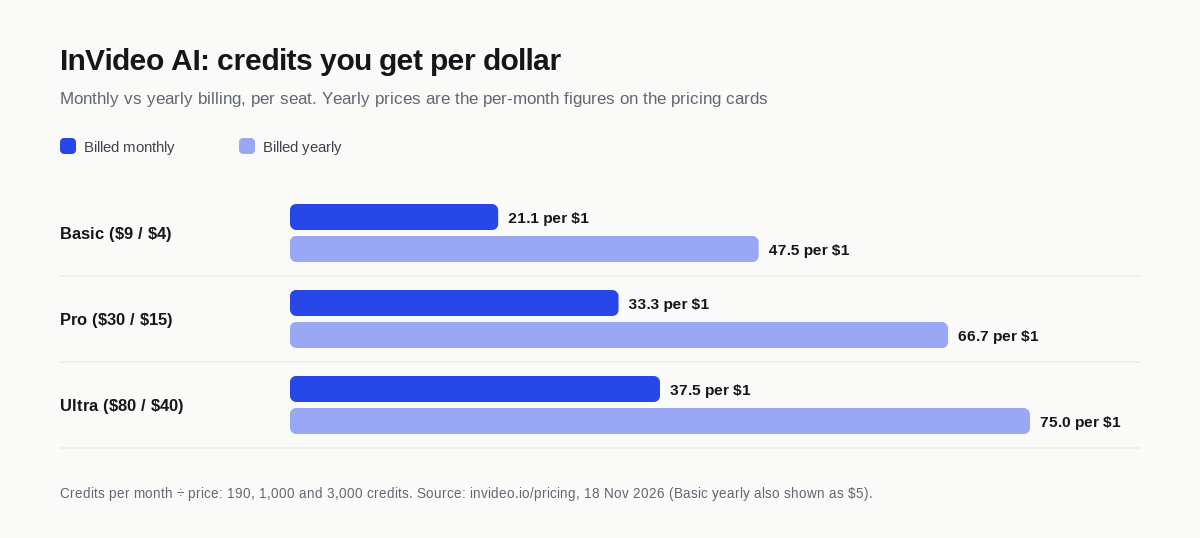
Divide the price by the credits. Billed monthly, Basic is $9 ÷ 190 = 4.7¢ a credit, Pro is $30 ÷ 1,000 = 3¢, and Ultra is $80 ÷ 3,000 = 2.7¢. InVideo labels Ultra as having the lowest cost per credit. Billed yearly, each rate roughly halves: Basic 2.1¢, Pro 1.5¢, Ultra 1.3¢.
Three rules change what those credits are worth in practice. Unused plan credits don't roll over to next month. Extra credits you buy expire when your plan ends or after a set period (InVideo help). And InVideo's FAQ says credit costs can change "at any time, without prior notice".
What credits cost per clip, image and minute
Credits pay for AI generation, voice, transcripts and paid stock. Timeline edits and exports are free (InVideo credits). Video models charge per second, so a minute of AI video is 12 five-second clips. Here are InVideo's own estimates, converted to a minute and to dollars at Ultra's monthly rate:
| Asset | Credits each (approx.) | Credits per minute | Cost per minute on Ultra | Available on Basic? |
|---|---|---|---|---|
| GPT Image 2.5 Sunburst image | 0.4 | 4.8 | $0.13 | Yes |
| Nano Banana Pro image | 2.5 | 30 | $0.80 | Yes |
| Nano Banana Pro 4K image | 4 | 48 | $1.28 | Yes |
| Seedance 2.5 clip, 5 s, Draft | 24.5 | 294 | $7.84 | No |
| Seedance 2.5 clip, 5 s, 720p | 56 | 672 | $17.92 | No |
| Seedance 2.5 clip, 5 s, 1080p | 96 | 1,152 | $30.72 | No |
Other models vary a lot. InVideo's plan limits page says a Kling 2.6 Standard clip "might cost 5 credits", while a Veo 3.1 4K clip with audio can cost 100 or more. Voice generation also uses credits, but the pages we read didn't give the rate, so voice isn't in our numbers (InVideo text to speech).
Worked example: the cost of a 10-minute video
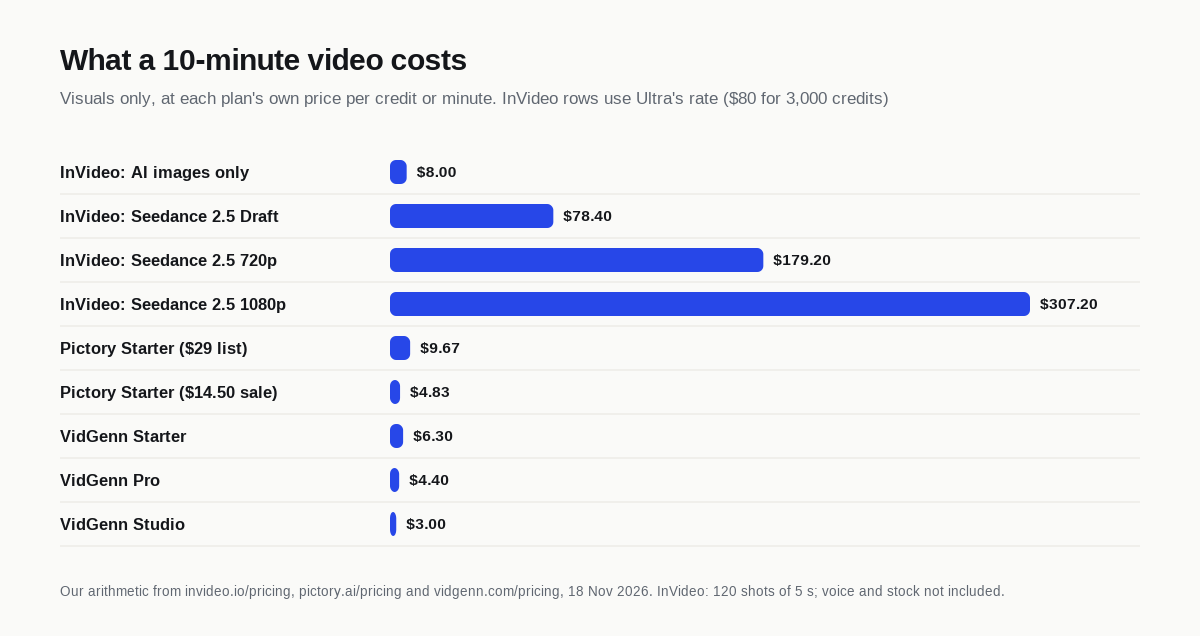
Let's price a 10-minute YouTube video. It's our arithmetic from the table above, with one new visual every 5 seconds: 600 seconds ÷ 5 = 120 shots. The formula is shots × credits per shot × price per credit.
| How you fill the 120 shots | Credits | Cost at Pro rate (3¢) | Cost at Ultra rate (2.67¢) | Fits in one month of… |
|---|---|---|---|---|
| Nano Banana Pro images | 120 × 2.5 = 300 | $9.00 | $8.00 | Pro or Ultra (not Basic's 190) |
| Seedance 2.5 Draft clips | 120 × 24.5 = 2,940 | $88.20 | $78.40 | Ultra, just |
| Seedance 2.5 clips, 720p | 120 × 56 = 6,720 | $201.60 | $179.20 | None: 2.2 months of Ultra |
| Seedance 2.5 clips, 1080p | 120 × 96 = 11,520 | $345.60 | $307.20 | None: 3.8 months of Ultra |
The spread is the whole story of InVideo's pricing. With AI images or your own stock, a 10-minute video is cheap and fits easily on Pro. With AI video in every shot, a single video costs more than the most expensive self-serve plan includes, so you'd need extra credits on top. Most creators mix the two: a few AI clips for the hook and key moments, then images or stock for the rest.
A mixed example
Say 20 of the 120 shots are 720p Seedance clips and 100 are Nano Banana Pro images. That's (20 × 56) + (100 × 2.5) = 1,120 + 250 = 1,370 credits. On Ultra's monthly rate that's about $36.50 per video, and Ultra's 3,000 credits cover two such videos a month. On Pro, 1,370 credits is more than the 1,000 you get, so you'd need Pro 2x or extra credits.
Add-ons, extra credits and upgrades
- Extra credits: you can buy credit packs without changing your plan or billing cycle, and they're added at once. The pack prices weren't shown on the pages we read; InVideo shows them in your account.
- Expiry: extra credits expire after a set period or when your plan ends, whichever comes first.
- Upgrades: an upgrade "starts a new billing cycle". InVideo charges the new plan in full and credits the unused days of your old plan.
- Bigger tiers: Pro 2x, Ultra 2x and Ultra 3x double or triple the credits. Prices weren't on the plan limits page.
- Guest seats: free on Pro (10) and Ultra (20), with 190 credits each.
Costs that aren't on the plan card
The per-shot numbers above are the floor. A real video usually costs more credits, for four reasons:
- Narration. Voice generation uses credits, and InVideo didn't publish the rate on the pages we read. At a typical speaking pace of about 150 words a minute (our estimate), a 10-minute video has about 1,500 spoken words to voice, so budget for it.
- Retries. InVideo prices each generation. If you regenerate a clip three times to get a usable shot, you pay for three clips. The pages we read don't say that rejected generations are refunded.
- Premium stock beyond the allowance. Plans list 45, 150 or 180 premium stock items. Other paid stock carries "a small credit charge", shown in the search results.
- Upscaling. Video upscaling is charged by the length of the source clip, and image upscaling by the result size.
None of these is unusual for a credit-based tool. They're the reason InVideo can't print a price per finished video, and why we'd add a margin of 20 to 50% to the worked examples above when budgeting. That margin is our estimate, not an InVideo figure.
Worked example: a team of three
Credits are per seat, so seats and plans trade off. Three Pro seats billed monthly cost 3 × $30 = $90 for 3 × 1,000 = 3,000 credits. One Ultra seat costs $80 for the same 3,000 credits, and Ultra also includes 20 free guest seats with 190 credits each. If one person makes the videos and two people only review or tweak them, one Ultra seat plus two guest seats is $10 a month cheaper, and the guest seats add 380 credits on top. That's our arithmetic from the pricing page; check what guest seats can do in your workspace before you rely on it.
Monthly or yearly billing?
Yearly billing halves the price: Pro drops from $30 to $15 a month, Ultra from $80 to $40. That's $180 or $480 paid up front for one seat. It's a good deal if you already know you'll use the credits every month, since unused ones don't carry over. It's a poor one if you're still testing whether the tool suits your channel, because refunds are so limited (below). Start monthly, then switch once you know your real monthly credit use.
Does InVideo AI give refunds?
Rarely. Its terms say fees are non-refundable, except that you can ask within 24 hours of a first purchase or renewal if you "have not used any credits or premium features" (InVideo terms). There are no partial refunds, and credits are non-refundable. The help centre adds that requests are reviewed at InVideo's discretion, and App Store purchases go through Apple (refunds help). Older InVideo pages mentioned 7 days, so check the terms on the day you buy.
Cost per finished minute: InVideo vs Pictory vs VidGenn
Pictory and VidGenn sell minutes of video, so their price per finished minute is plain division. Pictory's plans give "up to" 30, 90 or 300 minutes a month, and a Black Friday sale cut its prices about in half when we checked (Pictory pricing). VidGenn sells exact minutes of finished video, from $19 for 30 minutes (VidGenn pricing).
| Tool and plan | Price a month | What you get | Per finished minute | 10-minute video |
|---|---|---|---|---|
| InVideo Ultra, AI images | $80 | 3,000 credits | about $0.80 | about $8.00 |
| InVideo Ultra, 720p AI video | $80 | 3,000 credits | about $17.92 | about $179.20 |
| Pictory Starter (list / sale) | $29 / $14.50 | up to 30 min | $0.97 / $0.48 | $9.67 / $4.83 |
| Pictory Professional (list / sale) | $59 / $29.50 | up to 90 min | $0.66 / $0.33 | $6.56 / $3.28 |
| VidGenn Starter | $19 | 30 min | $0.63 | $6.30 |
| VidGenn Pro | $79 | 180 min | $0.44 | $4.40 |
| VidGenn Studio | $149 | 500 min | $0.30 | $3.00 |
The fair reading: an InVideo video made of AI images and stock can cost about the same per minute as Pictory or VidGenn, and InVideo is the only one of the three that offers top generative video models. Pictory's sale price is the lowest per minute right now, and it has a 14-day trial. VidGenn is the only one that writes a researched documentary script from a topic and puts a motion graphic on every fact. But it has no trial, stops at 20 minutes and only makes documentary-style videos. For the full three-way comparison, see Pictory vs InVideo, VidGenn vs InVideo and VidGenn vs Pictory.
Which InVideo plan should you buy?
- Basic ($9): for trying the editor and making image-based or stock videos. 190 credits won't cover a 10-minute video of AI images (300 credits), and Seedance 2.5 isn't included.
- Pro ($30): the sensible start for a weekly YouTube video built from images and stock, with a few AI clips. Budget about 300 to 1,000 credits per 10-minute video.
- Ultra ($80): if you want AI video in many shots or several team seats. It still covers only about 4.4 minutes of 720p Seedance 2.5 a month.
- None of them: if you want long faceless documentaries at a known price per video. Our InVideo AI alternative for long YouTube videos and the InVideo alternatives page list tools that charge per finished minute.
Whichever you pick, run your own numbers with our cost calculator and our guide to YouTube automation cost per video.
Common questions
How much does InVideo AI cost per month?
$9 (Basic), $30 (Pro) or $80 (Ultra) per seat, billed monthly. Billed yearly, it's $4 to $5, $15 or $40 a month per seat. Prices are from InVideo's pricing page on 18 November 2026.
How many videos can I make with InVideo AI credits?
InVideo doesn't state minutes of finished video. It depends on the models you use. On Pro's 1,000 credits, InVideo's own table estimates 17 five-second Seedance 2.5 clips at 720p or about 400 Nano Banana Pro images. A 10-minute video of AI images needs about 300 credits.
Do InVideo AI credits roll over?
No. Unused plan credits reset each billing cycle. Extra credits you buy last until a set expiry date or until your plan ends.
Is InVideo AI cheaper than Pictory?
The entry price is lower: $9 against Pictory's $29 list price ($14.50 on sale). Per finished minute it depends on visuals. Images and stock make InVideo competitive; AI video in every shot makes it far more expensive. Compare them in Pictory vs InVideo and see the Pictory alternatives.
Can I get a refund on InVideo AI?
Only within 24 hours of buying or renewing, and only if you haven't used any credits or premium features, according to its terms. Credits are non-refundable.