Pick Pictory if you turn scripts, articles or slides into stock-footage videos up to 30 minutes and want a 14-day trial first. Pick InVideo AI if you want an AI editor with top generative models (Seedance, Kling, Veo) and edit your own footage. For long faceless documentaries at a fixed price per minute, VidGenn is the third option. Pictory vs InVideo comes down to how each one charges: Pictory sells minutes of video, while InVideo sells credits per AI clip and image.
Below is a three-way table (price, minutes, longest video, visuals, voices, script input, trial and refunds), a worked cost example, and "which to pick for…" scenarios. VidGenn publishes this guide, so it's included as the third column, and we say plainly where Pictory and InVideo do better. For the two-way pages, see VidGenn vs Pictory and VidGenn vs InVideo.
How we checked: we read Pictory's pricing page and InVideo's pricing page, plan limits, help centre, docs and terms on 18 November 2026. We didn't test either product hands-on. Prices are US dollars, monthly billing unless stated. Pictory had a Black Friday sale running, so we show its list and sale prices.
Key takeaways: (1) Entry price: InVideo $9 (190 credits), VidGenn $19 (30 minutes), Pictory $29 list or $14.50 on sale (up to 30 minutes). (2) Longest video: Pictory 30 minutes from a script, VidGenn 20, InVideo not stated. (3) A 10-minute video costs about $9.67 on Pictory Starter at list price, $6.30 on VidGenn Starter, and $8 to $179 on InVideo depending on visuals. (4) Only Pictory has a trial; InVideo refunds within 24 hours if unused; Pictory gives no refunds.
Pictory vs InVideo vs VidGenn at a glance
| Pictory | InVideo AI | VidGenn | |
|---|---|---|---|
| Starting price | $29 list; $14.50 on sale ($12.50 yearly) | $9 per seat ($4 to $5 yearly) | $19 |
| What you get | Up to 30 min + 2,000 AI credits a month | 190 credits a month | 30 min of finished video |
| Bigger plans | Professional $59, up to 90 min; Teams $199, up to 300 min | Pro $30, 1,000 credits; Ultra $80, 3,000 credits | Creator $38, 60 min; Pro $79, 180 min; Studio $149, 500 min |
| Per finished minute | $0.97 → $0.66 (list); $0.48 → $0.33 (sale) | Not stated; about $0.80 with AI images, $17.92 with 720p AI video (Ultra) | $0.63 → $0.30 |
| Longest video | 30 min from a script or URL; 60 to 180 min in its editor | Not stated | 20 min |
| Visuals | Getty and Storyblocks stock, plus AI features paid with credits | Stock, AI images and AI video (Seedance, Kling, Veo) | Licensed real footage + a motion graphic on every fact |
| Voices | ElevenLabs multilingual voices | AI voices incl. ElevenLabs, 50+ languages, voice cloning | 24 ElevenLabs voices, 6 languages |
| Script input | Script, article URL or slides | Prompt, or "Use my script" for an exact script | Topic (writes a researched script) or your script, word for word |
| Resolution | 1080p (720p on trial) | Depends on the model | 1080p |
| Trial | 14 days: 3 videos, up to 10 min, 720p, watermark | No free plan listed | None |
| Refunds | None on paid subscriptions | Within 24 hours, only if no credits used | Failed videos give their minutes back |
Sources: Pictory pricing, InVideo pricing, InVideo terms and VidGenn pricing.
How do Pictory and InVideo charge?
This is the biggest difference, and it decides which one costs less for you.
Pictory: minutes, "up to"
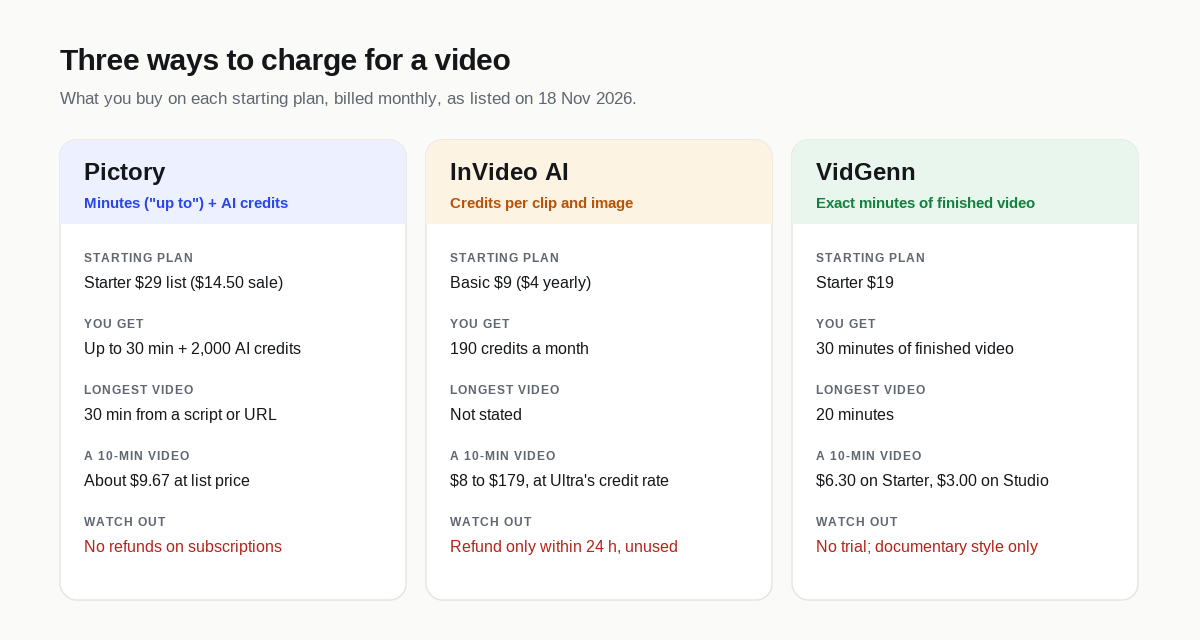
Pictory's plans list video minutes as "up to" 30, 90 or 300 a month, alongside AI credits (2,000, 6,000 or 18,000 a month). Its FAQ says the credits are the currency for "all AI usage-based features", but the pricing page doesn't say how many credits an AI visual uses. List prices are $29, $59 and $199; the Black Friday sale showed $14.50, $29.50 and $99.50, or $12.50, $17.50 and $59.50 a month billed yearly. Yearly plans get all their credits up front.
InVideo AI: credits per generation
InVideo gives 190, 1,000 or 3,000 credits a month per seat for $9, $30 or $80. Credits pay for AI clips, images, voices and premium stock; edits and exports are free (InVideo credits). Its compare table puts a 5-second Seedance 2.5 clip at about 56 credits at 720p and a Nano Banana Pro image at about 2.5. Unused credits don't roll over. Our InVideo AI pricing guide has the full breakdown.
VidGenn: exact minutes of finished video
VidGenn's minutes equal the length of the finished video: a 10-minute video uses 10 minutes. Starter is $19 for 30, Creator $38 for 60, Pro $79 for 180 and Studio $149 for 500. Edits and re-renders don't use minutes, and a failed video gives its minutes back. There's no free plan, trial or yearly plan yet.
Who is each tool built for?
The three tools overlap less than their marketing suggests. Each was built around a different starting point, and that shapes everything else.
- Pictory starts from text you already have. A blog post, a script, a webinar transcript or a slide deck becomes a video with matching stock. Marketing teams, course creators and agencies that repurpose content are its natural buyers. It doesn't research or write the script for you from a bare topic.
- InVideo starts from an edit. You bring footage or a prompt, and the agent cuts, captions and fills gaps with stock or generated shots. It suits creators who already film, plus ad makers who need eye-catching AI shots. It's a toolbox, so the result depends on how you use it.
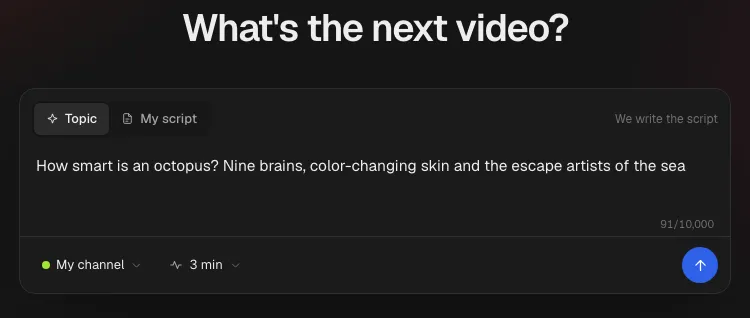
- VidGenn starts from a topic. You type a subject ("How smart is an octopus?") or paste a script, choose a length and a voice, and get a finished documentary. It's built for faceless YouTube channels in history, science, nature and similar niches, and does nothing else: no Shorts, avatars, thumbnails or uploading.
Teams and seats
If several people work on the videos, the plans differ again. Pictory's Teams plan is $199 a month at list price for up to 300 minutes and 3 or more users, with priority support. InVideo prices every plan per seat: Pro allows up to 10 seats plus 10 free guest seats, and Ultra up to 20 plus 20 guests, each guest with 190 credits. VidGenn's Studio plan ($149 for 500 minutes) is the one meant for teams and many channels. Agencies running several channels should compare on minutes per month first, then on seats.
Worked example: four 10-minute videos a month
Say you publish one 10-minute video a week: 40 minutes a month. Our arithmetic, monthly billing, from each pricing page:
- Pictory: Starter covers up to 30 minutes, so 40 minutes needs Professional: $59 list, or $29.50 on the current sale.
- VidGenn: Starter's 30 minutes isn't enough, so Creator's 60 minutes: $38. That leaves 20 minutes spare.
- InVideo, AI images: 4 videos × 120 shots × 2.5 credits = 1,200 credits. Pro's 1,000 isn't enough, so Ultra: $80, or Pro 2x.
- InVideo, 720p AI video in every shot: 4 × 120 × 56 = 26,880 credits, about nine months of Ultra's 3,000 credits. Not realistic on a self-serve plan.
On Pictory's sale price, Pictory is the cheapest of the three for this example. At list price, VidGenn is. InVideo only makes sense here if most shots are images or stock. Voice credits on InVideo would come on top, since it doesn't publish the voice rate on the pages we read.
Which makes longer videos?
Pictory states a clear limit: videos from a script or URL run up to 30 minutes on paid plans (5 on the trial). Its AI video editor handles 60 minutes on Starter and 180 on Professional and Teams for footage you upload (Pictory pricing). VidGenn makes videos of 3 to 20 minutes. InVideo doesn't state a maximum; its blog says long videos are "assembled shot by shot" from clips of a few seconds each (InVideo blog). If you need over 30 minutes, see our InVideo AI alternative for long YouTube videos.
Visuals: stock, AI or real footage?
- Pictory leans on stock: Getty and Storyblocks on every plan, with 5 million+ videos on Starter and 18 million+ on Professional, plus AI features paid with credits. Good for marketing, explainers and anything generic stock can illustrate.
- InVideo has the strongest generative line-up: Seedance 2.5, Kling 4.0, Veo 3.1, Nano Banana Pro and more, plus stock. Best when you want shots no camera filmed. The trade-off is cost per second.
- VidGenn uses licensed real footage for every sentence from NASA, Wikimedia Commons, the Internet Archive, Pexels and Pixabay, not AI-generated clips, and adds a motion graphic on every fact (184+ designs). A credits file lists every source. Best for history, science and nature, where viewers expect the real thing.

For more on safe footage sources, read copyright-safe documentary footage.
Voices and script input
All three offer ElevenLabs voices. InVideo goes furthest: 50+ languages and voice cloning from an uploaded recording (InVideo help). Pictory lists multilingual ElevenLabs voices on every plan, with more on Professional. VidGenn has 24 ElevenLabs narrators in English, Portuguese, Spanish, French, German and Italian.
For scripts, Pictory takes a script, an article URL or slides. InVideo has a "Use my script" mode that "makes a video from that exact script" (InVideo docs). VidGenn takes your script word for word, or writes a researched script from a topic, with every line editable before rendering. Our script to video AI guide compares more script-in tools.
Trials, refunds and licence
- Pictory: a 14-day trial with 300 credits (up to 10 minutes) and 3 projects, at 720p with a watermark. After that, "we don't currently offer refunds on paid subscriptions"; you can cancel before renewal.
- InVideo: no free plan on its pricing page. Its terms allow a refund within 24 hours of purchase or renewal only if no credits or premium features were used. They give you a commercial licence to outputs, with stock limited by the stock licence (InVideo terms).
- VidGenn: no free plan or trial. A failed video gives its minutes back.
Whichever you use, YouTube decides monetization. Mass-produced or templated videos aren't monetizable, and realistic AI content needs a label (YouTube AI disclosure). See can you monetize AI documentaries on YouTube.
Which to pick for…
| If you… | Pick | Why |
|---|---|---|
| Want to try before you pay | Pictory | The only 14-day trial of the three |
| Turn blog posts or slides into videos | Pictory | Article URL and slides input, big stock library |
| Edit your own footage, podcasts or vlogs | InVideo AI | Agentic editor; edits and exports cost no credits |
| Need striking AI shots for ads or hooks | InVideo AI | Seedance, Kling and Veo in one plan |
| Want your own cloned voice | InVideo AI | Voice cloning from an uploaded recording |
| Run a faceless documentary channel, 8 to 20 min | VidGenn | Researched script from a topic, real footage, graphics, $0.30 to $0.63 a minute |
| Need videos over 20 minutes | Pictory (to 30) or a long-video tool | VidGenn stops at 20; InVideo doesn't state a limit |
| Want the lowest price per minute today | Pictory on sale, else VidGenn | $0.48 on Pictory's sale vs $0.63 on VidGenn Starter, $0.30 on Studio |
The short verdict
Pictory is the safer buy for script-to-video: you know the minutes, the length limit is clear, and you can try it first. Its weak points are "up to" minutes, no refunds and generic stock. InVideo is the more powerful tool, with the best AI models and a real editor, but you can't price a video until you've chosen your models, and long all-AI videos get expensive fast. VidGenn is narrower than both. It only makes faceless documentaries up to 20 minutes, with no trial, but it writes the script, uses real footage and charges a known price per finished minute.
Still deciding? The Pictory alternatives and InVideo alternatives pages list other options, and our Pictory AI review and InVideo AI review cover each tool alone.
Common questions
Is Pictory or InVideo better for YouTube?
For script-to-video with stock footage up to 30 minutes, Pictory is simpler to budget because it sells minutes. For editing your own footage or adding AI-generated shots, InVideo is stronger. For long faceless documentaries, compare both with VidGenn on VidGenn vs Pictory.
Which is cheaper, Pictory or InVideo?
InVideo's entry price is lower ($9 against $29 list or $14.50 on sale). Per finished minute, Pictory is usually cheaper unless your InVideo videos are mostly images and stock. With 720p AI video in every shot, InVideo costs about $17.92 a minute in credits on Ultra.
Does Pictory or InVideo have a free trial?
Pictory has a 14-day trial (3 videos, up to 10 minutes, 720p, watermark). InVideo's pricing page lists no free plan. VidGenn has no trial either.
Which makes the longest videos?
Pictory states 30 minutes from a script or URL. VidGenn makes up to 20 minutes. InVideo doesn't state a maximum, and long videos cost credits for every shot. See VidGenn vs InVideo for details.
Can I use my own script in Pictory, InVideo and VidGenn?
Yes, all three take a finished script. Pictory also takes article URLs and slides, InVideo has a "Use my script" mode, and VidGenn reads your script word for word or writes one from a topic. Our guide on how to write a documentary script for YouTube helps with the writing.