The best InVideo AI alternative for long YouTube videos depends on length. For 10 to 20-minute documentaries at the lowest price per minute, VidGenn costs $0.30 to $0.63 a finished minute. For 20 to 60 minutes, VidRush and Vid.AI go up to an hour. And Pictory suits script-to-video up to 30 minutes, with a trial first. A long-video AI generator is a tool that sells minutes of finished video and builds a whole 10 to 60-minute narrated video in one job, rather than charging credits for each clip.
This post is the long-video angle. It explains why InVideo users hit limits on 10 to 20-minute videos, then compares five tools built for long videos, each with its longest video and price per minute. If you want the general list, see InVideo alternatives. VidGenn publishes this guide and is one of the five, so every number below comes from each vendor's own pages, and we say where the others do better.
How we checked: we read the pricing page, homepage, FAQ, docs or terms of InVideo AI, VidGenn, VidRush, Pictory, Subscribr and Vid.AI on 18 November 2026. We didn't run test videos on competitors. Prices are monthly billing in US dollars. "Price per minute" is our arithmetic: plan price ÷ minutes of finished video.
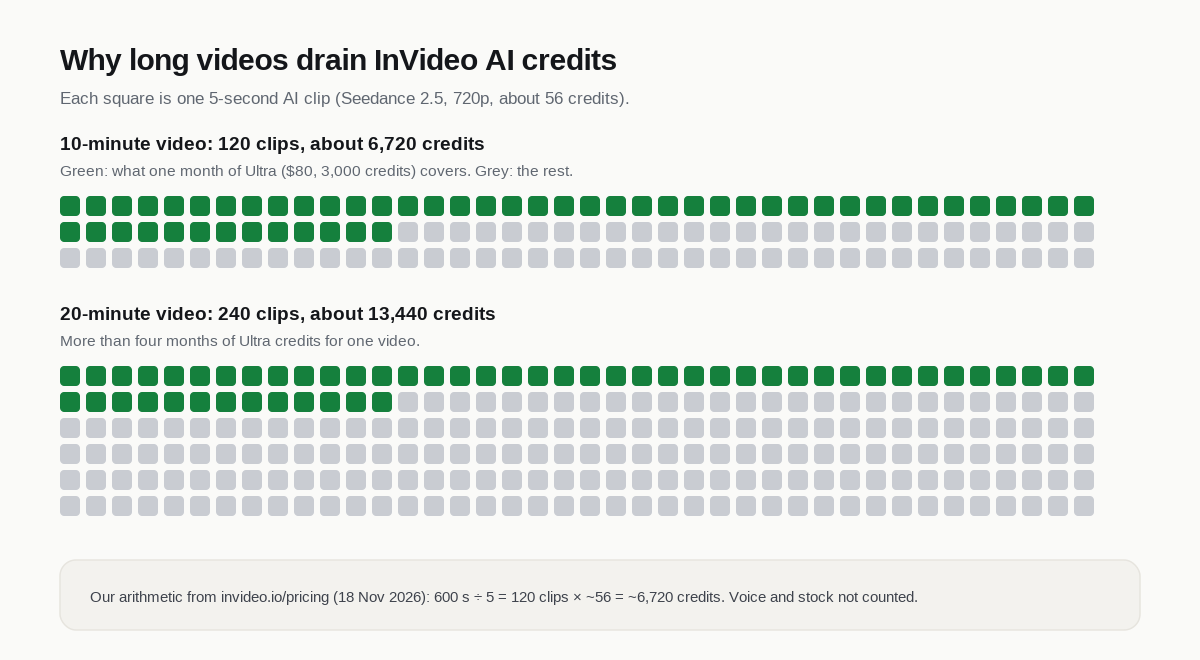
Key takeaways: (1) A 10-minute InVideo video with 720p AI video in every shot needs about 6,720 credits, more than two months of its $80 Ultra plan. (2) Cheapest per minute: VidGenn at $0.63 on Starter and $0.30 on Studio. (3) Longest videos: VidRush and Vid.AI (Plus and Pro) go to 60 minutes; VidGenn stops at 20. (4) Pictory is the only one here with a free trial; Pictory, Subscribr and InVideo give little or no money back.
Why do InVideo users hit limits on long videos?
InVideo AI is a strong agentic editor, but it charges credits for each AI clip and image, not for minutes of finished video (InVideo pricing). That works for a 60-second ad. It gets hard at 10 to 20 minutes, for three reasons:
- Credits per clip. InVideo's own table puts a 5-second Seedance 2.5 clip at about 56 credits at 720p. A 10-minute video has 120 five-second shots.
- No stated length or minutes. InVideo's pricing and help pages don't state a maximum video length or how many minutes of video a plan makes. Its blog says long-form "is assembled shot by shot" (InVideo blog).
- Credits don't roll over, and refunds are limited to 24 hours if no credits were used (InVideo terms). You can't save up for a big video, and a failed experiment isn't refundable.
Worked example: a 15-minute video on InVideo
Our arithmetic from InVideo's published estimates. Fifteen minutes is 900 seconds, or 900 ÷ 5 = 180 shots. With Seedance 2.5 at 720p, that's 180 × 56 = 10,080 credits, about $269 at Ultra's rate of $80 per 3,000 credits. Built from Nano Banana Pro images instead, it's 180 × 2.5 = 450 credits, about $13.50 on Pro. Images keep the cost down, but then you're making a slideshow-style video, and you could do that in a tool built for long videos at a known price. Full numbers are in our InVideo AI pricing breakdown.
What to look for in a long-video tool
Five questions sort the long-video tools from the clip tools. Ask them of any tool before you pay, including the five below:
- Does it sell minutes of finished video? If the plan says "45 minutes" or "66 minutes", you can price a video before you make it. If it says "1,000 credits", you can't until you've chosen every model.
- What's the longest single video? Look for a stated number on the pricing page or FAQ. "Not stated" usually means it's limited by credits instead.
- Where do the visuals come from? Real footage, stock, AI images or AI video. For history, science and nature, real footage is usually what viewers expect; AI clips can look wrong on real places and people.
- Can you edit the script first? On a 15-minute video, fixing one wrong fact before rendering saves a re-render. Check whether edits and re-renders cost minutes.
- What happens when a video fails? Look for minutes or credits given back automatically, and read the refund terms. Several tools here give no money back once you've used the plan.
None of these is about quality, which you can only judge from sample videos. But they decide whether a tool can make your weekly 15-minute video at a price you can plan for, which is what most InVideo users looking for an alternative are after.
Long-video alternatives compared
| Tool | Longest video | Starting plan | Per minute (start → biggest plan) | Visuals | Your own script | Trial / refunds |
|---|---|---|---|---|---|---|
| VidGenn | 20 min | $19 for 30 min | $0.63 → $0.30 | Licensed real footage + a motion graphic per fact | Yes, read word for word | No trial; failed videos give minutes back |
| VidRush | 60 min (6 to 60) | $99 for 45 min | $2.20 → $1.56 | Real footage from the web; you choose the source type | Yes, up to 60 min | No trial; refunds for verified technical failures |
| Pictory | 30 min from a script or URL | $29 list ($14.50 sale) for up to 30 min | $0.97 → $0.66 (list) | Getty and Storyblocks stock, plus AI features paid with credits | Yes (script, URL, slides) | 14-day trial; no refunds on subscriptions |
| Subscribr | Scripts up to 3 hours; render cap not stated | $99 for 66 min | $1.50 → $1.20 | AI-generated, 14 styles | Yes; it also writes and researches | Free plan without video; all sales final |
| Vid.AI | 20 min on Starter, 60 on Plus and Pro | $59 for 4 ten-minute videos | $1.48 → $0.66 | AI scenes, Storyblocks stock, Seedance intros | Yes, or a topic or outline | No trial; unused credits refundable within 30 days |
| InVideo AI (for reference) | Not stated | $9 for 190 credits | Not stated (credits per clip) | Stock, AI images, AI video | Yes, "Use my script" | No free plan listed; 24-hour refund if unused |
1. VidGenn: best for 10 to 20-minute documentaries
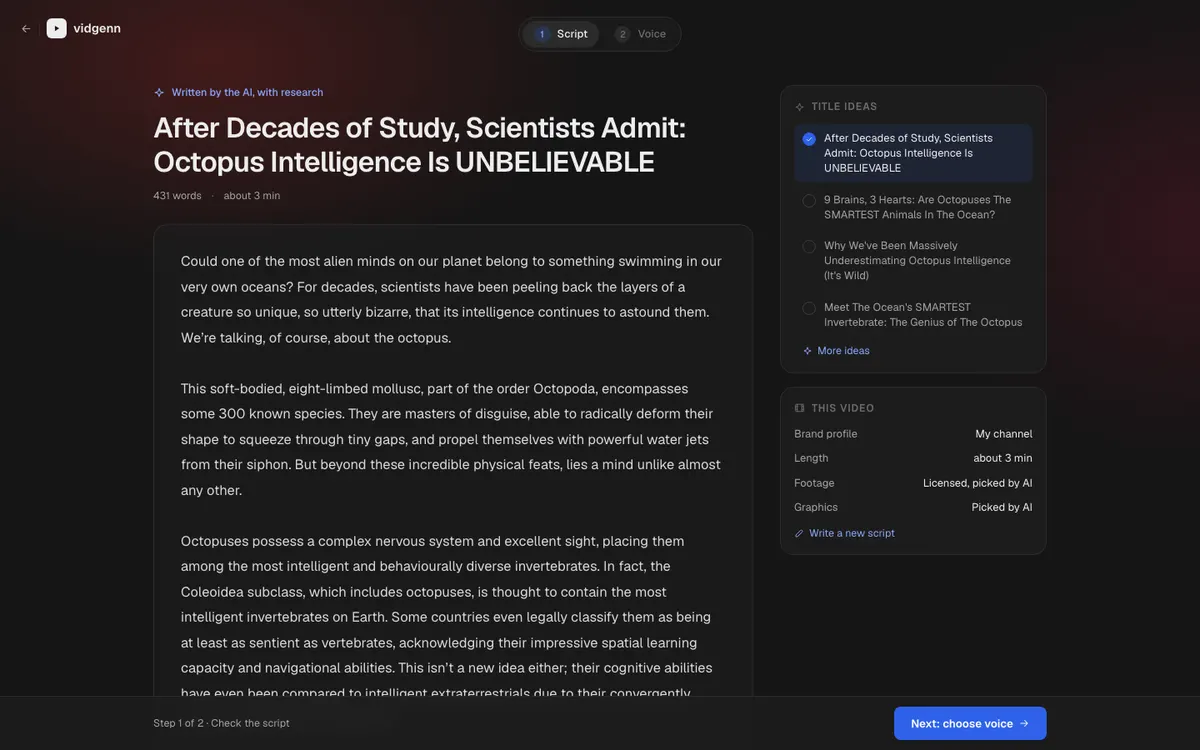
VidGenn turns a topic, or your own script read word for word, into a finished faceless documentary of 3, 5, 8, 10, 15 or 20 minutes in 1080p. It writes title options and a researched script you can edit line by line, then narrates it with one of 24 ElevenLabs voices in six languages. It finds licensed real footage for every sentence from NASA, Wikimedia Commons, the Internet Archive, Pexels and Pixabay. Every fact gets a motion graphic, and a credits file lists every source.
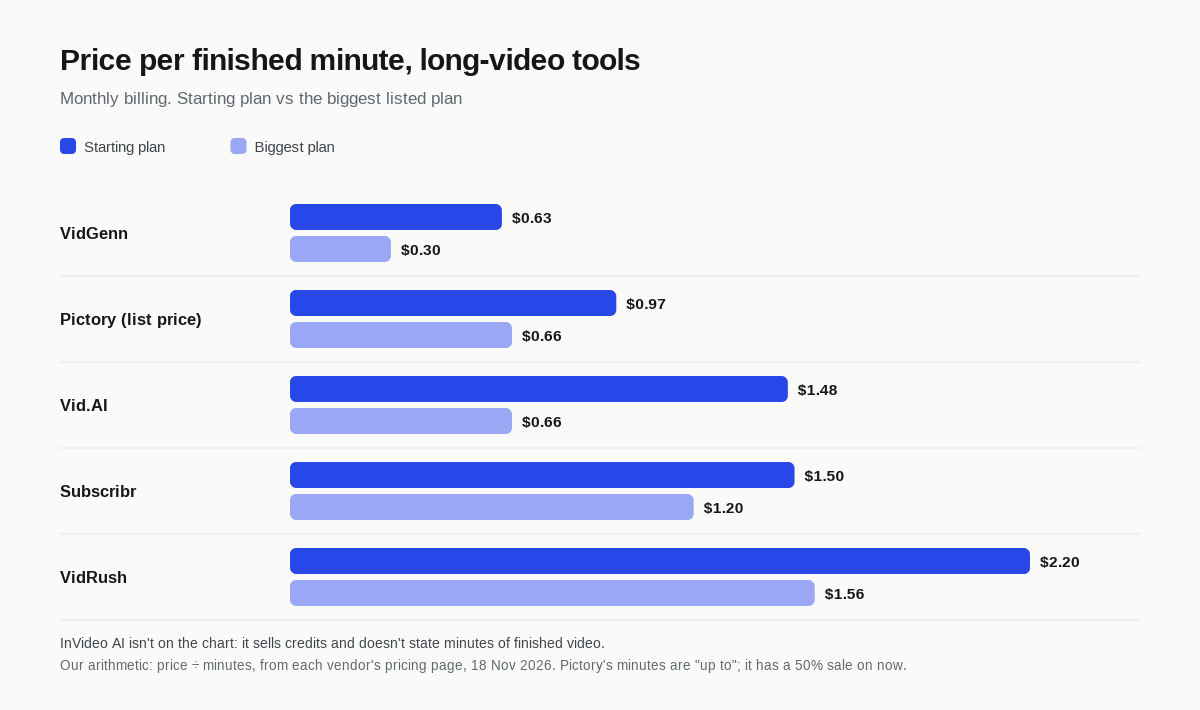
- Price: Starter $19 for 30 minutes ($0.63 a minute), Creator $38 for 60, Pro $79 for 180 ($0.44), Studio $149 for 500 ($0.30). A 10-minute video costs about $6.30 on Starter or $3.00 on Studio.
- Good: the lowest price per finished minute here, minutes that equal video length, and edits and re-renders that don't use minutes.
- Watch out: 20 minutes is the maximum. No free plan or trial, no yearly plan yet, documentary style only (no avatars or talking heads), and no Shorts, thumbnails or YouTube upload.
2. VidRush: best for 20 to 60-minute documentaries
VidRush makes documentary and Top 10 videos of 6 to 60 minutes, in English, matched to "real footage sourced from across the web". You choose the source type: CC and public domain only, commercial stock, general web, or testimonials. You can paste a finished script of up to 60 minutes or upload your own narration (VidRush).
- Price: Starter $99 for 45 minutes (about $2.20 a minute), Creator $239 for 136, Pro $639 for 409 (about $1.56). Yearly billing saves 20% (VidRush pricing).
- Good: the longest videos here alongside Vid.AI, and unused Starter credits roll over, up to half a month's credits.
- Watch out: the highest price per minute in this list, no trial mentioned, and its refund policy covers "verified technical failures" only (VidRush refunds).
We compare the two in VidGenn vs VidRush, the VidRush review covers it in depth, and VidRush alternatives lists cheaper options.
3. Pictory: best for script-to-video with a trial first
Pictory turns a script, an article URL or slides into a video with stock footage from Getty and Storyblocks and ElevenLabs voices. Videos made from a script or URL can run up to 30 minutes on paid plans, at 1080p. Its separate AI video editor handles longer uploads (Pictory pricing).
- Price: Starter is $29 a month at list price for up to 30 minutes ($0.97 a minute); Professional $59 for up to 90 ($0.66). A Black Friday sale had halved these to $14.50 and $29.50 when we checked.
- Good: the only free trial in this list (14 days, 3 videos, up to 10 minutes, 720p with a watermark), and big stock libraries.
- Watch out: minutes are "up to", it doesn't write a researched script from a topic, and Pictory says "we don't currently offer refunds on paid subscriptions".
See Pictory vs InVideo for a head-to-head, or VidGenn vs Pictory and Pictory alternatives.
4. Subscribr: best if research and scripting come first
Subscribr began as a YouTube research and script tool and now makes videos too. Its FAQ says faceless videos "put a voiceover over AI-generated visuals in 14 visual styles", and that scripts run "from about one minute to three hours" (Subscribr FAQ). It doesn't state a separate maximum render length on the pages we read.
- Price: Growth $99 for 66 minutes ($1.50 a minute), Pro $249 for 185, Max $499 for 415 ($1.20). Annual billing lists $1.25 to $1.00 a minute (Subscribr pricing).
- Good: strong research and scripting, a free plan for ideas and research, and the exact price is quoted before rendering.
- Watch out: AI-generated visuals, not real footage; 1080p export listed on Pro and Max; "all purchases are final".
More in VidGenn vs Subscribr and Subscribr alternatives.
5. Vid.AI: best for long AI-generated videos plus Shorts
Vid.AI starts "from a topic, a rough outline or your finished script" and builds videos from AI scenes, Storyblocks stock and Seedance intros, with 33 ElevenLabs narrators (Vid.AI). Videos run up to 20 minutes on Starter and 60 on Plus and Pro, and it makes Shorts too (Vid.AI pricing).
- Price: Starter $59 for four 10-minute videos (about $1.48 a minute), Plus $99 for twelve (about $0.83), Pro $199 for thirty (about $0.66).
- Good: 60-minute videos on Plus, newer AI video models (Veo 3.1 Fast, Seedance 2.5, Kling 2.5) and unused credits refundable within 30 days of your first payment.
- Watch out: no free trial ("Every video costs us real compute"), and the best models need Plus or Pro.
See VidGenn vs Vid.AI and Vid.AI alternatives.
Which one should you pick?
- 10 to 20-minute faceless documentaries, lowest cost: VidGenn.
- Videos over 20 minutes with real footage: VidRush.
- You want to try before paying, or you turn articles into videos: Pictory.
- Research and scripts matter most, and AI visuals are fine: Subscribr.
- Long videos with generative AI visuals, plus Shorts: Vid.AI.
- Edits of your own footage, ads, or a few hero AI shots: stay on InVideo AI. Our InVideo AI review explains where it's strongest.
Worked example: one 20-minute video a month
Our arithmetic, starting plan × 20 minutes, monthly billing: VidGenn Starter 20 × $0.63 = $12.60 of its $19 plan. Pictory Starter 20 × $0.97 = $19.33 at list price ($9.67 on sale). Vid.AI Starter 20 × $1.48 = $29.50. Subscribr Growth 20 × $1.50 = $30. VidRush Starter 20 × $2.20 = $44. On InVideo with 720p Seedance 2.5 in every shot, 240 × 56 = 13,440 credits, about $358 at Ultra's rate. Each plan still costs its full monthly price; this is the share one video uses.
Before you choose, check YouTube's side too. AI is allowed, but mass-produced or templated videos aren't monetizable, and realistic AI content needs a label (YouTube monetization policies). Our guide to long-form AI video generators for YouTube and best AI for long YouTube videos go deeper.
Common questions
What is the best InVideo AI alternative for long YouTube videos?
For 10 to 20-minute documentaries, VidGenn has the lowest price per finished minute ($0.30 to $0.63). For videos over 20 minutes, VidRush and Vid.AI go up to 60 minutes. Compare all of them on our InVideo alternatives page.
Can InVideo AI make a 20-minute video?
InVideo doesn't state a maximum length. A 20-minute video is possible with stock and images, but with AI video in every shot it would need about 13,440 credits at 720p, more than four months of Ultra. See VidGenn vs InVideo.
Which AI video tool makes the longest YouTube videos?
Of the tools here, VidRush (6 to 60 minutes) and Vid.AI (60 on Plus and Pro) have the longest stated limits. Subscribr says scripts can run up to three hours but doesn't state a render limit on the pages we read.
Is there a long-video AI tool with a free trial?
Pictory has a 14-day trial with 3 videos, up to 10 minutes in total, at 720p with a watermark. VidRush, Vid.AI and VidGenn have no trial. Subscribr has a free plan for research, without video.
What do Reddit users recommend instead of InVideo for long videos?
We don't quote forum threads, because claims there are hard to check. Instead, compare the numbers each vendor publishes: maximum length, minutes per plan and refund terms. The table above does that for five tools, and our YouTube automation cost per video guide adds editing and voice costs.