To make a long-form YouTube video with AI, write a script of about 145 words per minute (2,900 words for 20 minutes). Break it into chapters with a re-hook at each break, and render it in a tool built for long videos. VidGenn goes to 20 minutes, Pictory to 30, and VidRush to 60. Then verify your YouTube account so you can upload past 15 minutes, add chapters, and place mid-roll ads at natural pauses. A long-form AI video generator is software that turns a topic or script into a finished, narrated video of roughly 8 minutes or more, rather than a short clip.
This guide covers the craft and the maths: script length, structure for retention, chapters, mid-roll ads and splitting very long videos into parts. It also covers what each tool allows, render times, and how long videos get you to YouTube's new 8,000 watch-hour bar. VidGenn publishes this guide; for a full tool-by-tool comparison, see the best AI for long YouTube videos.
How we checked: YouTube rules come from YouTube Help (mid-roll ads, chapters, upload length, Partner Program changes); tool lengths and prices come from each vendor's own pricing page or FAQ. All were read on 18 November 2026. Watch-hour and cost figures are our arithmetic, with the assumptions stated.
Key takeaways: (1) A 20-minute video needs about 2,900 words of script at 145 words a minute. (2) Mid-roll ads need a monetized video of 8 minutes or longer, and slots at natural pauses serve best. (3) From 1 February 2027, new Partner Program applicants need 8,000 watch hours in 12 months, so a 20-minute video earns hours about 2.5× faster than an 8-minute one at the same retention. (4) Unverified YouTube accounts can only upload 15 minutes.
Why make long-form videos with AI?
Two YouTube rules reward length. First, mid-roll ads are only available on monetized videos of 8 minutes or longer, so a 20-minute video can carry several ad breaks where a 6-minute one carries none. Second, the Partner Program counts watch hours, and from 1 February 2027 new applicants need 8,000 qualified watch hours in the last 365 days (or 20 million Shorts views in 90 days), double today's 4,000 (YouTube Help).
Length only helps if people keep watching. A padded 20-minute video with poor retention earns fewer hours than a tight 10-minute one. That's why the rest of this guide is mostly about structure.
How long should the script be?
Documentary narration runs at about 145 words a minute. Multiply by the minutes you want, then cut anything that doesn't move the story.
| Video length | Script words (× 145) | Chapters (one per 3–5 min) |
|---|---|---|
| 15 minutes | ≈ 2,175 | 4–5 |
| 20 minutes | ≈ 2,900 | 5–6 |
| 30 minutes | ≈ 4,350 | 7–9 |
| 45 minutes | ≈ 6,525 | 10–12 |
| 60 minutes | ≈ 8,700 | 12–15 |
Long scripts fail in the middle. Before you render, read the middle third on its own. If it's background the viewer doesn't need yet, move it later or cut it. Our documentary script guide covers pacing line by line.
How do you structure a long video for retention?
Think of a 20-minute video as five or six short episodes joined by questions. Each chapter answers one question and ends by raising the next. That line, the re-hook, is what carries viewers across the chapter break.
- Cold open (first minute): the most surprising fact or moment, with no introduction.
- Background chapter: only what the viewer needs to follow the story. Save the rest for later chapters.
- Middle chapters: each one raises the stakes. Vary the picture: footage, a map, a timeline, a number on screen.
- Re-hook at every break: “But that wasn't the strangest part,” or a question the next chapter answers.
- Payoff: answer the opening question and call back to the cold open.
What changes when a video is 20 minutes, not 8?
Everything scales with length, and the parts that are easy at 8 minutes become the hard parts at 20. Here's the workload side by side (our arithmetic, assuming the picture changes every 4 seconds and a fact graphic every 30 seconds):
| 8-minute video | 20-minute video | |
|---|---|---|
| Script words (× 145) | ≈ 1,160 | ≈ 2,900 |
| Shots (seconds ÷ 4) | 120 | 300 |
| Fact graphics (seconds ÷ 30) | 16 | 40 |
| Chapters | 3 | 5–6 |
| Possible mid-roll breaks at chapter breaks | 1–2 | 4–5 |
| Music changes (one per act or chapter) | 2–3 | 5–6 |
Three hundred shots is where hand-made long videos stall: each one has to match its sentence and carry a license you've logged. It's also where AI helps most. VidGenn finds licensed real footage for every sentence and designs a motion graphic for every fact, then opens the plan in an editor so you can swap any shot before rendering.
The other thing that changes is visual fatigue. Twenty minutes of similar clips feels longer than it is. Break it up: a map when the story moves, a timeline when years pass, a counter when a number matters, a photo card when there's no footage. The documentary tutorial shows these graphics in a real video.
Keep the sound steady for 20 minutes
Viewers forgive a plain shot more easily than a voice that changes halfway through. On long videos, audio problems add up, so set a few rules before you render:
- One narrator, one set of settings. If you voice the script in pieces, keep the same voice and the same settings for every piece, and note them for the next video in the series.
- Change the music with the story, usually at chapter breaks. One track looped for 20 minutes is the fastest way to make a video feel long.
- Keep music under the voice. If you have to strain to hear a name or a number, the music is too loud.
- Listen to the joins. Wherever two renders or two narration pieces meet, check for a jump in volume or tone.
In VidGenn you pick one of 24 ElevenLabs narrators for the whole video, so voice joins only matter when you split a very long video into parts. Our ElevenLabs for YouTube guide covers voice settings if you narrate separately.
Chapters: the rules
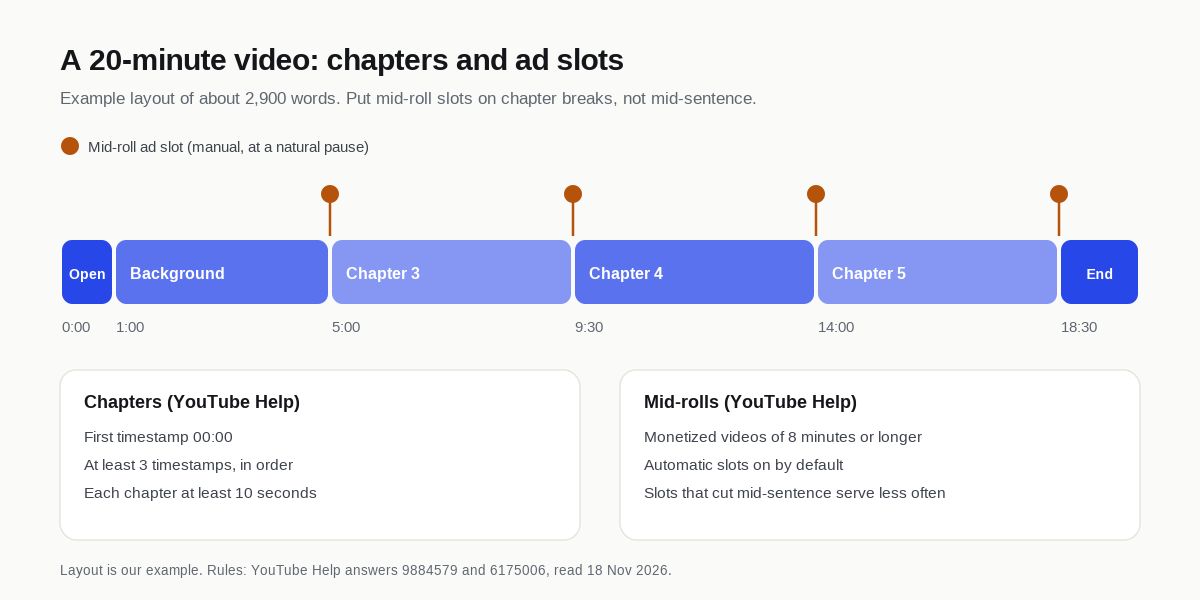
Chapters let viewers jump to the part they want, and they show your structure in the progress bar. YouTube's chapter rules are short: list timestamps in the description, the first must be 00:00, you need at least three in ascending order, and each chapter must be at least 10 seconds.
Name chapters like questions or promises (“Why the river never floods”), not labels (“Part 3”). If you script in chapters from the start, the timestamps fall out of the edit for free.
Mid-roll ads: where to put them
According to YouTube Help, automatic mid-roll slots are selected by default, and YouTube looks for natural breakpoints. You can add or move slots yourself in YouTube Studio on desktop. Slots at natural pauses or transitions are more likely to serve an ad; slots that cut mid-sentence or mid-action are less likely to, and YouTube marks unlikely slots in red.
In a chaptered documentary, the natural pause is the chapter break, just after the re-hook line. The viewer has a reason to wait through the ad. Don't place one in the cold open or the payoff.
How long can each AI tool make a video?
| Tool | Longest video | Cheapest plan | Source |
|---|---|---|---|
| VidGenn | 20 minutes (3, 5, 8, 10, 15 or 20) | $19 for 30 minutes | Pricing |
| Pictory | 30 minutes (5 on the trial) | $29 for 30 minutes (on sale at $14.50) | Pictory pricing |
| Vid.AI | 20 minutes on Starter, 60 on Plus and Pro | $59 for four 10-minute videos | Vid.AI pricing |
| VidRush | 6 to 60 minutes | $99 for 45 minutes | VidRush pricing |
| Subscribr | Not stated (scripts up to about 3 hours) | $99 for 66 minutes | Subscribr FAQ |
| InVideo AI | Not stated | $9 for 190 credits | InVideo pricing |
VidGenn's 20-minute cap is lower than VidRush's or Vid.AI's. In return, it costs the least per minute ($0.63, down to $0.30 on Studio) and uses licensed real footage with a graphic on every fact. The full breakdown, with prices per minute, is in the best AI for long YouTube videos. Head to head: VidGenn vs VidRush, vs Pictory and vs InVideo; or see InVideo alternatives, Pictory alternatives and the InVideo AI alternative for long videos.
How do you make a video longer than the tool allows?
If your story needs 40 minutes and your tool stops at 20, you have two good options.
- Join the parts into one upload. Split the script at a natural chapter break, render each half, and join them in any video editor. Keep the same narrator and settings for both halves so the voice doesn't change. Put a chapter at the join.
- Publish a series. Release “Part 1” and “Part 2” a few days apart, with the end screen of Part 1 linking to Part 2. Each part carries its own mid-rolls, and a series gives viewers a reason to come back.
Cost example (our arithmetic): a 40-minute documentary made as two 20-minute VidGenn videos uses 40 minutes: 40 × $0.44 = $17.60 on Pro, or 40 × $0.30 = $12.00 on Studio. Split at a chapter break, not mid-scene, so the cut feels deliberate. One limit to know: YouTube only lets verified accounts upload videos longer than 15 minutes, so verify your account by phone before upload day.
How long does a long AI video take to render?
Few vendors put render times on their pricing pages, and long videos take longer than short ones. What the vendors do say:
- VidRush: its homepage promises videos “publish-ready in under an hour”.
- Subscribr: its FAQ says to “expect under two hours” from a channel link to a finished video, depending on your brief and edits.
- VidGenn, Pictory, Vid.AI and InVideo AI: no render time stated on their pricing pages.
Whatever the tool, plan for it: render the day before you publish, not the hour before. Then allow time for YouTube's own processing after upload, which is longer for a 20-minute file than for a 5-minute one. Before you render the full length, watch the plan or a draft from start to finish: fixing a wrong shot at minute 14 is much cheaper before the render than after it. And schedule the upload as private first, so you can check chapters, ad slots and the description before it goes public. In VidGenn, edits and re-renders don't use minutes, and a failed video gives its minutes back, so a re-render costs you time but not plan minutes.
Worked example: long videos and the 8,000-hour bar
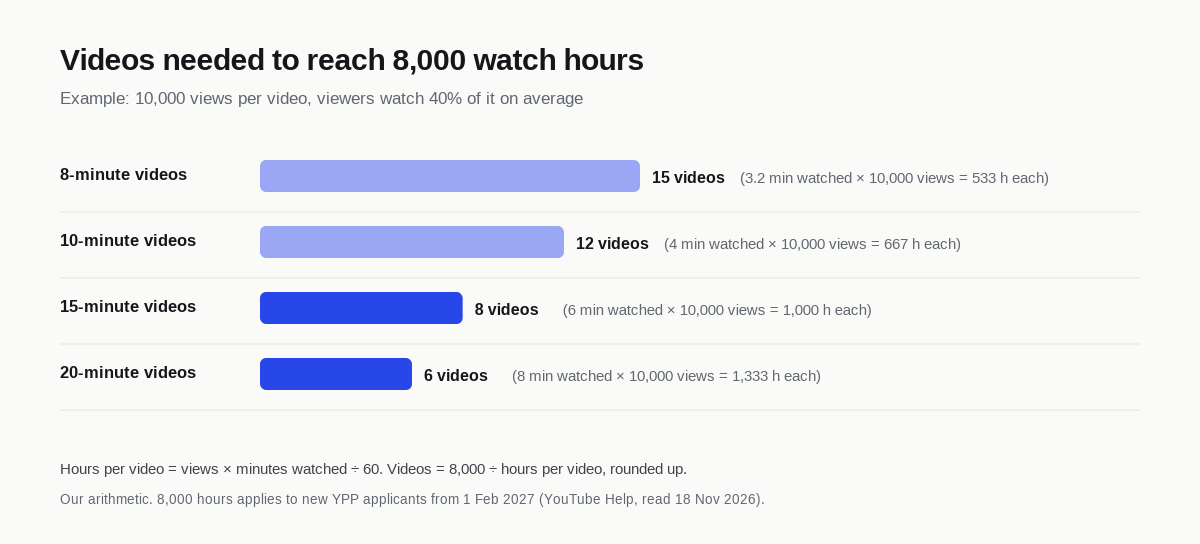
Say a new documentary channel wants to reach the 2027 threshold of 8,000 watch hours. Assume each video gets 10,000 views and viewers watch 40% of it on average. Both numbers are assumptions for the example, not predictions.
- Hours per video = views × minutes watched ÷ 60.
- 8-minute video: 40% = 3.2 minutes watched. 10,000 × 3.2 ÷ 60 ≈ 533 hours, so 8,000 ÷ 533 → 15 videos.
- 20-minute video: 40% = 8 minutes watched. 10,000 × 8 ÷ 60 ≈ 1,333 hours, so 8,000 ÷ 1,333 → 6 videos.
- Cost of six 20-minute videos in VidGenn: 120 minutes. That fits the Pro plan ($79 for 180 minutes) in one month, or about $13.17 a video. On Studio, 120 × $0.30 = $36 worth of its 500 minutes.
The catch is the 40%. Retention usually falls as videos get longer, and a long video people abandon at minute three earns less than a short one they finish. Use the extra length for more story, not more padding. For the full thresholds and steps, read how to get monetized on YouTube; for whether this kind of channel pays, see do faceless YouTube channels make money.
Checklist before you upload a long video
- Your YouTube account is verified, so uploads over 15 minutes are allowed.
- The first 60 seconds start with the strongest fact, not an introduction.
- Every chapter ends with a re-hook, and the chapters are listed from 00:00 in the description.
- Every number and date has been checked against two sources.
- The footage credits are in the description.
- Mid-roll slots sit on chapter breaks, not mid-sentence.
- Realistic AI scenes, if any, are labelled when you upload.
Keep long AI videos monetizable
Long videos made in bulk from one template are exactly what YouTube's inauthentic content policy refuses: it names “AI-generated content made with generic or unoriginal templates giving the impression of mass production”. AI tools are allowed. What passes review is an original angle, real research and licensed footage, edited by someone who cares about the story.
In practice: vary the structure between videos, write or rewrite the script yourself, check every fact, and keep a credits file for the footage. Our guide to scaling YouTube automation covers doing this across several channels.
Common questions
Which AI video generator makes the longest YouTube videos?
Of the tools we checked, VidRush and Vid.AI's Plus and Pro plans go to 60 minutes, and Subscribr's FAQ says its scripts run up to about 3 hours. VidGenn goes to 20 minutes at a lower price per minute. Full comparison: best AI for long YouTube videos.
How many words is a 20-minute YouTube script?
About 2,900 words at 145 words a minute. A 15-minute script is about 2,175 words and a 30-minute one about 4,350.
How long does a video need to be for mid-roll ads?
8 minutes or longer, on a monetized video. YouTube places slots automatically by default, and you can add or move them in YouTube Studio on desktop.
Why can't I upload a video longer than 15 minutes?
Your account isn't verified yet. YouTube limits unverified accounts to 15 minutes; verify by text message or voice call, and you can upload up to 12 hours or 256 GB, whichever is less.
Should I make one 40-minute video or two 20-minute parts?
One video if the story only works in one sitting; two parts if each half stands on its own. Parts give you two uploads, two sets of mid-rolls and a reason for viewers to come back. See how to make a documentary with AI for structuring each part.