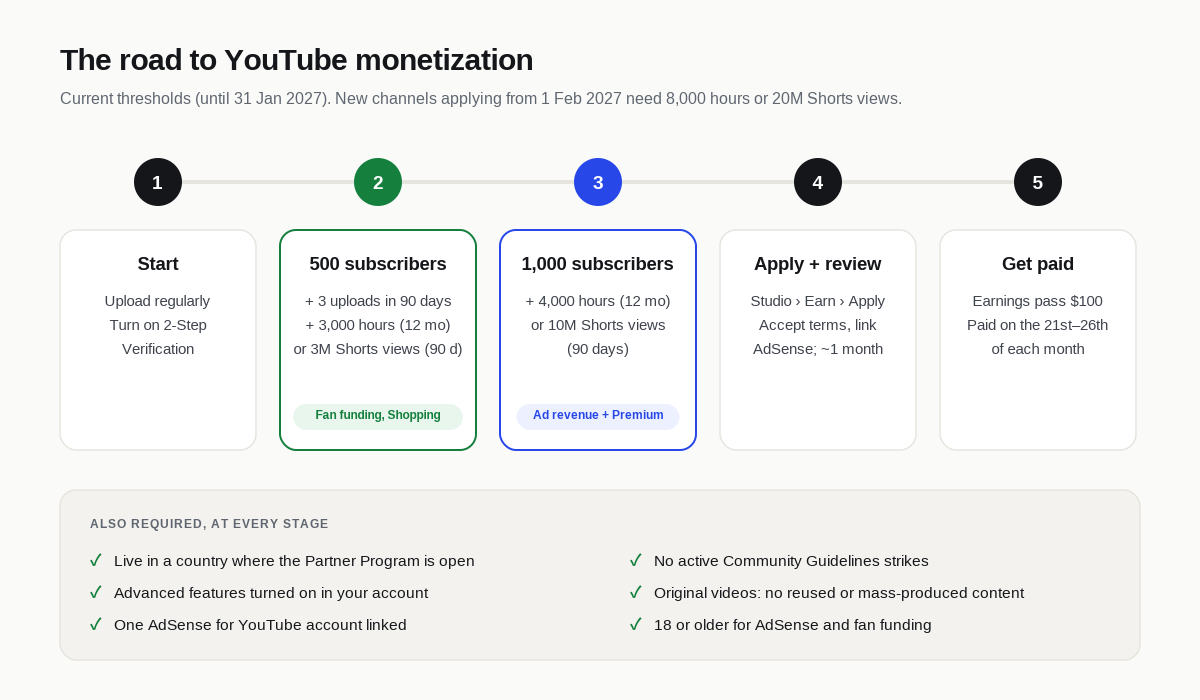
The YouTube Partner Program (YPP) is YouTube's program for paying creators: once a channel is accepted, it earns a share of the ads shown on its videos and money from fans. To get monetized on YouTube, your channel has to join the YouTube Partner Program (YPP). For ad revenue you need 1,000 subscribers plus either 4,000 public watch hours in the last 12 months or 10 million Shorts views in the last 90 days. You also need 2-Step Verification, a linked AdSense account, no active strikes, and videos that follow YouTube's monetization policies. When you qualify, you apply under Earn in YouTube Studio, and YouTube reviews the channel in about a month.
Two things make 2026 different. A lower tier opens at 500 subscribers and pays you through fan funding and Shopping before ads. And from 1 February 2027 the bar for new channels doubles to 8,000 watch hours or 20 million Shorts views. This guide covers both tiers, the exact steps in YouTube Studio, what happens in review, how much YouTube pays, and when the money arrives.
How we checked: every rule below comes from YouTube's Help Center and Official Blog, read on 16 November 2026, and each one links to its source. YouTube changes these pages often, so the links go to the live versions.
Key takeaways: (1) Ads need 1,000 subscribers + 4,000 hours (12 months) or 10M Shorts views (90 days). (2) The 500-subscriber tier unlocks memberships, Super Chat, Super Thanks and Shopping, not ads. (3) New applicants from 1 February 2027 need 8,000 hours or 20M Shorts views, so long videos people finish matter more. (4) Review takes about a month; you're paid after earnings pass $100, between the 21st and 26th.
YouTube monetization requirements in 2026
YouTube has two levels of the Partner Program. The first unlocks money from your fans; the second unlocks ads, which is where most channels earn most of their income.
| Fan funding tier | Full Partner Program | |
|---|---|---|
| Subscribers | 500 | 1,000 |
| Uploads | 3 public videos in the last 90 days | No set number |
| Watch hours route | 3,000 public watch hours in the last 12 months | 4,000 public watch hours in the last 12 months |
| Shorts route | 3 million Shorts views in the last 90 days | 10 million Shorts views in the last 90 days |
| What it unlocks | Channel memberships, Super Chat, Super Stickers, Super Thanks, Shopping | Everything in the first tier, plus ad revenue and YouTube Premium revenue |
The fan funding tier is open in around 100 countries (YouTube Help). Where it isn't, the first level is the full program. Either way, the numbers only start a review. According to the Partner Program overview, your channel also has to:
- follow the YouTube channel monetization policies (more on these below, since they are why most channels get refused);
- be in a country or region where the Partner Program is available;
- have no active Community Guidelines strikes;
- have 2-Step Verification turned on for the Google Account;
- have advanced features turned on (a phone or ID check in YouTube's settings, easy to forget);
- have one active AdSense for YouTube account linked, or create one while applying.
What changes on 1 February 2027
YouTube has announced the biggest change to the Partner Program in years (YouTube Help: Changes to the YouTube Partner Program). If you're starting a channel now, you will probably reach the thresholds after this date, so plan for the new numbers:
| Until 31 January 2027 | From 1 February 2027 | |
|---|---|---|
| New channels joining for ads | 1,000 subscribers + 4,000 watch hours (12 months) or 10M Shorts views (90 days) | 1,000 subscribers + 8,000 watch hours (365 days) or 20M Shorts views (90 days) |
| Channels already in the program | – | Status not affected |
| Fan funding tier | 500 subscribers + 3,000 hours or 3M Shorts views | Unchanged |
| Staying active | Monetization may be turned off after 6 months with no uploads or posts | Any one of: 1,000 watch hours a year, 1M Shorts views in 90 days, or 2 long videos or 5 Shorts every 90 days |
| Monthly Shorts pool earnings | Paid to all Shorts-monetized members | Need 10M Shorts views over the last 90 days (you stay in YPP if you miss it) |
Two details are easy to miss. Existing members must accept the updated terms in YouTube Studio by 31 January 2027, or they stop earning from the affected features until they do. And a channel that drops below the activity bar gets a 90-day window to recover, but only through the watch-hour or Shorts-view routes; uploading more doesn't restore it.
What counts as a watch hour (and how many views you need)
Only qualified watch hours count. In August 2026 YouTube spelled out what that means (YouTube Official Blog):
- Counts: watch time on public long-form videos (including podcasts) and archived livestreams.
- Doesn't count: private, unlisted and deleted videos, views watched as an ad, livestreams that weren't archived, and any watch time on Shorts.
- Shorts views count toward the Shorts route only if they come from public Shorts and are engaged views (the viewer kept watching past the first few seconds).
Delete or hide a video and its hours leave your 12-month total. Watch hours are views multiplied by how long people watch, so the views you need depend on your average view duration, which YouTube Studio shows for every video:
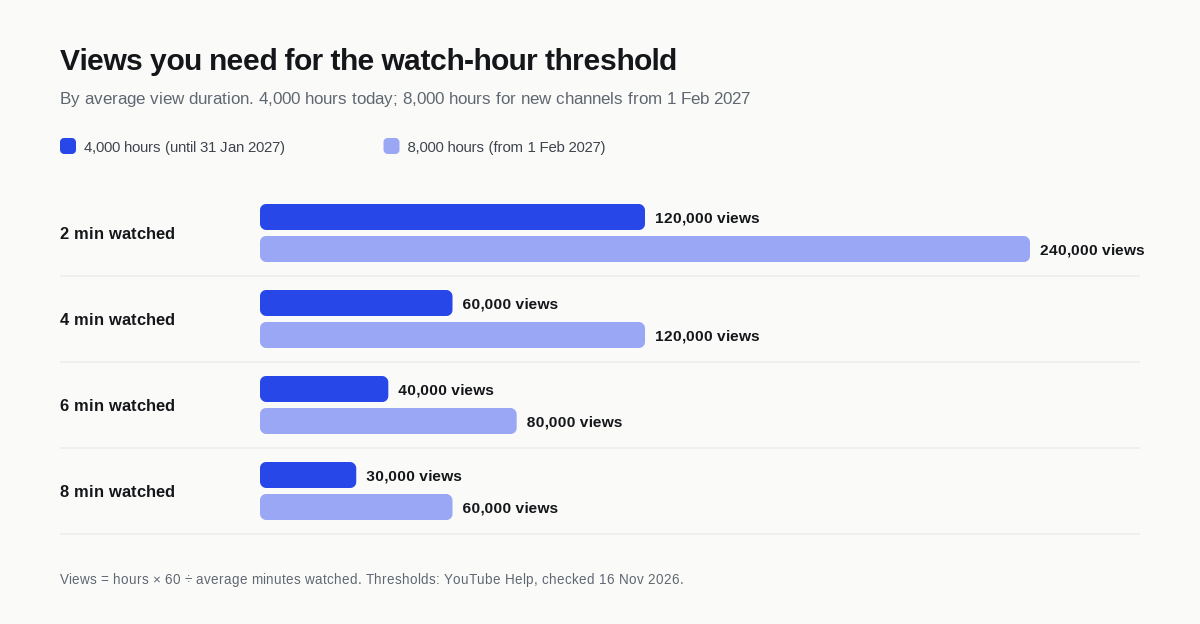
This is why long videos people finish are the efficient route, especially after February 2027. A 10-minute documentary watched for 6 minutes on average needs a third of the views of a video watched for 2 minutes. Our guide to making longer YouTube videos with AI covers tools for 10 to 20 minute videos.
Worked example: how long 4,000 hours takes
Take a new documentary channel that uploads two 10-minute videos a week, and whose viewers watch 4 minutes on average. It needs 60,000 views in 12 months for 4,000 hours, or 120,000 for 8,000 hours (see the chart). After six months it has about 50 videos. If they average 1,200 views each, that's 60,000 views and the current threshold. Under the 2027 rule, the same channel needs either twice the views or a longer average view: lifting it from 4 to 8 minutes gets it to 8,000 hours on the same 60,000 views. That's our arithmetic, not a forecast: most videos get far fewer views than a channel's best few, so watch your own numbers in YouTube Studio's Analytics.
| Channel | Videos in 6 months | Avg. views per video | Avg. minutes watched | Watch hours |
|---|---|---|---|---|
| A | 50 | 1,200 | 4 | 4,000 (meets today's bar) |
| B | 50 | 1,200 | 8 | 8,000 (meets the 2027 bar) |
| C | 50 | 2,400 | 2 | 4,000 (twice the views for the same hours) |
How to apply for monetization in YouTube Studio
You can start the steps before you qualify: YouTube Studio shows your progress and can notify you when you're eligible. The application itself, from YouTube Help:
- Sign in to YouTube, click your profile picture, then YouTube Studio.
- Click Earn in the left menu. Before you qualify, this page shows your progress toward each threshold.
- When you're eligible, select Apply Now.
- Click Start to review and accept the Base terms.
- Click Start to set up a new AdSense for YouTube account, or link one you already have. Use your legal name and the address where you'll receive mail: AdSense sends a PIN there later.
- Your channel joins the review queue. You'll get a decision, typically in about a month.
- Once accepted, accept the modules for the money you want: the Watch Page Monetization Module (long-form ads), the Shorts Monetization Module and the Commerce Product Module (fan funding, Shopping).
Before you press Apply: turn on 2-Step Verification, turn on advanced features, and remove or fix any videos that use clips, music or images you don't have the rights to. Reviewers look at your channel as a whole, not just your best video.
What reviewers check, and why channels get refused
A person looks at your channel's main theme, most-viewed videos, newest videos and the biggest share of your watch time, plus titles, thumbnails and descriptions. They check one thing: do the videos follow the YouTube channel monetization policies? The two policies that refuse the most new channels:
Inauthentic content
Renamed from "repetitious content" on 15 July 2025, this policy refuses mass-produced or repetitive videos. YouTube's examples include "similar or repetitive content with low educational value, commentary, narratives, or minimal variation across videos". They also include "image slideshows, templated storylines, or scrolling text with minimal or no narrative", and "AI-generated content made with generic or unoriginal templates giving the impression of mass production". Using the same intro and outro is fine if the rest of each video is different.
Reused content
Videos built from other people's material without real change are refused, even if you have permission. That includes clips of a show edited together with little or no story, content downloaded from another site with no substantive changes, and reactions with no voice commentary. Reaction videos where you comment on the original are fine.
What about AI and faceless channels? YouTube has no rule against either. The policies target mass-produced, low-value content, not the tools. A faceless channel with its own researched scripts, narration and clearly licensed footage is the kind of channel these rules leave alone. You must label AI content that looks realistic (a real person saying something they didn't, or a realistic scene that never happened) with the "AI use" setting when you upload. YouTube says that disclosing alone won't limit a video's reach or its eligibility to earn (YouTube Help). We go deeper in can you monetize AI documentaries on YouTube?
If you're refused
You can appeal within 21 days by uploading a short video explaining your channel. If you don't appeal, you can reapply after 30 days; after a second refusal, the wait is 90 days. Use that time to fix what the email names: usually reused clips, near-identical videos, or videos with no narration of your own (YouTube Help).
Every way to make money on YouTube, and what each needs
| Feature | Who pays | Your share | Needs |
|---|---|---|---|
| Ads on long videos | Advertisers | 55% of net ad revenue | Full Partner Program + Watch Page module |
| Ads in the Shorts feed | Advertisers, pooled | 45% of your share of the Creator Pool | Full Partner Program + Shorts module (10M Shorts views per 90 days for monthly pool pay from Feb 2027) |
| YouTube Premium | Premium subscribers | Based on how much Premium members watch you | Full Partner Program |
| Channel memberships | Your viewers, monthly | 70% of net revenue | Fan funding tier, 18+, not set as made for kids |
| Super Chat and Super Stickers | Viewers in live streams and Premieres | 70% of net revenue | Fan funding tier, 18+ |
| Super Thanks | Viewers, on any video | 70% of net revenue | Fan funding tier, 18+ |
| Shopping | Buyers of your products or affiliates | Depends on the product | In the Partner Program, not made for kids; affiliate program in 18 countries |
Sponsorships, affiliate links in your description and your own products don't need the Partner Program at all. Many faceless channels earn from these before they qualify for ads.
How much does YouTube pay?
YouTube reports what you earn as RPM: revenue per 1,000 views, after YouTube's share, counting all views including the ones with no ads (YouTube Help). YouTube doesn't publish RPMs by niche, and figures from third parties vary a lot. One of the more transparent datasets comes from the network AIR Media-Tech (300 channels, May 2025 to May 2026). It found a median RPM of about $2.30 across niches, with education and science highest at about $10 and kids' content lowest at about $0.33 (AIR Media-Tech). Within one niche, channels ranged several times apart.
Three things move your RPM more than anything else. The niche: advertisers pay more to reach learners and buyers. Where your viewers live: US, UK, Canadian and Australian views pay more. Video length: videos of 8 minutes or more can carry mid-roll ads. For worked examples, see do faceless YouTube channels make money?
How and when you get paid
- Your earnings for a month are finalized and added to AdSense between the 7th and 12th of the next month (AdSense Help).
- Once your balance passes the $100 payment threshold (or your local equivalent), AdSense pays you between the 21st and 26th of that month (AdSense Help).
- Before your first payment: verify your address with the PIN AdSense mails you, add your tax information, and add a bank account. Fix any payment hold by the 20th or that month's payment waits.
- Bank transfers usually arrive within a week. Anything under $100 rolls over to the next month.
How to reach the thresholds faster
- Make longer videos people finish. Watch hours, not views, are the bottleneck. A clear structure, a strong first 30 seconds and a payoff at the end raise average view duration.
- Pick a niche with evergreen searches. History, science, geography and explainers keep getting views for years, so your hours keep adding up. See the best niches for faceless documentary channels.
- Upload on a schedule. Two long videos a week for six months gives you 50 chances to find one that takes off.
- Turn one topic into a series. One topic can give you five videos; our easy YouTube video ideas shows how.
- Keep every video monetizable from day one. Use licensed footage and keep a credits file, so nothing has to be deleted before review.
That last point is where VidGenn helps: it turns a topic into a 3 to 20 minute documentary with your own editable script, a narrator, licensed real footage for every sentence and a credits file listing each source. Plans start at $19 a month for 30 minutes of finished video. It makes the videos; reaching 1,000 subscribers is still up to your topics and titles.
Make your first documentary with VidGenn
Common questions
How many subscribers do you need to get monetized on YouTube?
1,000 subscribers for ad revenue, with 4,000 watch hours in 12 months or 10 million Shorts views in 90 days. In many countries, 500 subscribers (with 3 uploads in 90 days and 3,000 hours or 3 million Shorts views) unlocks memberships, Super Chat, Super Thanks and Shopping.
How long does YouTube take to review a monetization application?
Typically about a month, according to YouTube. It can take longer when many channels apply. You can see the status under Earn in YouTube Studio.
Do Shorts views count toward the 4,000 watch hours?
No. Shorts watch time never counts toward watch hours. Shorts have their own route: 10 million qualified Shorts views in 90 days (20 million for new applicants from 1 February 2027).
Can you get monetized with AI or faceless videos?
Yes, if the videos are original. YouTube refuses mass-produced, template-made and reused content, not AI tools or channels without a face. Write your own scripts, use licensed footage and label realistic AI content when you upload.
When do you get your first YouTube payment?
In the month after your AdSense balance passes $100, between the 21st and 26th, once your address PIN, tax information and bank details are complete.
Will my channel lose monetization in 2027?
Not because of the new entry thresholds: channels already in the program keep their status. You do need to accept the updated terms in YouTube Studio by 31 January 2027, and stay active (1,000 watch hours a year, 1 million Shorts views in 90 days, or 2 long videos or 5 Shorts every 90 days).