To scale YouTube automation, build systems before you add channels: an idea bank, a script structure per format, a review checklist, batch production and a publishing calendar. Add a channel only when the current one runs on schedule and every video passes review. Keep each channel distinct, because YouTube's rules target repetitive, mass-produced content. Scaling YouTube automation is raising the number of good videos your team ships each week without lowering the quality of any one of them.
This guide covers the five systems, who does what between people and AI, the YouTube risks that only show up at scale, the numbers to watch, and a simple test for adding a channel. VidGenn publishes this guide; it makes documentary videos and is one of the tools mentioned. If you're new to the model, start with YouTube automation with AI.
How we checked: every YouTube rule here comes from YouTube Help, read on 18 November 2026, and links to its page. RPM figures are AIR Media-Tech's published medians. Rules of thumb (such as 8 weeks on schedule) are our suggestions and are labelled that way.
Key takeaways: (1) Scale the system, not the uploads: five systems carry most of the load. (2) YouTube's spam policy covers "coordinated networks of channels" and AI used to "churn out high volumes of similar content", so each channel needs its own niche, voice and research. (3) Several channels can share one AdSense for YouTube account, but you can only have one per payee name. (4) Three channels at three 10-minute videos a week need 360 minutes a month, which fits VidGenn Studio's 500 minutes ($149).
What does scaling YouTube automation actually mean?
Most people think scaling means more uploads. It doesn't. A channel that doubles its uploads but halves its watch time per video has grown its costs, not its business. Real scaling raises the output per person while each video stays as good as the last.
That changes where the work goes. On one channel, the owner does everything and holds the standards in their head. On three or more channels, the standards have to live on paper, so other people (and tools) can meet them. That's what the systems below are for.
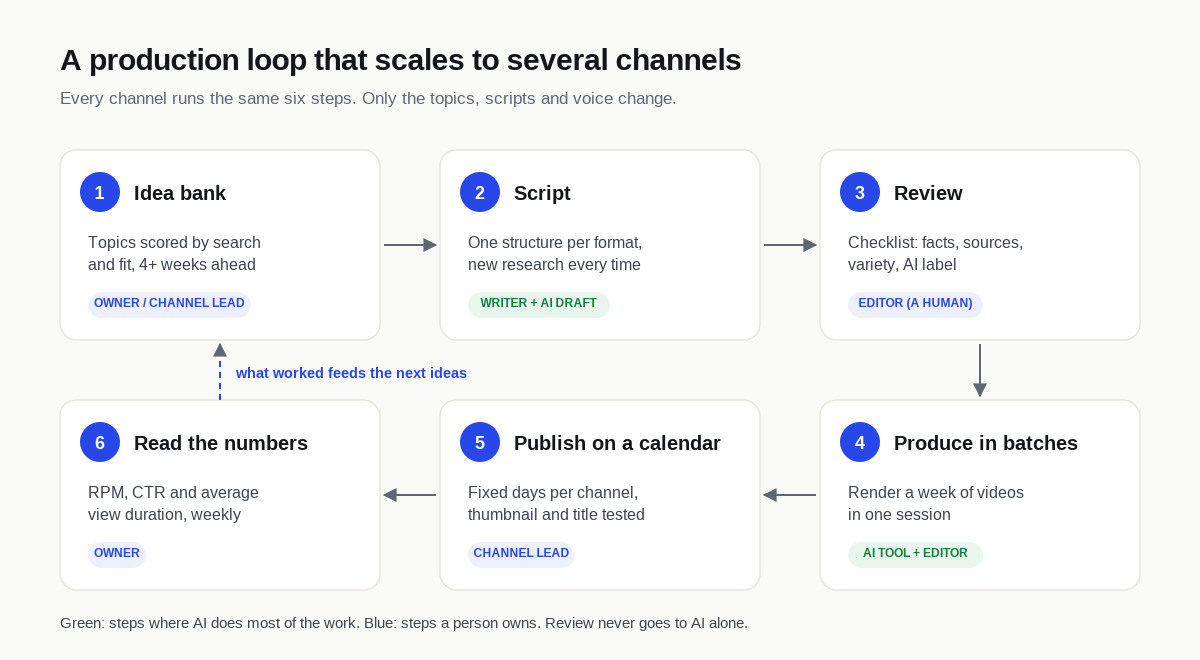
The five systems that let you run several channels
1. An idea bank
Keep one shared list per channel with at least four weeks of topics. Score each one on search interest, fit with the channel, and whether you can show it with licensed footage. A topic that scores low on footage will cost you later. Our easy YouTube video ideas guide shows how one topic becomes several distinct videos.
2. A script structure per format, not one template
Write down the structure of each format you use: the hook, the setup, the turns, the payoff. A top-10 video and a single-story documentary need different shapes. What stays fresh is the research, the angle and the words. This is the line YouTube draws: its monetization policies allow the "same intro and outro for your videos, but the bulk of your content is different". Our documentary script guide has structures to start from.
3. A review checklist
The checklist is what keeps quality when the owner isn't watching. Keep it short enough that people actually use it (see the quality control section below for ours). Every video passes it before upload, with no exceptions for busy weeks.
4. Batch production
Do the same kind of work together. Write and review a week's scripts in one block, render them in one session, then do all the thumbnails. Switching between jobs is where time leaks. With VidGenn, you can prepare a week of scripts, swap shots or graphics in the editor, and re-render without using extra minutes.
5. A publishing calendar
Give each channel fixed upload days and keep a two-week buffer of finished videos. The buffer is what saves you when a video fails review or a team member is sick. A calendar also shows overload early: if one reviewer has 15 videos due on Friday, you'll see it on Monday.
A sample week for a three-channel team
Here's how the five systems can fit into one week. It's our suggested rhythm for three channels at three videos a week each, not a rule. Adjust the days to your upload calendar.
| Day | Main job | Output |
|---|---|---|
| Monday | Pick next week's topics from each idea bank; draft scripts | 9 script drafts |
| Tuesday | Fact-check and edit scripts; choose narrators per channel | 9 approved scripts |
| Wednesday | Render the batch; first watch-through and shot swaps | 9 draft videos |
| Thursday | Checklist review, thumbnails, titles and descriptions | 9 videos ready |
| Friday | Schedule uploads; read last week's RPM, CTR and view duration | Calendar filled, notes for the idea bank |
The point of the rhythm is that nothing waits on one person's mood. If Thursday's review finds a problem, the two-week buffer covers it while the video is fixed.
Team roles: what people do and what AI does
At a few channels, you don't need a big team, but you do need clear owners. Here is a split that works with an AI video tool doing production.
| Role | Owns | AI helps with | Never hand to AI alone |
|---|---|---|---|
| Owner | Niches, budget, which channels to add or close | Pulling numbers into a report | Deciding what a channel stands for |
| Channel lead (one per 1 to 3 channels) | Idea bank, calendar, titles, thumbnails | Title options, topic lists | Choosing the honest title |
| Writer or script editor | Research and the final script | First drafts, outlines, summaries | Checking every number in two sources |
| Video editor or reviewer | Watching every video, shot swaps, the checklist | Footage search, graphics, timing | The final watch before upload |
VidGenn covers the production middle: it drafts a researched script you can edit line by line, narrates with one of 24 ElevenLabs voices, finds licensed real footage for every sentence and places a motion graphic on every fact. It doesn't make thumbnails or upload to YouTube, so those stay with the channel lead. If you'd rather hire for editing, see our guides to hiring a faceless video editor and YouTube video editing services.
What are the YouTube risks of running many channels?
Some risks barely matter on one channel and grow with every channel you add. Read these before you scale, not after.
Spam and mass production
YouTube's spam policy lists "using automated tools or AI to churn out high volumes of similar content with minimal changes" and says "we don't allow use of these tools to flood our platform with repetitive content." It also names "coordinated mass-production" and says the policy applies to "coordinated networks of channels". Ten channels posting the same script with the nouns swapped is exactly what this describes.
Inauthentic and reused content
On 15 July 2025 YouTube renamed its "repetitious content" policy to inauthentic content. The monetization policies don't pay for "AI-generated content made with generic or unoriginal templates giving the impression of mass production", nor for reused content taken from other sources without substantive changes. AI itself is allowed: the same page says that when you use automated tools, "the final product must still demonstrate your creative vision".
AI disclosure
Realistic AI content (a real person shown saying something they didn't, altered footage of a real event, a realistic scene that never happened) must be labelled when you upload (YouTube Help). Put the label check on your review checklist so it doesn't depend on who uploads that day. VidGenn uses real licensed footage rather than AI-generated clips, which keeps most documentary videos out of that category.
AdSense: one account, many channels
YouTube's AdSense for YouTube page says "you can also monetize more than one YouTube channel using the same AdSense for YouTube account." It also says "you can only have one AdSense or AdSense for YouTube account under the same payee name", and you can change the linked account only once every 32 days. So don't open a second AdSense account for a new channel; link the existing one. For client channels, each client normally links their own.
At scale, one problem hits every channel. A policy issue on a shared workflow can repeat across all your channels at once. That's the best argument for distinct niches, distinct narrators and a human review on every video.
A quality control checklist for every video
This is the checklist we suggest. It takes about ten minutes once the reviewer has watched the video.
- Facts: every number and date checked in two sources; sources saved with the script.
- Variety: the hook, structure and opening shot differ from the channel's last three videos.
- Footage: every clip is licensed for commercial use, with a credits file ready for the description (footage guide).
- Sound: one narrator per channel, no mispronounced names, music below the voice.
- Title and thumbnail: they promise only what the video delivers.
- Disclosure: the AI label set where the content is realistic and synthetic.
- Watched in full: someone other than the person who made it has watched the whole video.
Which metrics should you watch across channels?
Track the same three numbers for every channel, weekly, in one sheet. Together they tell you whether a channel needs better topics, better packaging or better videos.
| Metric | What it tells you | What YouTube says |
|---|---|---|
| RPM | Money per 1,000 views, after YouTube's share | "How much money you've earned per 1,000 video views", counting all views (YouTube Help) |
| Impressions CTR | Whether titles and thumbnails earn the click | "Half of all channels and videos on YouTube have an impressions CTR that can range between 2% and 10%" (YouTube Help) |
| Average view duration | Whether the video keeps its promise | "Clickbait videos tend to have low average view duration and therefore are less likely to get recommended" (same page) |
RPM differs most by niche. In AIR Media-Tech's data (300 channels, May 2025 to May 2026), the median was $10.22 for Education & Science and about $2.30 across all niches. When two channels cost the same to run, the one with the higher RPM deserves more of the next month's budget. See the best niches for faceless documentary channels.
Read the three together. Low CTR with good view duration means the video is fine but the title or thumbnail isn't earning the click: change the packaging. High CTR with low view duration means the packaging promises more than the video gives: fix the hook or the promise. Both low means the topic itself may be weak for that channel, so go back to the idea bank. Both healthy with a low RPM points to the niche or the audience's country, which is a budget decision, not a video one.
Watch watch hours too, if a channel isn't monetized yet. From 1 February 2027, new applicants to the Partner Program need 8,000 public watch hours in 12 months or 20 million Shorts views in 90 days (YouTube Help). Long videos that people finish count most.
When should you add another channel?
Add a channel when the current ones run without you, not when they're struggling. A second channel doubles a problem; it doesn't solve one. We use the five-question test below. The thresholds (8 weeks, 20 ideas) are our rules of thumb, not YouTube rules.
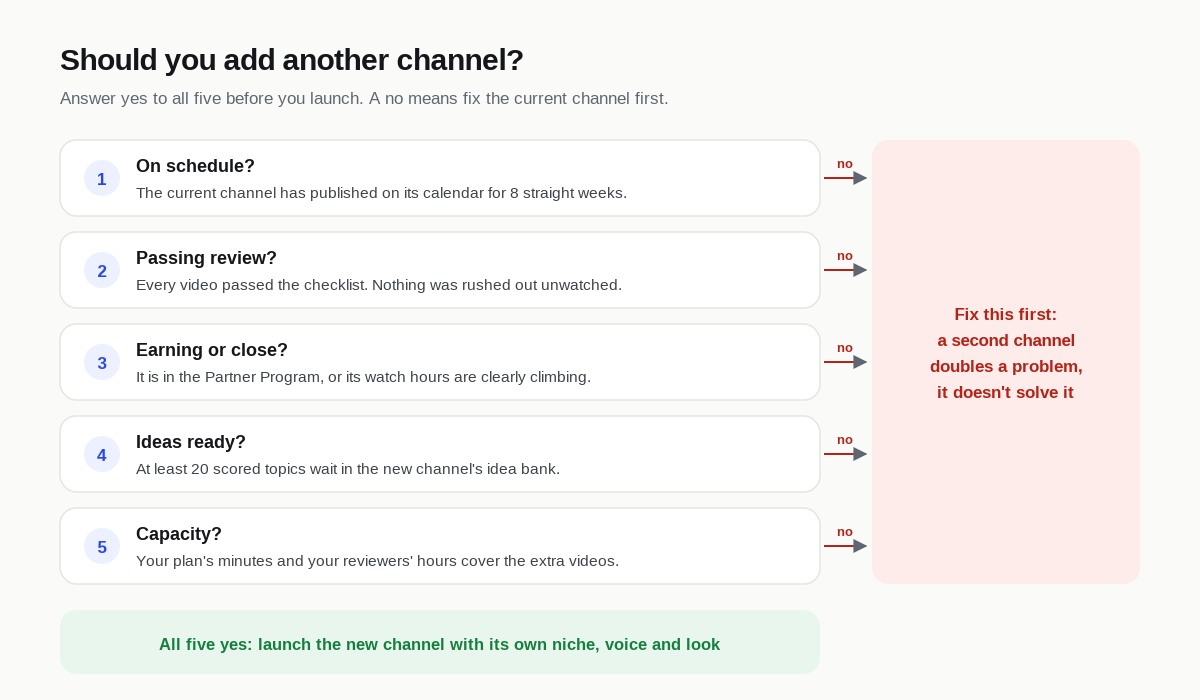
When you do launch, give the new channel its own niche, narrator, look and idea bank. A sister channel that copies the first one's scripts is the clearest version of the risk above.
Worked example: capacity for three channels
Say you run three documentary channels at three 10-minute videos a week each. Here's the capacity check, with our arithmetic and our time estimates.
- Videos: 3 channels × 3 videos × 4 weeks = 36 videos a month.
- Minutes: 36 × 10 minutes = 360 minutes. VidGenn Studio includes 500 minutes for $149, so 140 minutes are spare for a few longer videos. Cost per video: 10 × $0.30 = $3.00.
- Review hours: at about 1.5 hours per video for script review, the editor pass and the checklist (our estimate), 36 × 1.5 = 54 hours a month, or about 13.5 hours a week.
- Thumbnails: 36 a month. At $25 each from a freelancer (the low end of Upwork's range), that's $900.
- Adding a fourth channel at the same pace: 48 videos and 480 minutes, still inside 500, but review rises to 72 hours a month. That's the number to plan around.
The pattern holds at most sizes: minutes are rarely the limit; reviewer hours are. Hire or train a reviewer before you launch the channel that needs one. For full monthly budgets with tools and break-even views, see how much YouTube automation costs.
Using VidGenn Studio for a team
VidGenn's Studio plan is $149 a month for 500 minutes ($0.30 a minute), made for teams and many channels. That's fifty 10-minute videos a month. Minutes count finished video length; edits and re-renders don't use them, and a failed video gives its minutes back.
Be clear about what it isn't. VidGenn makes documentary and explainer videos from 3 to 20 minutes in six narration languages (English, Portuguese, Spanish, French, German, Italian). It has no avatars or presenters, isn't a Shorts tool, and doesn't upload or make thumbnails. If your channels need those, compare options on our compare page.
Common mistakes when scaling
- Cloning the first channel. Same narrator, same music, same structure, new niche. Viewers and reviewers notice the pattern.
- Skipping review in busy weeks. The week you skip it is the week a wrong fact or an unlicensed clip goes out.
- Judging channels too early. A channel with 10 videos hasn't had a fair test. Decide on a number of videos before you launch, and stick to it.
- Adding tools instead of fixing a step. A new subscription rarely fixes a weak idea bank or a slow reviewer.
- Spreading the budget evenly. Put more of next month's money behind the channel with the best RPM and view duration.
None of these are about software. They're about discipline, which is why the systems come first. For the costs side of the same decisions, our per-video cost guide breaks down freelancer, agency and AI routes.
Common questions
How many YouTube channels can one person run?
It depends on review time, not tools. If each video takes about 1.5 hours of your attention (our estimate), 3 videos a week across 2 channels is 9 hours a week. Past that, add a reviewer before you add a channel.
Can several channels share one AdSense account?
Yes. YouTube Help says you can monetize more than one channel with the same AdSense for YouTube account. You can only have one account per payee name, and the linked account can change only once every 32 days.
Will YouTube penalize me for running many automated channels?
Not for the number of channels. YouTube's spam policy targets AI used to "churn out high volumes of similar content" and coordinated networks doing so. Distinct niches, original research and a human review on every video keep you on the right side.
Should I scale with more uploads or more channels?
Usually more good videos on a channel that already works, up to the pace you can review. A new channel restarts the climb to the Partner Program, which needs 8,000 watch hours for new applicants from 1 February 2027.
Is a cash cow channel the same as YouTube automation?
Mostly. "Cash cow" is the community's name for a faceless channel run as a business. Our cash cow YouTube channel guide covers how they earn and the realistic numbers.