A faceless YouTube video editor is an editor who builds videos from narration, archive or stock footage, graphics and captions, with no presenter on camera. To hire one, post a job with a style guide on Upwork, Fiverr or a YouTube job board. Shortlist about five editors with faceless or documentary samples, and pay two or three of them for the same short test edit. Then run a one-month trial before you commit. Upwork lists a median of $35 an hour for video editors, with most charging $10 to $60.
This guide gives you everything to run that process: where to look, what to pay, a job post you can copy, a test task, a style guide template, a review checklist, and payment and contract basics. It ends with a workflow where VidGenn, which publishes this guide, makes the first cut and your editor polishes it and adds thumbnails and Shorts. If you're still choosing between freelancers and studios, read our comparison of YouTube video editing services first.
How we checked: rates and fees come from Upwork's and Fiverr's own pages, read on 18 November 2026. Upwork's pages block automated reading, so we used its figures as they appear in search results that day. The hiring steps are our recommendations, not survey data.
Key takeaways: (1) Upwork's median for video editors is $35 an hour; most charge $10 to $60. (2) Always pay for the test edit, and give every candidate the same 2-minute script and assets. (3) A written style guide (pacing, a visual per sentence, captions, music, licensed sources) cuts revision rounds. (4) With VidGenn making the first cut, a 10-minute video costs about $126.90 including an editor's polish, thumbnail and two Shorts (our estimate).
What does a faceless YouTube editor do?
A talking-head editor mostly cuts between takes of one person. A faceless editor has nothing to cut back to, so every sentence of narration needs its own picture. That changes the skills you're hiring for:
- B-roll research: finding a fitting, licensed clip or image for each line of the script.
- Pacing: keeping the screen changing every few seconds without feeling random.
- Motion graphics: numbers, maps, timelines and lists that turn facts into visuals.
- Sound: music under the voice, sound effects on transitions, and even levels.
- Packaging: thumbnails and vertical Shorts cut from the long video.
When you read portfolios, look for these skills on a video like yours. A great gaming or vlog editor isn't automatically a good documentary editor. Our guide to starting a faceless documentary channel shows the format in full.
Where to find faceless YouTube editors
| Where | How it works | Fees you pay as the client |
|---|---|---|
| Upwork | Post a job, receive proposals, hire hourly or fixed-price | 3–5% marketplace fee on the Basic plan, plus a $0.99–$14.99 contract initiation fee |
| Fiverr | Buy a seller's fixed package, or ask for a custom offer | 5.5% of the order, plus $3.50 on orders under $200 |
| Contra and similar portfolio sites | Browse portfolios and contact freelancers directly | Check the site's own fee page |
| YouTube-focused job boards | Boards that list roles for creators, such as editor and thumbnail designer | Check the board's posting price |
| Referrals | Ask creators in your niche who edits for them | None, but no platform protection either |
For a first hire, a marketplace is the safer choice. The platform holds the payment record, the contract and any dispute. Once you trust an editor, you can decide whether to stay on the platform.
How much does a faceless YouTube editor cost?
Upwork's video editor cost guide gives a median of $35 an hour, with most rates between $10 and $60 (Upwork). Rates rise with experience, motion graphics skill and English fluency, and fall in lower-cost countries. Many YouTube editors prefer a fixed price per video once they know your format.
To set a per-video price, use this formula: price per video = estimated hours × hourly rate. If a 10-minute faceless edit takes an editor an estimated 4 hours at $35, that's $140. Ask candidates for their own hour estimate after the test task; it's the most honest number you'll get. For comparison, agencies publish per-video prices: Tasty Edits charges $327 for one long video (Tasty Edits pricing).
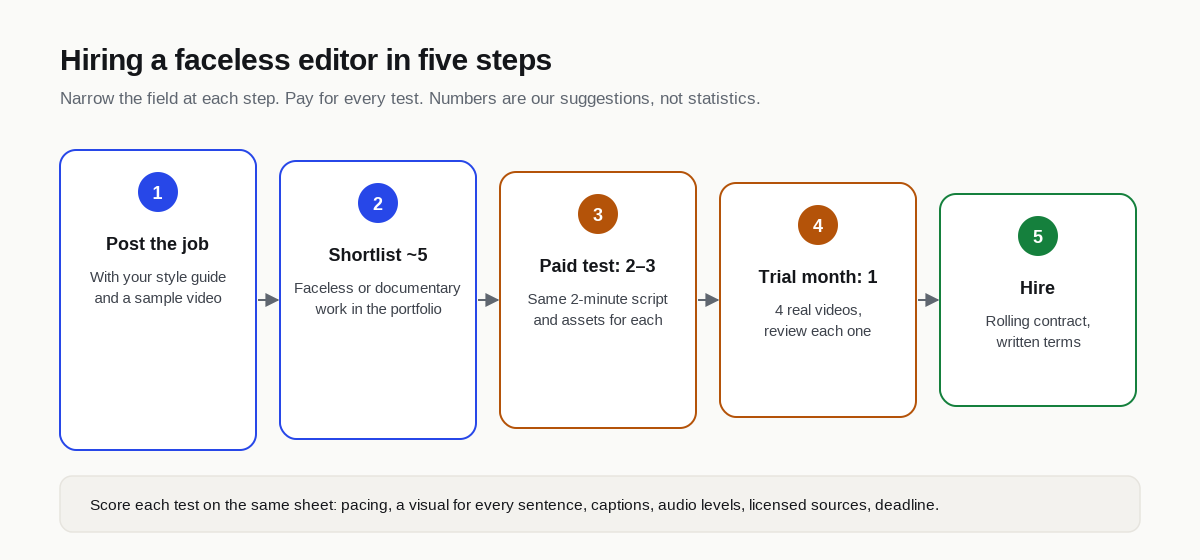
The hiring process, step by step
A sample job post you can copy
A clear post attracts the right editors and filters out copy-paste proposals. Adapt this one:
- Title: Video editor for a faceless documentary YouTube channel (10-minute videos, ongoing).
- About the channel: We publish faceless documentary videos about [your niche], 8 to 12 minutes long, narrated, built from archive and stock footage with motion graphics.
- The work: 4 to 8 videos a month. You receive a script, a voiceover and a first cut or asset pack. You tighten pacing, improve the first 30 seconds, add sound design and captions, and deliver a 1080p MP4. Optional: a thumbnail and two Shorts per video.
- Must have: a faceless, documentary or explainer video in your portfolio; experience with licensed stock footage and keeping a credits list; delivery within 72 hours.
- Nice to have: motion graphics, thumbnail design, vertical Shorts.
- To apply: send one faceless video you edited, your rate per hour or per 10-minute video, and one sentence on how you'd improve the reference video linked below.
- Next step: a paid 2-minute test edit for shortlisted editors.
The last instruction under "To apply" works as a filter. Editors who answer it have watched your video; generic proposals won't mention it.
The paid test task
A test edit tells you more than any portfolio, because everyone works on the same material. Keep it short, fair and paid.
- Same inputs for everyone: a 2-minute script excerpt, its voiceover, and either a first cut or a folder of licensed clips.
- Your style guide (template below) and one reference video.
- A deadline: 48 to 72 hours.
- Deliverables: a 1080p MP4 and a credits list with the source of every clip.
- Pay for it: at the editor's hourly rate for their estimated hours, through the platform. Unpaid tests put off the best editors.
Score every test on one sheet with the same headings: hook, pacing, a visual for each sentence, captions, audio levels, licensed sources, and whether it arrived on time. Then ask each finalist how long it took. That's your per-video price for the trial month.
A style guide template for your editor
A one-page style guide is the cheapest way to get consistent edits. Fill in the right-hand column for your channel:
| Item | What to specify | Example |
|---|---|---|
| Format | Resolution, frame rate, length | 1080p, 30 fps, 8–12 minutes, 16:9 |
| Pacing | Longest a shot may stay on screen | No shot over about 5 seconds; a cut on every sentence |
| B-roll per sentence | What each line needs on screen | At least one visual per sentence; numbers get a graphic |
| Hook | What the first 30 seconds must do | The question of the video by 0:10, a payoff teased by 0:30 |
| Captions | Style, position, size | White, bottom third, one line, key words bold |
| Music | Mood, volume under voice | Low ambient score, about 20 dB under narration |
| Footage sources | Allowed libraries and licences | Public domain archives, Pexels, Pixabay; no clips from other YouTube channels |
| Credits | How to record sources | One line per clip: timestamp, title, library, licence, link |
| Graphics | Fonts, colours, lower thirds | Channel font, two brand colours, no drop shadows |
| Delivery | Files and naming | MP4 + credits file + project file, named by video number |
The footage rules matter beyond style. YouTube doesn't monetize channels built on reused content, and clips lifted from other channels attract Content ID claims. Our guide to copyright-safe documentary footage lists libraries that allow commercial use, and stock footage sites for YouTube compares them.
How to review an edit
Review every video in one pass, with timestamps, and send all your notes together. Check these in order:
- Watch the first 30 seconds as a stranger would. Would you keep watching?
- Check every sentence has a visual, and that no shot sits too long.
- Check facts on screen against the script: numbers, dates, names, map labels.
- Listen on headphones: voice clear, music under it, no clipping or sudden jumps.
- Read the captions for typos and timing.
- Spot-check the credits file: open three sources at random and confirm the licence.
- Check for realistic AI visuals. If any appear, the upload needs YouTube's AI disclosure label.
Good notes say what and where, not how: "2:14, shot feels unrelated to 'trade routes', use a map" beats "make it better".
Payment and contract basics
Put the working terms in writing, even on a marketplace. This isn't legal advice, but most creator-editor agreements cover the same points:
- Payment: per video or per weekly milestone, paid through the platform on delivery of the final file.
- Ownership: the final videos, thumbnails and project files belong to you once paid.
- Licensed assets only: every clip, image, font and track is licensed for commercial YouTube use, with a credits file per video.
- Deadlines and revisions: the delivery time and the number of revision rounds included.
- Confidentiality: unreleased scripts and channel stats aren't shared or reused.
- Access: if the editor uploads, invite them in YouTube Studio as an Editor through channel permissions. Never share your password.
- Ending it: a notice period (for example, one week) and a final handover of files.
Common hiring mistakes to avoid
- Hiring on price alone. A $10-an-hour editor who needs three revision rounds can cost more than a $35 one who gets it right first time. Compare hours × rate × rounds.
- Skipping the trial month. One good test doesn't show how an editor handles deadlines, feedback and a busy week. Four real videos do.
- Changing the brief mid-video. Update the style guide between videos, not during one, so feedback stays fair.
- Letting the editor choose sources freely. Name the allowed libraries in writing and ask for the credits file every time.
- Keeping everything in the editor's account. Project files, fonts and music licences should live in your own drive, so a new editor can pick up where the last one stopped.
- No backup editor. Once your channel depends on uploads, keep a second editor who has passed your test, even if they only cut Shorts.
Most of these come down to the same habit: write things down. The job post, style guide, scoring sheet and contract together take an afternoon. After that, adding a second editor takes days, not weeks, which matters when you scale a faceless channel.
How to combine an editor with VidGenn
For documentary and explainer channels, the slowest part of an edit is research and footage hunting. VidGenn does that part: from a topic or your own script, it makes a finished 1080p documentary of 3 to 20 minutes. Each one comes with narration from one of 24 ElevenLabs voices, licensed real footage for every sentence, a motion graphic on every fact, and a credits file listing every source.
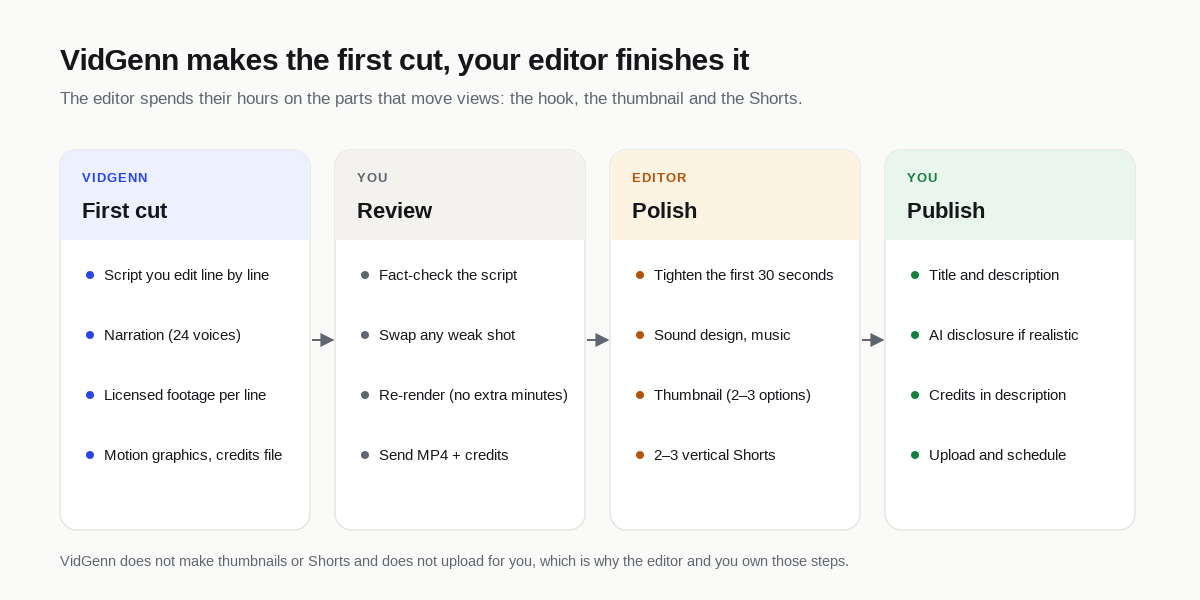
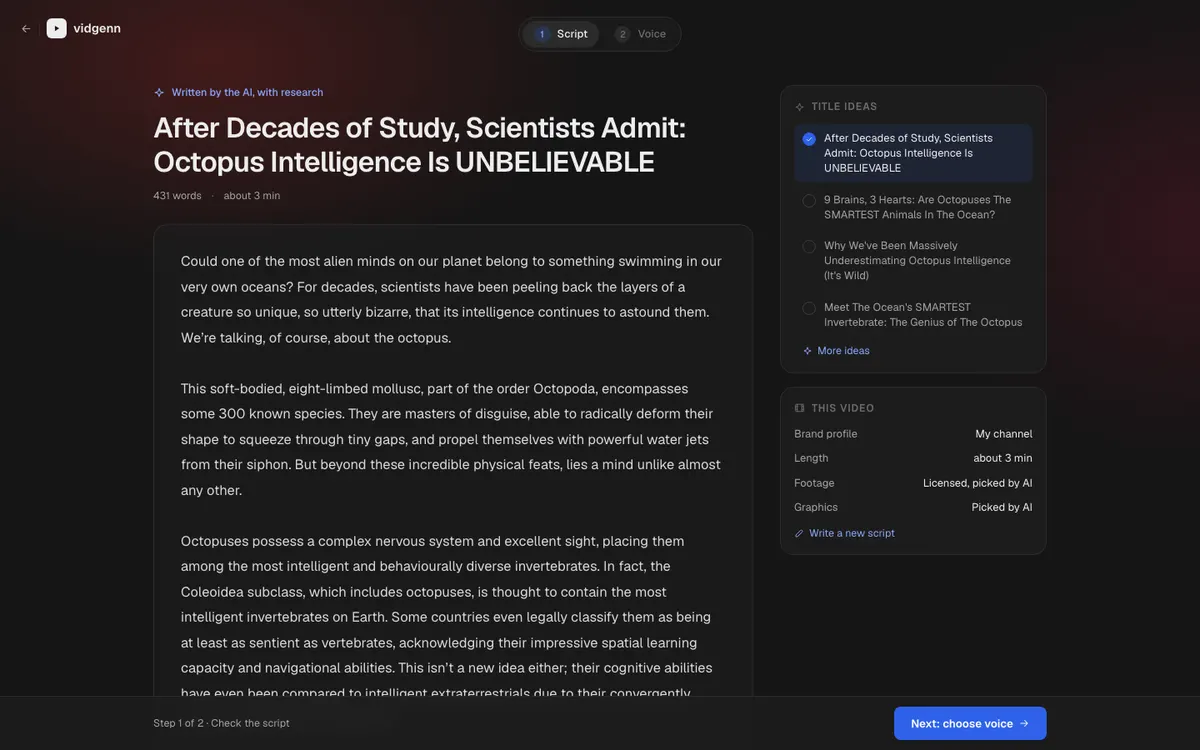
The split plays to each side's strengths. VidGenn doesn't make thumbnails or Shorts and doesn't upload, so those are exactly the jobs you give the editor. You still review the script before rendering: every line is editable, and edits and re-renders don't use minutes.
Worked example: one 10-minute video (our arithmetic)
- VidGenn first cut: 10 minutes × $0.44 per minute on Pro = $4.40.
- Editor polish: an estimated 1.5 hours on the hook, sound and captions, 1 hour on the thumbnail and 1 hour on two Shorts = 3.5 hours × $35 = $122.50.
- Total per video: $4.40 + $122.50 = $126.90, with a thumbnail and two Shorts included.
- Eight videos a month: VidGenn Pro's $79 covers 80 of its 180 minutes, plus 8 × $122.50 = $980 for the editor, so $1,059 a month.
- For comparison: Tasty Edits' published price for one long-form edit is $327, plus $43 for a thumbnail, = $370. That edits footage you supply; script and voice are extra.
The hours are our estimate; replace them with your editor's numbers from the test task. Where this setup doesn't fit: talking-head, vlog and gaming channels need a full editor working on your own footage, because VidGenn makes documentary and explainer videos only.
Common questions
How much should I pay a faceless YouTube editor?
Upwork's median for video editors is $35 an hour, with most between $10 and $60. Convert it to a per-video price after a paid test: hours × rate. See our YouTube automation cost per video guide.
Where is the best place to hire a YouTube editor?
For a first hire, Upwork or Fiverr, because the platform holds payment and disputes. Fees: 3–5% plus a contract fee on Upwork's Basic plan; 5.5% plus $3.50 under $200 on Fiverr.
Should I pay for a test edit?
Yes. Paid tests attract experienced editors, and the same short script for everyone makes the results comparable. Keep it to about 2 minutes of video.
Can an editor upload to my channel safely?
Yes, through YouTube Studio channel permissions with the Editor role, which can publish but can't manage permissions or delete the channel. Don't share your password.
Do I still need an editor if I use AI?
For thumbnails, Shorts and a polished hook, usually yes. An AI documentary tool can make the video itself; see how to make faceless YouTube videos with AI and how to scale YouTube automation.