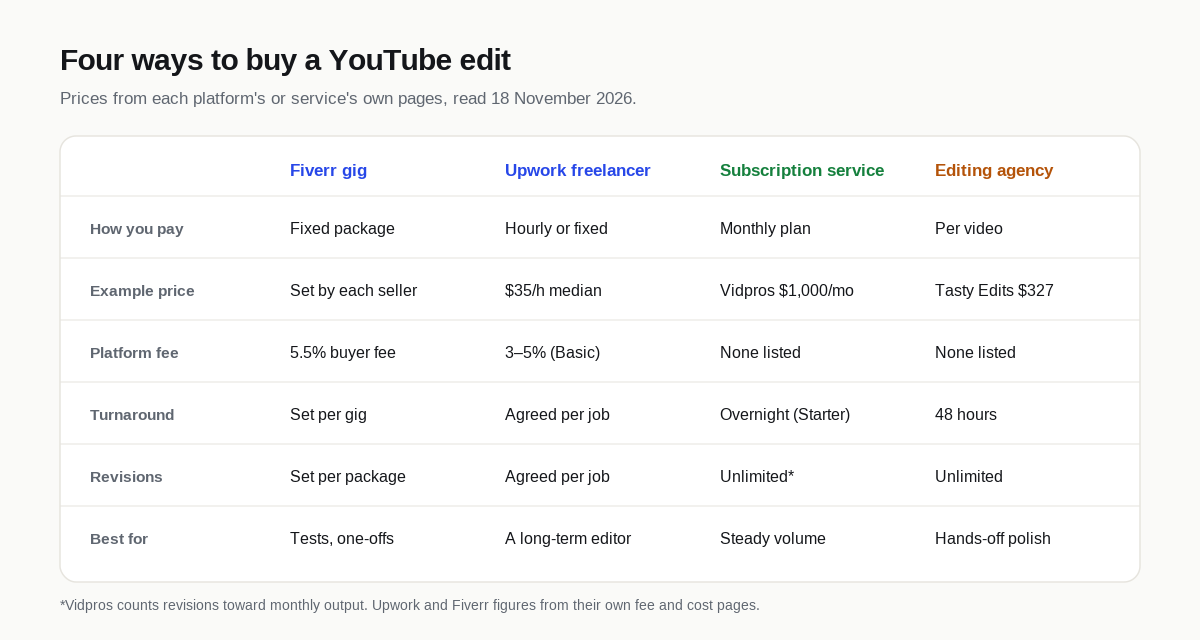
YouTube video editing services are freelancers, subscription studios and agencies that turn your raw footage, voiceover or script into a finished YouTube video for a fee. There are four main types. Fiverr gigs sell fixed packages, Upwork freelancers charge a median $35 an hour, and subscriptions such as Vidpros cost $1,000 to $4,000 a month. Per-video agencies such as Tasty Edits charge $327 for one long video, with 48-hour turnaround. For faceless documentary videos, an AI documentary tool can now make the whole video, but it doesn't replace an editor for talking-head, vlog or gaming content.
Below we compare the four types, their published prices, turnaround times and revision rules, what to expect from a faceless documentary-style edit, and when an AI tool replaces the edit. VidGenn, which publishes this guide, is one of those AI tools, so we've kept every competitor price to what the service shows on its own page. For the tools side, see our list of AI tools for faceless YouTube channels.
How we checked: prices, turnaround and revision terms come from each service's own pricing or help page, read on 18 November 2026, in US dollars. Upwork's pages block automated reading, so we used Upwork's own figures as shown in search results that day. We didn't order edits from these services.
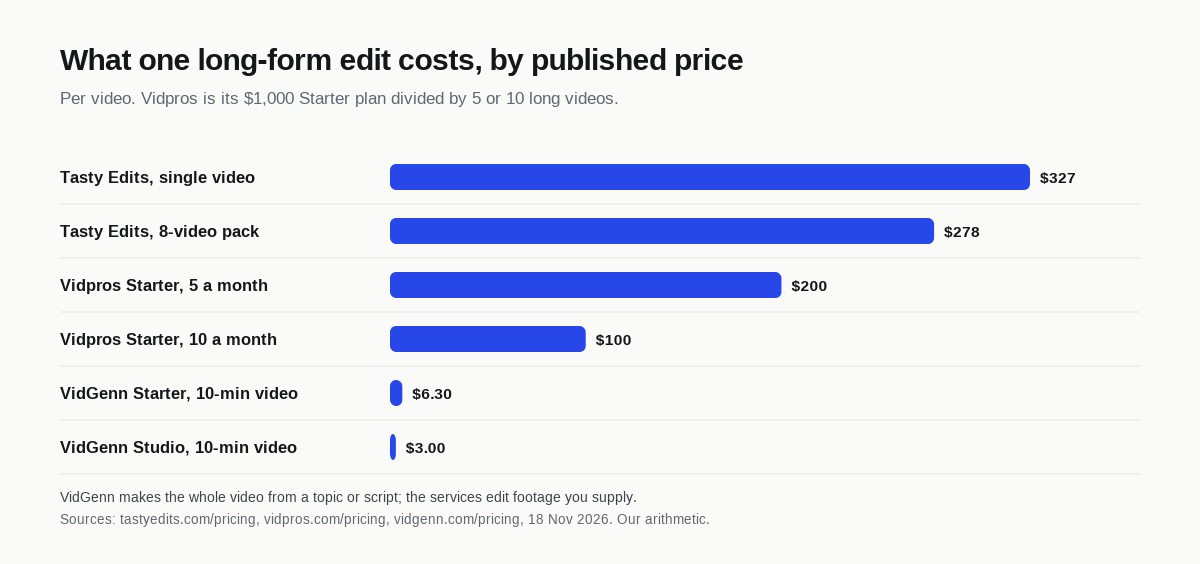
Key takeaways: (1) Upwork lists a $35 median hourly rate for video editors, with most between $10 and $60. (2) Tasty Edits charges $327 per long video, or $278 each in an 8-pack, with 48-hour turnaround and unlimited revisions. (3) Vidpros' $1,000 plan covers 5 to 10 long videos a month, so $100 to $200 each. (4) A 10-minute faceless documentary from VidGenn costs $3.00 to $6.30 in minutes, but it can't edit your talking-head or gaming footage.
What types of YouTube video editing service are there?
1. Fiverr gigs
On Fiverr, each seller sets fixed packages, usually three tiers with a stated video length, delivery time and number of revisions. You pay the package price plus Fiverr's service fee: 5.5% of the purchase, plus $3.50 on orders under $200 (Fiverr Help). Fiverr's YouTube editing category page blocked our reader, so we don't quote a typical range. Read each gig's package table instead.
Fiverr is good for testing a style or getting a one-off video done fast. The trade-off is consistency: a new seller for each order means a new style each time.
2. Upwork freelancers
Upwork is where most channels find a long-term editor. Its video editor cost guide puts the median at $35 an hour, with most rates between $10 and $60 (Upwork). Clients on the Basic plan pay a 3% to 5% marketplace fee plus a contract initiation fee of $0.99 to $14.99 (Upwork pricing). Turnaround and revisions are whatever you agree in the contract, so write them down.
3. Subscription editing services
Subscription studios sell a monthly output. Vidpros, for example, charges $1,000 a month for 5 to 10 long-form videos, $2,000 for 10 to 20, and $4,000 for 20 to 40, month to month (Vidpros pricing). A long-form video there means up to 15 minutes, cut from up to 60 minutes of raw footage. Revisions are unlimited but count toward output, and unused output doesn't roll over. A $100 trial week covers one long-form video.
4. Editing agencies
Agencies sell per video, with a dedicated editor and project manager. Tasty Edits charges $327 for one horizontal video, $305 each in a 4-pack and $278 each in an 8-pack. Vertical videos cost $94 to $80 each, and a thumbnail is a $43 add-on (Tasty Edits pricing). Every package includes unlimited revisions, stock footage, motion graphics and royalty-free music. Agencies that also manage the channel are covered in our YouTube automation agency guide.
How much do YouTube video editing services cost?
| Service | Pricing basis | Published price | Turnaround | Revisions |
|---|---|---|---|---|
| Fiverr gig | Per package, set by seller | Seller's package + 5.5% fee (+ $3.50 under $200) | Set per gig | Set per package |
| Upwork freelancer | Hourly or fixed | $35/h median; most $10–$60/h; + 3–5% fee on Basic | Agreed per contract | Agreed per contract |
| Vidpros Starter | Monthly | $1,000 for 5–10 long-form videos | Overnight; 1 long video every 2–4 days | Unlimited (count toward output) |
| Vidpros Growth / Scale | Monthly | $2,000 (10–20) / $4,000 (20–40) | Up to 1 / 2 long videos a day | Unlimited (count toward output) |
| Tasty Edits | Per video | $327 single; $305 in 4-pack; $278 in 8-pack | 48 hours (horizontal) | Unlimited |
Worked example: one 10-minute faceless video (our arithmetic)
- Upwork: an estimated 4 hours of editing × $35 = $140, plus a 5% Basic fee ($7) = $147. The 4 hours is our estimate; your editor's will differ.
- Fiverr: take a hypothetical $150 package. The fee is $150 × 5.5% = $8.25, plus $3.50 because it's under $200, so $161.75.
- Vidpros Starter: $1,000 ÷ 10 videos = $100 at the top of its range, or $1,000 ÷ 5 = $200 at the bottom.
- Tasty Edits: $327 for one, or $278 each when you buy 8.
- VidGenn: 10 minutes × $0.63 = $6.30 on Starter or Creator, × $0.44 = $4.40 on Pro, × $0.30 = $3.00 on Studio. This is the whole video, script and voice included, not an edit of your footage.
The services above edit material you send them: footage, a voiceover or a script. Scripts and voice are usually extra. For a full line-by-line budget, see YouTube automation cost per video.
Turnaround times and revisions: what to expect
Turnaround is where the types differ most. Tasty Edits quotes 48 hours for a horizontal video and 24 for a vertical one. Vidpros quotes overnight delivery with one long-form video every 2 to 4 days on Starter, rising to two a day on Scale. Fiverr and Upwork depend on the seller, so put a deadline in the order or contract. If you publish on a fixed day, ask for delivery at least two days before it, so there's room for one round of notes.
"Unlimited revisions" needs reading closely. At Vidpros, revisions count toward your monthly output, so heavy feedback means fewer videos. On Fiverr, the package states a number of revisions. A good rule is to send all your notes in one pass, with timestamps, rather than five rounds of small fixes.
What to expect from a faceless documentary-style edit
Faceless documentary videos are harder to edit than they look, because there's no presenter to cut back to. Every sentence of narration needs its own visual. Brief your editor or service on these points:
- A visual for every sentence: footage, a photo with slow movement, a map or a graphic. A shot held for more than about 5 seconds feels slow without a face on screen.
- Licensed sources only: public-domain archives and stock libraries, with a credits file. Clips ripped from other YouTube videos risk Content ID claims and the reused content rule.
- Motion graphics on facts: numbers, dates and lists shown on screen, which is where documentary channels keep viewers.
- Captions that match the narration, and music ducked under the voice.
- A strong first 30 seconds: the hook decides retention, and retention decides watch hours.
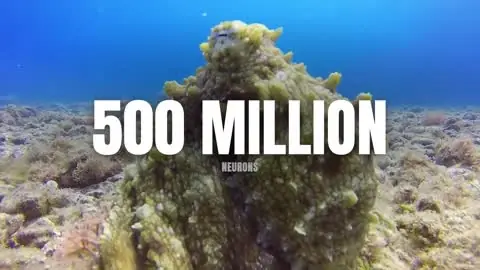
Finding footage is the slowest part. Our guides to copyright-safe documentary footage and stock footage sites for YouTube list the libraries that allow commercial use.
How to brief an editing service
Most bad edits come from thin briefs. Whichever type of service you use, send the same short document with every video. It saves revision rounds, which matters most where revisions count toward your output.
- The goal of the video in one line, and who it's for.
- A reference video with timestamps of the moments whose pace or style you want.
- Your assets: the final script, the voiceover file, any footage you own, logos and fonts.
- Pacing rules: for example, a new visual at least every sentence and no shot longer than about 5 seconds.
- Sources: which footage libraries are allowed, and a request for a credits file.
- Captions and music: style, position, and how loud the music sits under the voice.
- Deliverables: 1080p MP4, plus thumbnails or a vertical cut if you've paid for them.
- Deadline and one feedback round: when you'll send notes, and when the final file is due.
Our hiring guide has a fuller style guide template you can copy.
Red flags when buying YouTube editing
- No sample in your format. A great vlog editor may never have cut a 12-minute documentary. Ask for a faceless example.
- Footage with no source. If an editor can't say where a clip came from, it may be ripped from another channel, which risks claims and the reused content rule.
- "Unlimited" with no fine print. Read whether the limit is on revisions, videos, active requests or video length.
- Payment outside the platform. On Fiverr and Upwork, paying through the platform keeps the order and any dispute on record.
- Long lock-in for a first order. Start with one video or a trial week before a quarterly or annual plan.
None of these are rare, and none are hard to check. Ten minutes of questions before the first order is cheaper than a re-edit.
When does an AI documentary tool replace the edit?
For faceless documentaries and explainers, an AI documentary tool can now do the job an editing service does, plus the script and voice. VidGenn takes a topic or your own script (read word for word) and returns a finished 1080p video of 3 to 20 minutes. It adds narration from one of 24 ElevenLabs voices, licensed real footage from NASA, Wikimedia Commons, Internet Archive, Pexels and Pixabay for every sentence, and a motion graphic on every fact. You can swap shots and graphics in its editor, and re-renders don't use minutes.
| Your content | AI documentary tool | Human editing service |
|---|---|---|
| Faceless documentary, history, science, explainers, top 10s | Replaces the edit: makes the full video | Optional, for polish and thumbnails |
| Talking-head videos, interviews, podcasts | Doesn't fit: no presenters or talking heads | Yes |
| Vlogs and travel footage you filmed | Doesn't fit: it uses library footage, not yours | Yes |
| Gaming videos and streams | Doesn't fit | Yes |
| Shorts and Reels | Not a Shorts tool | Yes, often cut from your long videos |
| Thumbnails | Not included | Usually an add-on ($43 at Tasty Edits) |
Be clear about the limits. VidGenn is documentary and explainer style only, tops out at 20 minutes per video, doesn't make thumbnails or Shorts, and doesn't upload to YouTube. Many channels use both: VidGenn for the first cut, then an editor for the hook, thumbnails and Shorts. Our guide on how to hire a faceless YouTube video editor shows that workflow, and how to make faceless YouTube videos with AI walks through the tool side.
Which editing service should you choose?
- You post one or two videos a month and want to test styles: Fiverr, with a clear brief.
- You want one editor who learns your channel: Upwork, with a paid test edit first.
- You publish 5 or more long videos a month on a schedule: a subscription such as Vidpros.
- You want hands-off polish and will pay for it: an agency such as Tasty Edits.
- Your channel is faceless documentary or explainer: an AI documentary tool for the video, plus a freelancer for thumbnails and Shorts.
Volume changes the answer. At two videos a month, a per-video agency or a Fiverr gig keeps costs flexible and avoids a monthly commitment. At ten or more, a subscription or a steady freelancer is usually cheaper per video, and the editor learns your channel's style. Whichever you choose, keep the brief, the credits files and the project files in your own drive, so you can switch services without starting again.
If you're still deciding whether to outsource at all, our guide to scaling YouTube automation covers when a channel is ready for its first hire.
Common questions
How much does it cost to have a YouTube video edited?
From published prices: Upwork editors have a $35 median hourly rate, Tasty Edits charges $278 to $327 per long video, and Vidpros works out at $100 to $200 per long video on its $1,000 plan. Compare these in our YouTube automation cost guide.
Is Fiverr good for YouTube video editing?
It's good for tests and one-off videos, because packages are fixed and fast. Add 5.5% plus $3.50 on orders under $200 for Fiverr's fee, and expect style to vary between sellers.
How long does a YouTube editing service take?
Tasty Edits quotes 48 hours for a horizontal video. Vidpros delivers one long video every 2 to 4 days on its Starter plan. Freelancers agree a deadline per job.
Can AI replace a YouTube video editor?
For faceless documentaries and explainers, an AI documentary tool can make the whole video. For talking heads, vlogs and gaming, you still need a human editor. See the best AI faceless video generators.
What should I send an editing service?
Your script or voiceover, any footage you own, a style reference video, your caption and music preferences, and a deadline. For documentaries, ask for a credits file listing every clip's source.
Do YouTube editing services write scripts?
Usually not. Most edit the script, voice and footage you send. Script writing and voiceover are separate services or add-ons, while an AI documentary tool like VidGenn writes the script for you to edit. See how to write a documentary script.