A faceless YouTube channel needs five jobs done for every video: the script, the voice, the footage, the edit, and the packaging (title, thumbnail and search research). You can use one AI tool per job, or an all-in-one AI faceless video generator that does several at once. This guide compares the main AI tools for a faceless YouTube channel by job, with prices and features quoted from each vendor's own pages.
VidGenn, which publishes this guide, is one of the all-in-one tools. It is in the comparison with the same kind of facts as the others, including what it doesn't do.
How we checked: every price and feature below comes from the vendor's own page on 1 November 2026, in US dollars. Some vendors show different prices by country. Where a vendor's page would not load for us (OpenAI's ChatGPT pricing and Canva's pricing, for example), we left the facts out rather than guess.
What to check before you pay for any AI tool
- Commercial rights. Free plans often exclude them. ElevenLabs' terms say free users "may only use the Services for non-commercial purposes", and Murf's site notes that "the free plan does not include a commercial license". A monetized channel is commercial.
- Where the footage comes from. Stock, public domain or AI-generated? Each has different licence terms, and you need a list of sources for your description.
- How much you can change before export. The more of the video you can edit, the more of it is yours, which is what YouTube's monetization policies ask for: "the final product must still demonstrate your creative vision".
- How it charges. Credits, minutes of video, seats or a flat fee. Work out the cost of one finished video at your upload schedule.
AI tools for scripts and research
General AI assistants are good at gathering facts, proposing a structure and writing a first draft. They also make mistakes with confidence, so check every number in two sources before it goes in a video.
| Tool | Free plan | Paid from | From the vendor's page |
|---|---|---|---|
| Claude | Yes, $0 | Pro: $20 a month, or $17 a month billed annually | "Search the web, create files, and run code" |
| Gemini | Yes, $0 with a Google Account | Google AI Plus: $4.99 a month; Google AI Pro: $19.99 a month | AI Pro includes "a limited trial of Veo 3.1 Lite, our video generation model" |
Whichever assistant you use, the editing is the part that makes the script yours. The script guide shows an AI draft before and after a human edit.
AI voice tools for narration
A faceless channel is its narrator, so pick one voice and keep it. YouTube's GenAI disclosure page lists cloning your own voice for voice-overs as production help that needs no label.
| Tool | Free plan | Paid from | From the vendor's page |
|---|---|---|---|
| ElevenLabs | Yes: 10,000 credits, non-commercial use only | Starter: $6 a month, 30,000 credits (about 30 minutes of speech), with a commercial licence; Creator: $22, 121,000 credits | Annual billing costs ten times the monthly price |
| Murf | Yes, without a commercial licence | We couldn't load its prices | "Murf provides commercial rights for voiceovers, allowing you to use them in Youtube videos" |
| Descript | Yes, $0 | Hobbyist: $16 a month billed yearly, or $24 monthly | "Easily create a realistic voice clone or pick from our stock AI voices" |
Footage and music
For documentaries, the best footage is often free: public-domain archives and free-licence stock libraries. Each has its own rules about credit, people and trademarks, which the footage guide quotes in full.
| Library | Good for | Credit needed? |
|---|---|---|
| Pexels and Pixabay | Modern nature, cities, people | No |
| Wikimedia Commons | Historical photos, maps, scans | Depends on the file: CC BY and CC BY-SA need it |
| NASA | Space and Earth from orbit | NASA asks to be acknowledged as the source |
| Internet Archive | Old newsreels and educational films | Per film; use only items marked public domain or with a clear licence |
For music, YouTube's own Audio Library has "royalty-free production music and sound effects"; Partner Program members can monetize videos that use it, and its copyright-safe tracks "won't be claimed by a rights holder through the Content ID system". Creative Commons tracks there need a credit in the description.
AI-assisted video editors
| Editor | Free version | Paid | From the vendor's page |
|---|---|---|---|
| DaVinci Resolve | Yes, up to Ultra HD 3840 × 2160 at 60 fps | Studio: $295 (on sale at $236 when we checked) | Studio adds "text based editing, magic mask" |
| CapCut desktop | Yes: "Download for free" | We couldn't load Pro prices | Lists "Script to video" among its tools |
| Descript | Yes, with text-based editing | Hobbyist: $16 a month billed yearly; Creator: $24 billed yearly, or $35 monthly | "Edit video by editing a doc" |
Editors are where most of the hours go. The faceless documentaries we measured cut to a new shot every 2.8–3.6 seconds on average, so a 10-minute video needs a clip chosen for nearly every sentence.
Titles, thumbnails and research
YouTube's disclosure rules treat AI help with a title, thumbnail or script as production help that needs no label, so these tools carry no disclosure duty of their own.
All-in-one AI faceless video generators
An AI faceless video generator turns a script, a topic or an article into a narrated video with footage, so one subscription covers several of the jobs above. If you are looking for a YouTube AI video generator that does the whole chain, this is the category to compare. They differ in what they are built for and where their footage comes from:
| Tool | Price | What it makes, in its own words | Footage, in its own words |
|---|---|---|---|
| InVideo | Priced per seat; the page showed conflicting Basic prices, so we left them out | AI credits (190 a month on Basic) "used for video creation, generative models" | "Premium stock footage" (45 on Basic) |
| Pictory | Starter: $29 a month, or $25 billed annually; 14-day free trial | "Generate video from script or URL" | "5 million+ royalty-free videos from Getty Images and Storyblocks" |
| Fliki | Free forever plan: 3 credits a month, with a Fliki watermark; paid prices didn't load for us | "Create videos from ideas, scripts, blog posts, or PPTs" | "Royalty free media sources" and licensed premium media |
| VidGenn | Starter: $19 a month for 30 minutes of finished video; no free plan | Faceless documentaries from a topic or your own script, with research, narration, motion graphics and an editor before rendering | Pexels, Pixabay, Wikimedia Commons, NASA, Openverse and public-domain Internet Archive items, listed in a credits file |
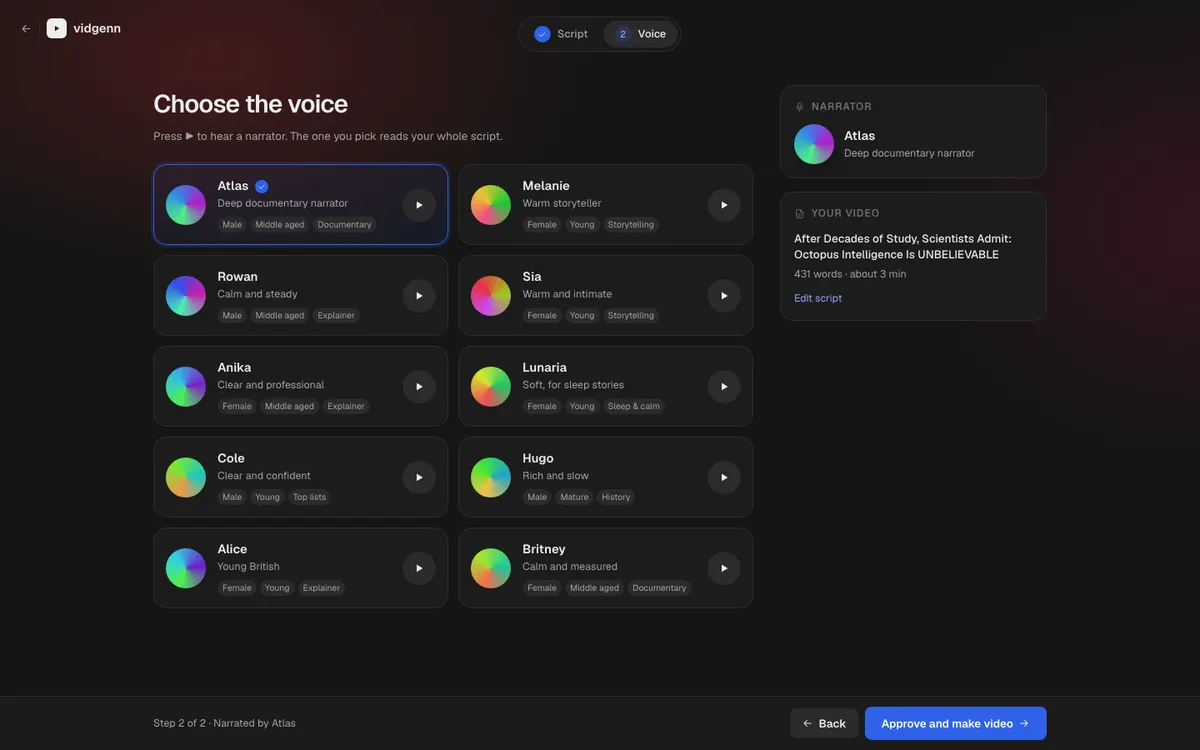
InVideo, Pictory and Fliki are general-purpose: they make many kinds of video from many kinds of input. VidGenn does one format. It writes a researched script (or reads yours word for word), narrates it with one of ten voices, places a licensed shot on every sentence and a motion graphic on every fact, and lets you swap any clip or graphic before it renders a 1080p MP4.
What VidGenn doesn't do: it makes English, horizontal videos of 3 to 20 minutes, so no Shorts and no other languages yet. It doesn't record your own voice, design thumbnails, or upload to YouTube, and there is no free plan.
Which tools to pick
| If you want… | Start with |
|---|---|
| The lowest cost and full control | Free footage libraries, DaVinci Resolve's free version, your own voice and an AI assistant's free plan |
| Natural narration without recording | A paid plan of an AI voice tool, for the commercial licence |
| To turn articles or blog posts into videos | A general-purpose generator such as Pictory or Fliki |
| To edit video by editing text | Descript |
| Faceless documentaries with archive footage and a graphic on every fact | VidGenn |
Compare costs per finished video, not per month. At monthly prices, Claude Pro ($20) and ElevenLabs Creator ($22) with a free editor and free footage cost $42 a month, and the editing is still yours. VidGenn's Creator plan is $38 for 60 minutes of finished video, about $6.33 per 10-minute video (pricing).
What no AI tool does for you
No tool can make a channel original for you. YouTube's spam policy does not allow "using automated tools or AI to churn out high volumes of similar content with minimal changes", whichever tool made them. Checking facts, choosing the angle, reviewing every clip and disclosing realistic AI depictions of real events stay your job. The YouTube automation guide shows a workflow that keeps those steps in your hands.
Common questions
What is the best AI video generator for YouTube?
It depends on the format. For turning articles or scripts into general videos, compare the general-purpose generators above. For narrated documentaries with archive footage and on-screen facts, a documentary tool such as VidGenn fits better. Try each on one real video before you commit.
Is there a free AI faceless video generator?
Fliki has a free forever plan (3 credits a month, with a watermark) and Pictory has a 14-day free trial. CapCut's desktop editor is free to download. VidGenn has no free plan. Check that a free plan's licence allows commercial use before you monetize.
Can I monetize videos made with an AI video generator?
Yes, if your channel meets the Partner Program thresholds and the videos follow YouTube's policies. YouTube judges the videos, not the tools. The monetization guide quotes the rules.
Do I need to credit stock footage from these tools?
It depends on each file's licence. Pexels and Pixabay don't require credit; CC BY and CC BY-SA files do. Listing every source in the description is the safe habit either way.