VidRush is an AI tool that turns a topic into a long faceless YouTube video: a documentary or a Top 10 list of 6 to 60 minutes. It does the research, script, narration, real footage from the web and editing for you. Is it worth $99 a month? Yes, if your videos run longer than 20 minutes, because that's the length VidRush is built for. If your videos are shorter, $99 buys about 45 minutes of video, or $2.18 a minute, and several tools charge less for the same length.
This review covers what VidRush makes, where its footage comes from, how its credits, rollover and refunds work, and who it suits. VidGenn, which publishes this guide, also makes long documentaries, so we're a competitor. We've kept this to what VidRush's own pages say, and we point out where VidRush does better. For a side-by-side view, see VidGenn vs VidRush.
How we checked: every VidRush fact below comes from VidRush's own website, pricing page, help docs and Terms of Use, read on 18 November 2026, in US dollars. We didn't buy a VidRush plan; we read its pages. Where two of its pages disagree, we say so.
Key takeaways: (1) VidRush makes 16:9 documentaries and Top 10 videos of 6 to 60 minutes, mainly in English; no Shorts. (2) Starter is $99 a month for 2,000 credits, about 45 minutes, or $2.18 a minute. (3) Unused credits roll over up to half a month's allowance, per its docs. (4) There's no free trial; its Terms allow a refund within 14 days only if no credits were used, and its docs refund technical failures, not creative results.
What does VidRush make?
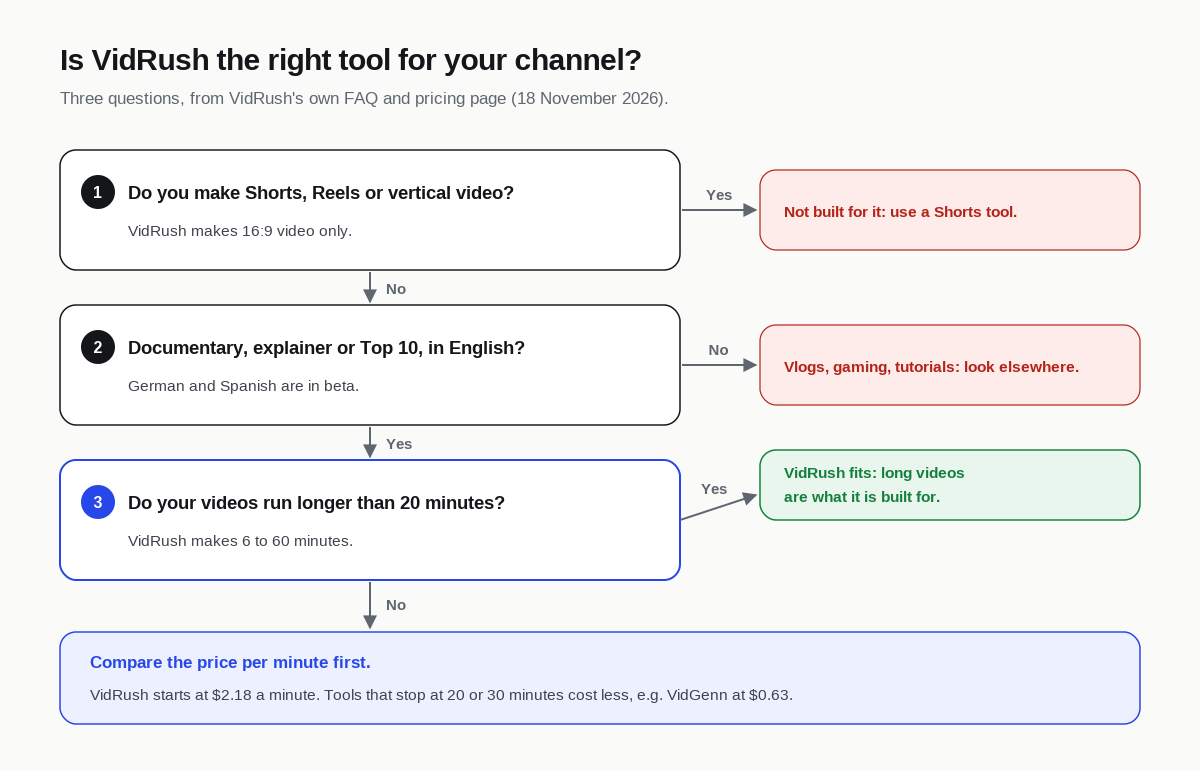
VidRush describes itself as a tool that handles "research, scripting, voiceover, footage, motion graphics, and editing" from a single brief, "publish-ready in under an hour" (VidRush). Its pricing FAQ is specific about the formats: "Documentary and Top 10 videos, 6 to 60 minutes, in English" (VidRush pricing). The home page also lists explainers and breakdowns.
It's equally clear about what it doesn't do. VidRush says it's "not built for vlogs, gaming, reactions, software tutorials", and it doesn't make vertical video for Shorts or Reels. Its help docs add that it only makes horizontal 16:9 video and that the aspect ratio can't be changed in the editor (VidRush FAQ).
Before anything is generated, VidRush shows you a plan: the script, the footage, the voice, the style and an estimated cost (it calls this a Quote Statement). After the video is made, it opens in an editor with drag-and-drop, a media library and text overlays. You can swap clips, retime cuts, fix captions or replace audio without regenerating the whole video, or ask its Rush Agent to make changes in chat.
The 6 to 60 minute range
Length is VidRush's biggest selling point. Many AI video makers stop at 10, 20 or 30 minutes. VidRush goes to 60, which suits channels whose viewers sit through long history, finance, true-crime or geopolitics deep-dives. Two caveats from its docs: the length you pick is a target, and a video can come out shorter if there isn't enough material. And its newer Deep Video V2 model (in beta) only makes 10 to 30 minute videos.
Where does VidRush's footage come from?
This is where VidRush differs from tools that generate pictures with AI models. Its FAQ says each video is matched to real footage, and: "Nothing is pulled from a template, and nothing is AI-generated footage" (VidRush pricing). The footage is found on the web, which is why VidRush says it's "strongest wherever that footage exists online": history, finance, true crime, science and geopolitics.
You choose where the clips may come from, per video:
- CC & Public Domain Only: Creative Commons and public-domain footage. VidRush's docs note that CC clips need a credit in your YouTube description.
- Commercial Stock: licensed stock footage. VidRush's docs suggest this setting if monetization is your priority.
- General Web Crawling: footage found more widely across the web.
That last setting deserves care. Footage "found on the web" can belong to someone else, and VidRush's docs say you're responsible for your topic and script. Our guide to copyright-safe documentary footage explains which sources are safe on a monetized channel.
"Not AI-generated footage" also doesn't mean nothing is generated. VidRush's cheaper Mini model is listed as an image model, and its docs advise turning on YouTube's "altered or synthetic content" label because the AI voice and some AI images are generative. YouTube asks creators to label realistic altered or synthetic content (YouTube Help). That's sensible advice for any AI documentary tool, VidGenn included.
Can you use your own script or voice?
Yes. VidRush accepts three kinds of input beyond a plain topic (VidRush FAQ):
- Paste a script of up to 60 minutes. It's read aloud word for word, so remove speaker labels and stage directions first.
- Upload your own narration as MP3, WAV, M4A or AAC, up to 300 MB and 6 to 60 minutes long.
- Clone your voice in its Voice Studio from at least 10 seconds of clear speech; VidRush says about 3 minutes works best.
One thing to know before you plan your budget: VidRush says "bringing your own voiceover doesn't lower the credit cost", because credits pay for the whole pipeline. A video with your narration costs the same as one with AI narration.
Languages and Shorts
VidRush's pricing page says its videos are made "in English". Its help docs go a little further: English, plus German and Spanish in beta, and French isn't supported. If you run a channel in another language, VidRush isn't the tool for it yet.
There are no Shorts. If you want to grow with Shorts alongside long videos, you'll need a separate tool for vertical clips. Whether long or short videos suit you better is a strategy question we cover in long-form AI video for YouTube.
VidRush plans and credits
VidRush sells credits. Every plan includes the full platform, and plans differ only in capacity: credits, team seats and how many videos can generate at once (VidRush Plans & Pricing).
| Plan | Monthly | Yearly | Credits a month | About | $/min (monthly) | Seats |
|---|---|---|---|---|---|---|
| Starter | $99 | $990 | 2,000 | 45 min | $2.18 | 0 |
| Creator | $239 | $2,390 | 6,000 | 136 min | $1.75 | 1 |
| Pro | $639 | $6,390 | 18,000 | 409 min | $1.56 | 3 |
| Scale | $1,750 | $17,500 | 50,000 | 1,136 min | $1.54 | 10 |
| Studio | $4,990 | $49,900 | 150,000 | 3,409 min | $1.46 | 15 |
The minutes are estimates because the credit cost per minute depends on the model and setting you choose. The 44 credits a minute behind the table is the top of the range, for the Pro video model at Medium. The cheaper settings stretch the same credits further:
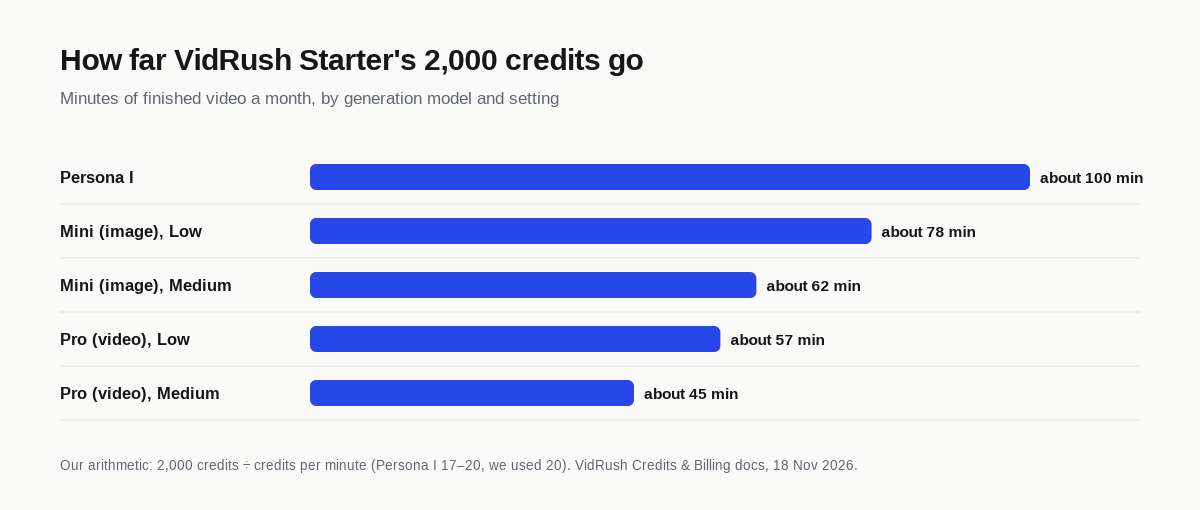
The credit rates come from VidRush's Credits & Billing docs. Mini (image) costs 25.6 or 32 credits a minute, Pro (video) 35.2 or 44, and Persona I about 17 to 20 (VidRush Credits & Billing). Re-rendering after edits costs 5 credits a minute, and the first render of each project is included. Failed generations caused by system errors aren't charged.
Worked example: one 30-minute documentary on Starter
Our arithmetic from VidRush's published numbers. One Starter credit costs $99 ÷ 2,000 = about $0.05. A 30-minute video on the Pro model at Medium uses 30 × 44 = 1,320 credits, which is about $65 of a Starter plan. The same video on Mini at Low uses 30 × 25.6 = 768 credits, about $38. So Starter covers one 30-minute Pro video a month, plus some change, or two on the Mini model.
For deeper numbers, including the cost per 10-minute video on every plan and a schedule of 2 or 3 videos a week, read our VidRush pricing breakdown.
Rollover, refunds and the trial
Rollover
VidRush's docs say unused credits roll over, up to half your monthly allowance. On Starter, up to 1,000 credits carry into the next month, so your balance never goes above 3,000. The cap doesn't stack, and rollover needs back-to-back paid months: a pause or cancellation resets it. Top-up credits are separate and don't expire at renewal, though they end if you cancel (VidRush Credits & Billing).
One inconsistency to know about: VidRush's Terms of Use (last updated 3 June 2026) say credits unused at the end of a billing cycle "do not roll over" (VidRush Terms). The pricing page and docs both describe the half-month rollover, so it's likely the Terms are older, but ask support if rollover matters to your budget.
Refunds
VidRush's Terms give you 14 days from your first confirmation email to change your mind, but only "provided you have not used any credits". After you generate anything, its refund policy covers "verified technical failures": long stretches with no footage, corrupted files, or silence where narration should be. It doesn't refund creative results, a voice you didn't like, or a few mismatched clips (VidRush refund policy).
Free trial
None. VidRush's FAQ says plainly: "VidRush doesn't offer a free trial." You can sign up, but you need a paid plan to generate a video. So the first $99 is effectively your test, and it's not refundable once you've used credits.
Strengths and weaknesses
Where VidRush does well
- Long videos: 6 to 60 minutes, longer than most AI video makers.
- Real footage, with a choice of sources, including a commercial-stock-only setting for monetized channels.
- Your own script, narration or cloned voice are all supported.
- A full editor and chat editing, so you can fix shots without regenerating.
- Rollover of up to half a month's credits, and plans that scale to 150,000 credits and 15 seats.
- Clear about its limits: its own FAQ says what it won't make.
Where it falls short
- Price: $99 to start and $2.18 a minute on Starter, falling only to about $1.46 on Studio at $4,990 a month.
- No trial, and refunds only before you use credits, or for technical failures.
- English first: German and Spanish are in beta; no French or other languages.
- No Shorts or vertical video.
- Your own voiceover doesn't lower the price.
- Web-crawled footage puts the copyright check on you if you choose that setting.
Who is VidRush best for?
VidRush suits channels whose videos run longer than 20 minutes: 30 to 60 minute history documentaries, finance explainers, true-crime cases or geopolitics breakdowns in English. If your format is long, VidRush's length and editor are worth the higher price per minute. It also suits agencies running several channels, since the bigger plans add seats and concurrent generations.
If your videos are 8 to 20 minutes long, look harder at the price. At $2.18 a minute, a channel posting four 10-minute videos a month uses roughly the whole Starter plan. Tools built for that length cost a fraction of it. Our guide to the best AI for long YouTube videos and our Top 10 video tools list the options.
A VidRush alternative for videos up to 20 minutes
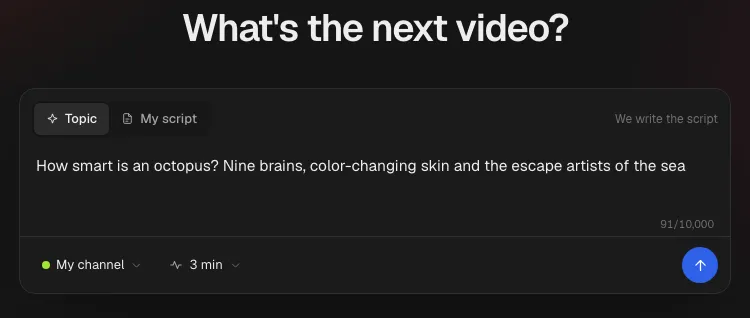
VidGenn makes the same kind of video, a faceless documentary with real footage, for videos of 3, 5, 8, 10, 15 or 20 minutes. You type a topic or paste your own script. VidGenn writes title options and a researched script you can edit line by line, and narrates it with one of 24 ElevenLabs voices. It matches every sentence with licensed real footage from NASA, Wikimedia Commons, Internet Archive, Pexels and Pixabay. It adds a motion graphic to every fact and gives you a credits file listing every source.
| VidRush | VidGenn | |
|---|---|---|
| Starts at | $99/mo for about 45 min | $19/mo for 30 min |
| Price per minute, smallest plan | $2.18 | $0.63 |
| Longest video | 60 min | 20 min |
| Footage | Real footage from the web, by source setting | Licensed real footage from public-domain and freely licensed libraries |
| Narration languages | English; German and Spanish in beta | English, Portuguese, Spanish, French, German, Italian |
| Shorts | No | No |
| Trial | None | None |
Where VidRush does better: it makes videos three times longer, it has a clone-your-voice studio and upload-your-narration option, and its bigger plans add team seats. VidGenn costs less per minute on every plan ($0.63 down to $0.30) and narrates in more languages. Neither has a trial or makes Shorts. Compare the two on VidGenn vs VidRush, or see all VidRush alternatives.
Verdict: is VidRush worth $99 a month?
For long-form channels, yes. VidRush is a serious, focused tool. It makes long English documentaries and Top 10 videos with real footage, it's honest about what it won't do, and its editor lets you fix what the AI gets wrong. If your videos run 25, 40 or 60 minutes, it's built for exactly that.
For videos of 20 minutes or less, $99 a month buys less video than you can get elsewhere. Work out how many minutes you publish each month, multiply by the price per minute, and compare. And since there's no trial, read its refund terms before your first video.
Common questions
Is VidRush legit?
VidRush publishes its prices, credit rates, refund policy and Terms of Use, and its Terms name a UK company, Vidrush Ai Studios LLP. Like any paid tool, read the refund terms first: refunds are limited once you've used credits.
How long can VidRush videos be?
6 to 60 minutes, according to its FAQ. The length is a target, so a video can come out shorter if there isn't enough material, and the Deep Video V2 beta makes 10 to 30 minute videos. See long-form AI video for YouTube for how length affects watch time.
Does VidRush use AI-generated footage?
Its FAQ says "nothing is AI-generated footage": clips come from the web, by the source setting you pick. The narration is AI unless you upload your own, and its docs mention some AI images, so it recommends YouTube's altered or synthetic content label.
Can you get a refund from VidRush?
Within 14 days of your first payment if you haven't used any credits, per its Terms. After that, only for verified technical failures such as corrupted files or missing narration, not for creative results.
What's cheaper than VidRush for long documentaries?
For videos up to 20 minutes, VidGenn costs $19 a month for 30 minutes ($0.63 a minute). Our VidRush alternatives page compares more tools, and VidRush pricing works out the cost per video.