Pictory is an AI video maker that turns a script, an article link, slides or a prompt into a narrated video with stock footage, captions and music. For YouTube in 2026, it's worth it if you already have the words and want a clean stock-footage video quickly. Plans start at $14.50 a month during its current sale (normally $29) for up to 30 minutes of video, and there's a 14-day trial. It's a weaker fit if you want the tool to research and write the video for you, or if you make documentaries where every shot must show the real subject.
This review covers how Pictory builds a video, where its footage and voices come from, every plan and limit, the sale price against the normal price, and the trial. Then it lists where Pictory does well, where it falls short, and when an alternative makes more sense. VidGenn, which publishes this guide, makes documentary videos and is one of those alternatives, so we say where Pictory does better too. For a side-by-side table, see VidGenn vs Pictory.
How we checked: every Pictory price, limit and feature below comes from Pictory's own pricing page, product pages, help center and developer docs, read on 18 November 2026, in US dollars. We didn't buy a Pictory plan; we read its pages. Where Pictory doesn't publish a number, we say so instead of guessing.
Key takeaways: (1) Pictory's Starter plan is $14.50 a month on sale, normally $29, for 2,000 credits, which Pictory says is up to 30 minutes of video. (2) A video made from a script or URL can be up to 30 minutes long on every paid plan, in 1080p. (3) Stock comes from Getty and Storyblocks, and voices from ElevenLabs; AI clips cost extra credits, 10 to 40 credits a second. (4) The 14-day trial gives 300 credits, 3 projects, 5-minute videos at 720p with a watermark; paid plans have no refunds.
What does Pictory do?
Pictory's core job is turning text you already have into video. Its home page lists the inputs: "text, prompts, scripts, articles, and blog posts", web page URLs, PowerPoint files, documents, PDFs, audio recordings and images. It also has a text-based editor, where editing the transcript cuts the video. It also offers captions, translation, AI avatars, voice cloning and an "AI Studio" for generating images and short video clips (Pictory).
For a YouTube channel, three of these matter most:
- Script to video: paste a script and Pictory, in its words, "gives every line a scene, a visual, a voice and captions" (Pictory script to video). This is the main reason creators buy it.
- URL or article to video: paste a blog post link and Pictory summarizes it into scenes. Useful if you run a blog and want a video version of each post.
- Slides to video: upload a PowerPoint and get a narrated video. Better for training and courses than for a YouTube channel.
Pictory makes 16:9, 9:16 and 1:1 videos, so one script can become a YouTube video and a vertical Short. Its pages don't describe publishing to YouTube for you, so plan to download the MP4 and upload it yourself. If you're new to this kind of tool, our guide to script to video AI explains the general workflow.
How does Pictory split a script into scenes?
Scenes are the heart of a Pictory video. Pictory creates "a scene for every sentence or line break" in your text. Then it picks a visual for each scene "matched from 18M+ stock clips and images, including Getty Images" (Pictory script to video). Its developer docs show the two switches behind this: a new scene at each line break, a new scene at the end of each sentence, or both (Pictory docs).
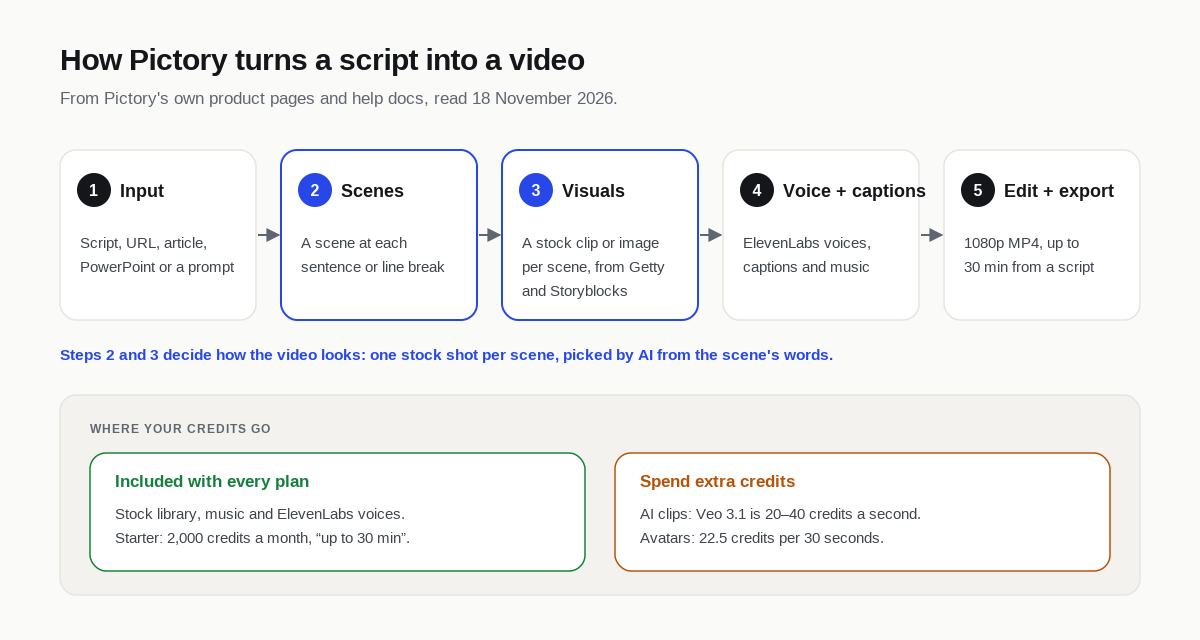
What this means in practice: how you write the script decides how the video looks. Short sentences give quick cuts. A long sentence gives one shot that stays on screen for its whole length. If a visual doesn't fit, you can swap it for another stock clip, upload your own, or generate one in AI Studio. You can also split a scene by hand at any word.
Stock libraries are strongest on general ideas, such as "a busy city at night" or "a team in a meeting". They hold far less footage of specific events. A sentence about the Battle of Britain may get a generic plane or war clip, not footage of that battle. For documentary topics, plan to replace a share of the shots yourself.
Stock footage, music and voices
Pictory licenses its media, so you don't pay extra royalties for the visuals or music it includes. Its pricing page says "no additional royalties are required" (Pictory pricing). What each plan gets:
| Starter | Professional | Teams | |
|---|---|---|---|
| Stock video library | Getty and Storyblocks, 5 million+ videos | Getty and Storyblocks, 18 million+ videos | Getty and Storyblocks |
| Music tracks | 5,000 | 15,000 | 15,000 |
| AI voices | ElevenLabs voices | 3x more ElevenLabs voices, voice clones | As Professional |
| Languages | 7 | 29 | 29 |
| Brand kits | 1 | 5 | 10 |
Voices are a real strength. ElevenLabs is the voice engine many faceless channels already pay for separately, and Pictory includes it. Its script-to-video page lists "170+ AI voices in 29+ languages" and voice cloning from a short recording. You can also upload your own voiceover and Pictory syncs the scenes to it.
The catch is the footage. Getty and Storyblocks are high-quality commercial libraries, but they hold stock: lifestyle shots, landscapes, business scenes. They don't hold much archive footage of real events, real places in history or real scientific missions. If your channel covers those topics, our guide to copyright-safe documentary footage shows where that footage lives.
Pictory pricing in 2026: the sale price vs the normal price
When we checked, Pictory's pricing page showed a "Black Friday Offer" with a banner reading "50% Off ALL Plans Today". It doesn't say when the offer ends. Two days earlier, on 16 November, the same $14.50 Starter price was already shown as a sale price. Here is what you pay now and what each plan normally costs:
| Plan | Sale, billed monthly | Sale, billed yearly | Normal price | Credits | Video a month |
|---|---|---|---|---|---|
| Starter | $14.50/mo | $12.50/mo | $29/mo | 2,000 a month | Up to 30 min |
| Professional | $29.50/mo | $17.50/mo | $59/mo | 6,000 a month | Up to 90 min |
| Teams (3 users) | $99.50/mo | $59.50/mo | $199/mo | 18,000 a month | Up to 300 min |
| Enterprise | Custom | Custom | Custom | Custom | Custom |
Yearly plans get all their credits up front: 24,000 on Starter, which Pictory says is up to 360 minutes a year. Unused credits roll over to the next billing cycle, according to Pictory's help center (Pictory AI credits). That's more generous than many tools, which reset credits every month.
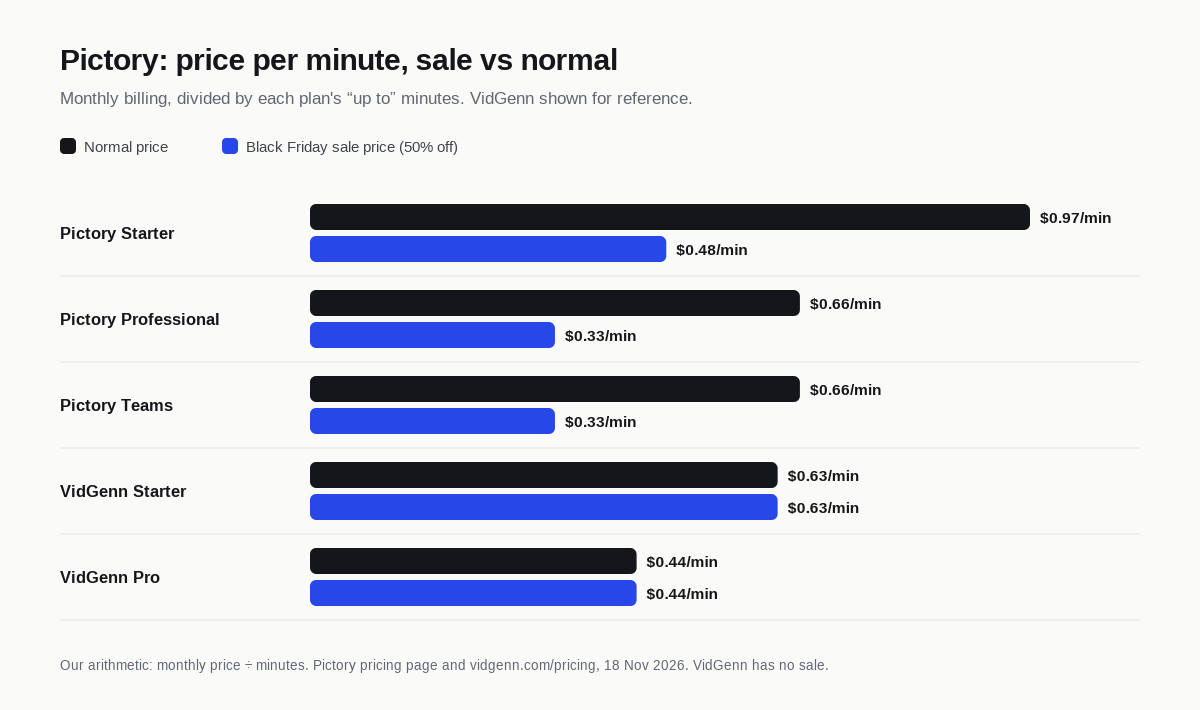
Worked example: what a 10-minute YouTube video costs on Pictory
Our arithmetic, from Pictory's own numbers. Price per minute = monthly price ÷ minutes a month. On Starter at the sale price, that's $14.50 ÷ 30 = $0.48 a minute, so a 10-minute video costs about $4.83. At the normal $29 it's $29 ÷ 30 = $0.97 a minute, or $9.67 per 10-minute video. On Professional at the normal $59 for 90 minutes, it's $0.66 a minute, or $6.56 per 10 minutes.
Two things can change that number. First, the minutes are "up to". Second, AI-generated clips spend credits fast: Pictory charges 20 credits a second for Veo 3.1 at 1080p without audio and 40 with audio (Pictory AI credits). Ten seconds of Veo 3.1 with audio is 10 × 40 = 400 credits, a fifth of Starter's 2,000 monthly credits. Use a few AI shots and your 30 minutes shrinks.
Before you buy at the sale price, check what the renewal price will be. A yearly plan bought on sale locks in the discounted year; a monthly plan may renew at a different price once the offer ends. Pictory's pricing page states: "We don't currently offer refunds on paid subscriptions." You can cancel any time, and you keep the videos you've downloaded.
Plan limits and video length
- Longest video from a script or URL: 30 minutes on Starter, Professional and Teams. That's long enough for most YouTube videos.
- Longest video in the editor: 60 minutes on Starter and 180 minutes on Professional and Teams, for editing your own recordings.
- Resolution: 1080p on paid plans, 720p on the trial.
- Number of videos: unlimited on paid plans; the credit balance is the real limit.
- Storage: 5 GB on Starter, 20 GB on Professional, 100 GB on Teams. Projects are deleted when you cancel, so download your videos first.
- Watermark: none on paid plans; the trial adds a Pictory watermark.
Is there a Pictory free trial?
Yes. Pictory has no free plan, but it has a 14-day trial with no card required. The trial gives 300 credits, which Pictory says is up to 10 minutes of video. You can create 3 video projects, each up to 5 minutes from a script or URL, at 720p, with a Pictory watermark and 500 MB of storage (Pictory pricing). ElevenLabs voices and the Getty and Storyblocks libraries are included in the trial.
That's enough to judge the scene matching on your own topic. Test with a real script from your niche, not a generic one: the way Pictory handles your specific subjects tells you more than any review can.
Pictory's strengths and weaknesses
Where Pictory does well
- Many ways in: script, URL, slides, documents, audio and images, all in one tool.
- Licensed commercial stock from Getty and Storyblocks, with no extra royalties.
- ElevenLabs voices included, plus voice cloning on Professional and up.
- A real trial of 14 days, and credits that roll over on paid plans.
- Low price during the sale: $0.48 a minute on Starter, $0.33 on Professional.
- Several formats: 16:9 for YouTube, 9:16 for Shorts, 1:1 for social posts.
Where Pictory falls short for YouTube
- You bring the words. Pictory is built to turn existing text into video. It can draft from a prompt, but it isn't built around researching and writing a long YouTube script.
- Stock looks like stock. One generic shot per sentence suits explainers and marketing. Documentary viewers notice when the footage doesn't show the real subject.
- Minutes are "up to", and AI clips or avatars use extra credits.
- No refunds on paid subscriptions.
- The price is a sale price. At the normal $29, Starter costs $0.97 a minute.
One more point for monetized channels. YouTube doesn't pay for "inauthentic content": mass-produced or templated videos with little variation (YouTube monetization policies). A script you wrote yourself, read over stock footage, is fine. A channel of near-identical article-to-video uploads is the kind of thing that policy describes. That applies to every tool, not just Pictory. Our guide to getting monetized on YouTube covers the rules.
Who should use Pictory?
- Bloggers and marketers who want a video version of each article: the URL-to-video flow is made for this.
- Course and training creators turning slides into narrated lessons.
- YouTube creators who write their own scripts and are happy with stock footage: explainers, motivation, business and self-improvement channels.
- Teams who need brand kits, shared assets and several users.
It's less suited to history, science, nature and true-crime documentaries, where the footage should show the real thing. It also suits you less if you want the tool to research the topic and write the script.
When to pick a Pictory alternative
Look at an alternative if one of these is true. You want the script researched and written from just a topic. You make documentaries and want real archive footage instead of generic stock. Or you want to know exactly what a minute of video costs, without "up to".
VidGenn is built for that case. You type a topic or paste your own script, which is read word for word. Pick a length of 3, 5, 8, 10, 15 or 20 minutes, and you get a finished faceless documentary in 1080p. It writes title options and a researched script you can edit line by line before anything is rendered. Every sentence gets licensed real footage from public-domain and freely licensed libraries such as NASA, Wikimedia Commons, Internet Archive, Pexels and Pixabay, not AI-generated clips, and a credits file lists every source.
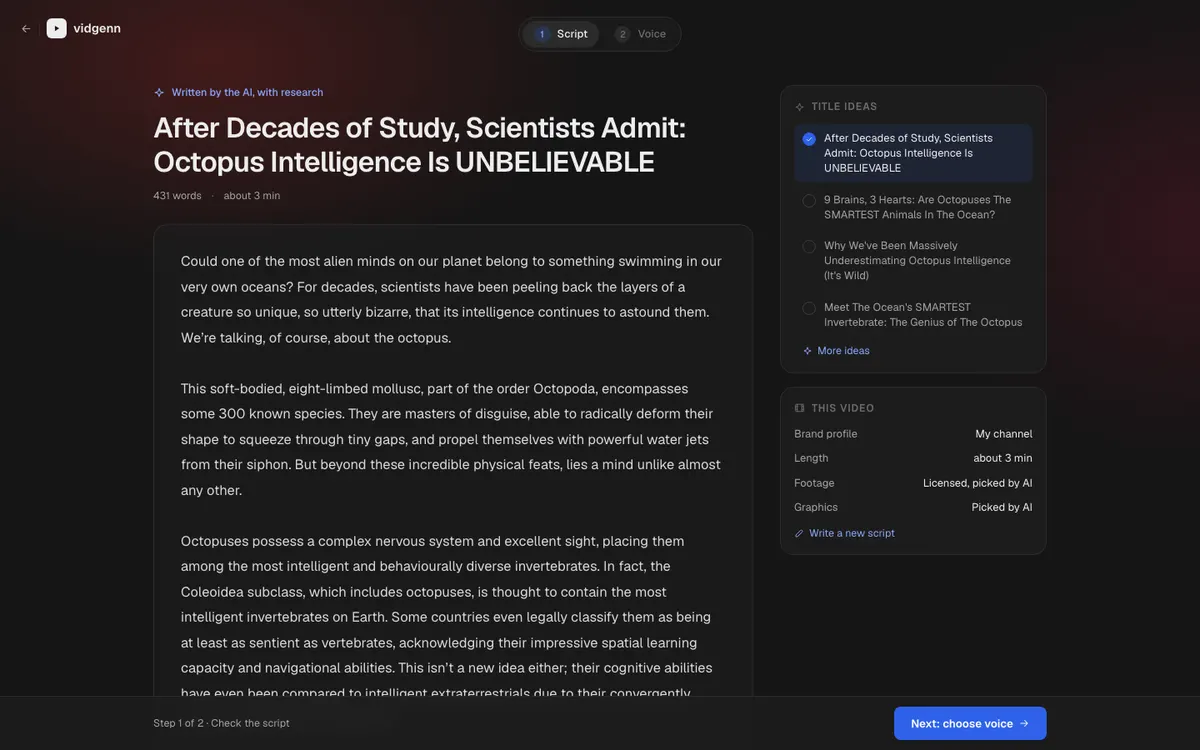
Each fact gets a motion graphic (counters, maps, timelines, checklists, from 184+ designs), and there are 24 ElevenLabs narrator voices. Plans are $19 for 30 minutes ($0.63 a minute), $38 for 60, $79 for 180 ($0.44) and $149 for 500 ($0.30). Minutes are the length of the finished video, and edits and re-renders don't use minutes.
Where Pictory does better, plainly. It has a 14-day trial, and VidGenn has no free plan or trial. It's cheaper per minute on Starter while the sale lasts. It makes videos up to 30 minutes (VidGenn stops at 20) and it makes Shorts, which VidGenn doesn't. And it supports 29 languages, while VidGenn narrates in six: English, Portuguese, Spanish, French, German and Italian.
| Pictory | VidGenn | |
|---|---|---|
| Starts at | $14.50/mo on sale ($29 normally) | $19/mo |
| Video a month on that plan | Up to 30 min | 30 min |
| Writes the script from a topic | From a prompt; built for your own text | Yes, researched and editable |
| Footage | Getty and Storyblocks stock, AI clips | Real footage from NASA, Wikimedia, Internet Archive, Pexels, Pixabay |
| Longest video | 30 min from a script | 20 min |
| Shorts | Yes (9:16) | No |
| Trial | 14 days, 3 projects, 720p | None |
For more options, see our list of Pictory alternatives and the full VidGenn vs Pictory comparison. If you're weighing Pictory against InVideo, read Pictory vs InVideo, our InVideo AI review, and the VidGenn vs InVideo and InVideo alternatives pages.
Verdict: is Pictory worth it in 2026?
Yes, for the right channel. If you write your own scripts or already have articles, and stock footage suits your topic, Pictory is a polished tool with good voices, licensed media and a fair trial. At the sale price it's one of the cheapest ways to get a 1080p narrated video per minute. Just plan around the normal price, since that's what a monthly plan may renew at.
If you make documentaries, or you want the tool to do the research and writing, Pictory leaves the hardest parts to you. That's when a documentary maker such as VidGenn, or another tool from our list of the best AI faceless video generators, is the better buy.
Common questions
Is Pictory AI good for YouTube?
It's good for YouTube explainers and list videos made from your own script, with stock footage. It makes 16:9 videos up to 30 minutes in 1080p. It's weaker for documentaries that need real archive footage. See how to make faceless YouTube videos with AI for the full workflow.
How much does Pictory cost?
On 18 November 2026, Starter was $14.50 a month billed monthly during a "Black Friday Offer", normally $29. Professional was $29.50 (normally $59) and Teams $99.50 (normally $199). Yearly billing on sale was $12.50, $17.50 and $59.50 a month.
Does Pictory have a free plan?
No. It has a 14-day trial with 300 credits, 3 video projects of up to 5 minutes, 720p and a watermark, with no card required.
Can Pictory videos be monetized on YouTube?
Pictory licenses its stock and music, so the media isn't the problem. What YouTube checks is whether the channel is original and not mass-produced. A video built on your own script and narration can qualify. Read can you monetize AI documentaries on YouTube for details.
What is the best Pictory alternative for documentaries?
For long faceless documentaries with real footage and a researched script, VidGenn is built for that job, from $19 a month for 30 minutes. Compare it on the VidGenn vs Pictory page, or browse all Pictory alternatives.