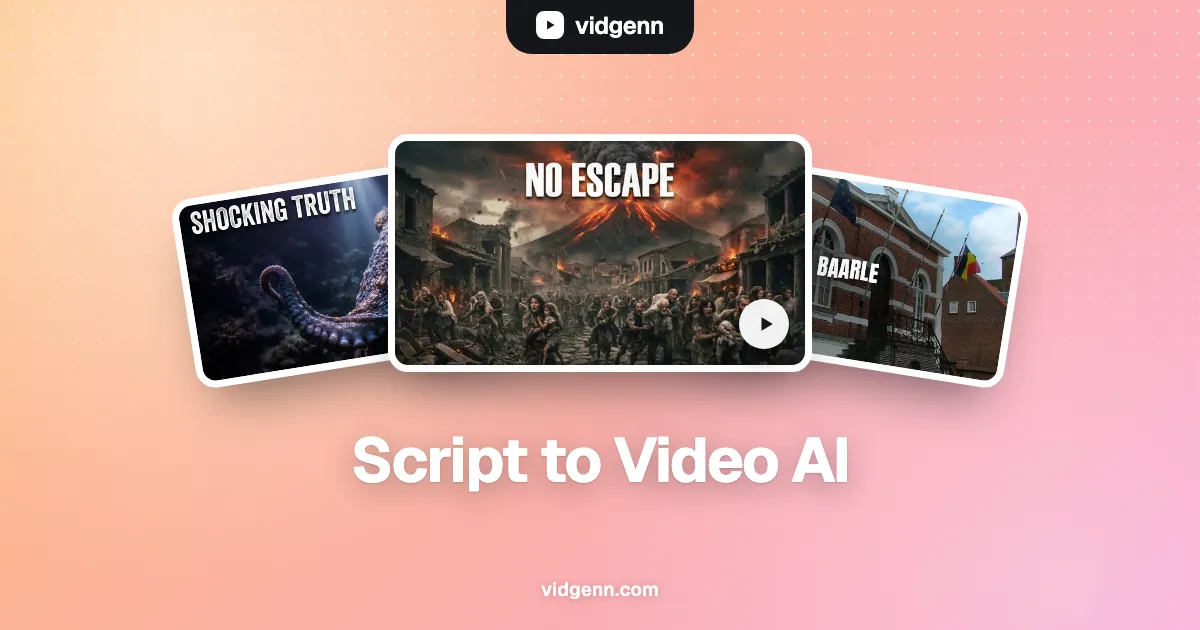
Script to video AI turns a written script into a finished video. You paste the script; the tool splits it into scenes, records an AI voiceover, finds or generates a visual for each scene, adds captions, graphics and music, and renders an MP4. Most tools do it in minutes. The difference between a good result and a slideshow comes down to two steps: how the tool splits your script into scenes, and where its visuals come from.
This guide shows how the process works, how to write and format a script so the AI makes good choices, and how 10 script to video generators compare on length, visuals, voices and price, including the free ones. VidGenn, which publishes this guide, is one of them; we say where others do better.
Key takeaways: (1) Every tool runs the same six steps; scene splitting and visual sourcing are where they differ. (2) Paste only the words to be spoken: headings, "NARRATOR:" and stage directions get read aloud or confuse the scene split. (3) One sentence, one picture: write sentences you could illustrate. (4) For long YouTube videos with real footage, use a documentary tool; for presenters, an avatar tool; for social clips, a short-form tool.
How script to video AI works
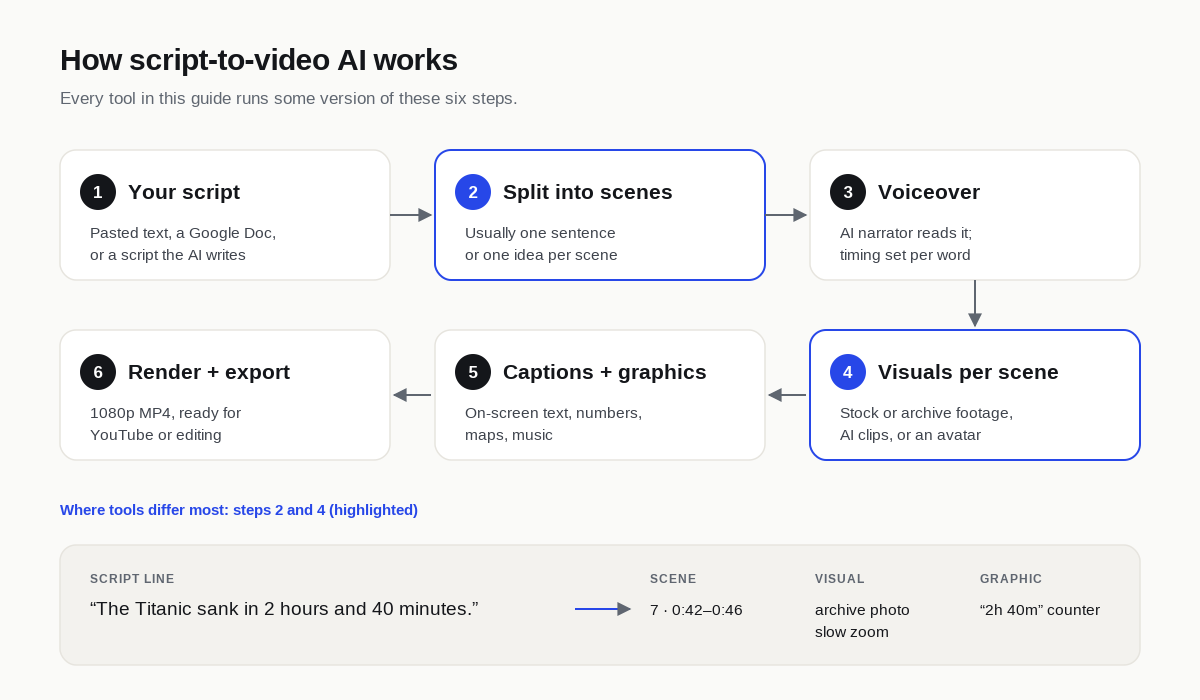
- Script in. You paste a finished script, upload a document, or let the tool write one from a topic.
- Scene split. The tool cuts the script into scenes. Simple tools cut at every sentence or line break; better ones group sentences that share one idea, so a scene lasts as long as the thought.
- Voiceover. An AI voice reads the script. The tool records when each word is spoken, which later times the cuts and captions.
- Visuals per scene. This is the biggest difference between tools: stock footage, archive footage, AI-generated clips, still images with a zoom, or a talking avatar.
- Captions, graphics, music. On-screen text, numbers, maps and a music bed.
- Render. A finished MP4, usually 1080p, that you can upload or edit further.
How to format a script for AI video
Most bad AI videos start with a script formatted for a human editor. The AI reads literally. Six rules fix most problems:
- Paste only what will be spoken. Remove headings, scene numbers, "NARRATOR:", "[B-roll of ocean]" and timestamps. Many tools read every word aloud.
- One sentence, one picture. Each sentence should describe something that can be shown. "In 79 AD, Vesuvius buried Pompeii" is easy to illustrate; "this was significant for many reasons" is not.
- Name things. "The Titanic", "Mauna Kea", "Marie Curie" give the footage search something to find. "It" and "this" give it nothing.
- Write numbers the way you'd say them, and keep them. Numbers become graphics in good tools; "2 hours and 40 minutes" makes a better counter than "a short time".
- Use paragraphs for topic changes. Several tools treat a line break as a new scene. Keep one idea per paragraph.
- Check the length. Narration runs at about 140 to 160 words a minute, so a 10-minute video needs roughly 1,400 to 1,600 words.
| Written for a human editor | Written for script to video AI |
|---|---|
| SCENE 3 – NARRATOR (V.O.): [drone shot of coast] The island is remote. | Tristan da Cunha is the most remote inhabited island on Earth. |
| As we can see here, this was a big deal. | The eruption forced all 264 islanders to leave in 1961. |
| Various animals live there. | Rockhopper penguins nest on its cliffs every spring. |
Worked example: one paragraph, three scenes
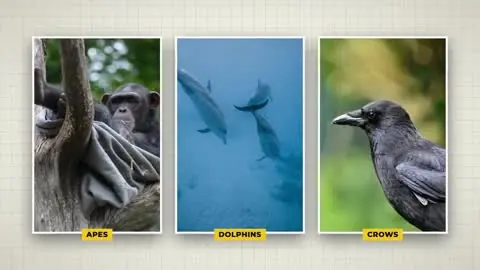
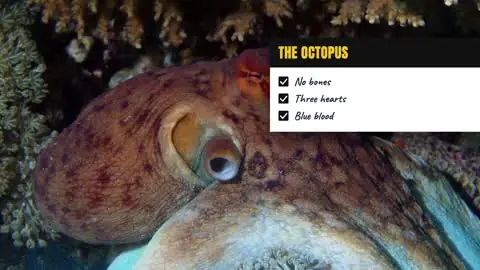
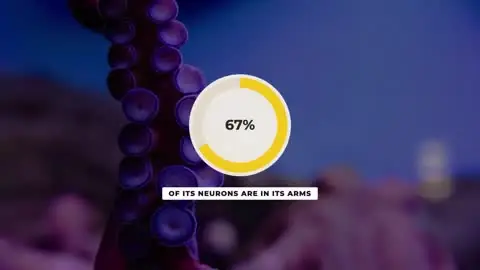
Here's a paragraph from the octopus script VidGenn uses as its example: "Most people think intelligence belongs to animals like us: apes, dolphins, crows. But one of the smartest animals on Earth has no bones, three hearts and blue blood." It became three scenes. The list of animals became three photo cards (apes, dolphins, crows). The octopus close-up came next. The phrase "no bones, three hearts and blue blood" became a checklist graphic over that close-up. Each named thing gave the footage search something concrete to find.
Writing the script from scratch? Our guide on how to write a documentary script for YouTube covers the hook, structure and pacing.
Script to video generators compared
We looked at ten tools that accept a finished script. Prices are each vendor's own, read on 16 November 2026, billed monthly unless noted.
| Tool | Best for | Visuals | Longest video | Free option | Paid from |
|---|---|---|---|---|---|
| VidGenn | Faceless YouTube documentaries | Licensed real footage + a motion graphic per fact | 20 min | No | $19/mo (30 min) |
| Pictory | Turning articles and scripts into stock videos | Stock (Storyblocks, Getty) | 30 min | 14-day trial | $14.50/mo on sale (normally $29) |
| InVideo AI | General videos with stock and AI clips | Stock + generative clips | Not shown | No | $9/mo |
| Fliki | Voiceover videos in many languages | Stock + AI clips on paid | 15 min (Standard) | Yes, 5 min, watermark | Not shown |
| Lumen5 | Blog to social video | Licensed stock | 10 min | Yes, 2 min, branded | $19/mo yearly |
| Kapwing | Editing plus AI clips | AI clips + stock | Not shown | Yes, 4 min, watermark | $16/mo |
| HeyGen | A talking AI presenter | Avatars + AI clips | 30 min (Creator) | Yes, 1 min, watermark | $29/mo |
| Synthesia | Training and corporate video | Avatars | Not shown | Yes, 10 min/mo, watermark | $19/mo |
| VidRush | Very long documentaries | Footage from the web, no AI clips | 60 min | No | $99/mo (45 min) |
| Subscribr | Script writing, then video | 14 visual styles | 3 hours | Ideas only | $99/mo (66 min) |
Two tools often suggested for this, Vid.AI and StoryShort, describe writing the script for you from an idea; neither vendor page says you can paste your own finished script, so we left them out. And Canva's "script to video" is a HeyGen app running inside Canva, not a Canva feature.
1. VidGenn: best for long faceless YouTube documentaries
VidGenn makes 3 to 20 minute documentaries from either a topic or your own script, read word for word. It splits the script by meaning rather than by line and narrates it with one of 24 voices. It finds licensed real footage for every sentence (NASA, Wikimedia Commons, the Internet Archive, Pexels and Pixabay) and adds a motion graphic to each fact: a counter for a number, a map for a place, a checklist for a list. You get a 1080p MP4 and a credits file listing every source for your YouTube description.
- Good: real footage instead of AI clips, a graphic on every fact, the lowest price per minute of the documentary tools we compare, and a credits file. Narration in English, Portuguese, Spanish, French, German or Italian.
- Watch out: no free plan or trial, videos stop at 20 minutes, and it's built for documentary-style videos, not presenters or talking heads.
- Price: $19 a month for 30 minutes, $38 for 60 and $79 for 180 (plans).
2. Pictory: best for turning articles into videos
Pictory turns a script, a URL or slides into a video with stock footage from Storyblocks and Getty, and ElevenLabs or standard AI voices. Its scene split is the most transparent of the group: it cuts at the end of each sentence and/or at line breaks, and you can switch either rule on or off, or split scenes by hand (Pictory help). Videos go up to 30 minutes on paid plans. The 14-day trial gives 3 videos of up to 5 minutes at 720p with Pictory branding. Starter was on sale at $14.50 a month when we checked (Pictory pricing).
3. InVideo AI: best all-rounder for short and medium videos
InVideo AI takes a finished script if you choose "Use my script", or if you start the prompt with "Create a video using exactly this script:" (InVideo docs). It mixes stock footage with generative clips paid for with credits. There's no free plan; Basic is $9 a month with 190 credits (InVideo pricing). Good for marketing and social videos; check how many generated clips your credits cover before planning long videos.
4. Fliki: best for multilingual voiceover videos
Fliki is built around voice: thousands of voices in many languages, with cloning on paid plans. It accepts scripts "from a 60-second short to a 15-minute long-form piece" (Fliki) and splits scenes by sentence rhythm and topic shifts. Visuals are stock, plus AI clips on paid plans. The free plan exports up to 5 minutes at 720p with a watermark and no commercial license. Fliki's own page didn't show its paid prices when we checked (Fliki pricing).
5–6. Lumen5 and Kapwing: free options for short videos
Lumen5 starts from a link, script or document and builds a video from licensed stock. Free: 5 videos a month, 2 minutes each, 720p, with a Lumen5 outro; paid plans reach 10 minutes, from $19 a month billed yearly (Lumen5 pricing). Kapwing starts from a script, article or PDF and mixes AI clips with B-roll, inside a full editor. Free exports run to 4 minutes at 720p with a watermark; Pro is $16 a month (Kapwing pricing). For more free tools, see the best free text-to-video AI.
7–8. HeyGen and Synthesia: best when you want a presenter
If your script needs a face, an avatar tool reads it on camera. HeyGen makes videos up to 30 minutes on Creator ($29 a month), with 1,000+ voices; free is 3 one-minute watermarked videos a month (HeyGen pricing). Synthesia builds a video slide by slide with an avatar presenter in 140+ languages; free is 10 minutes a month with a watermark, Starter is $19 a month (Synthesia pricing). Both suit training and product videos better than documentaries.
9–10. VidRush and Subscribr: for very long videos
VidRush accepts a finished script of up to 60 minutes, or your own narration audio, and builds a long documentary or Top 10 from footage it sources online; it says none of its footage is AI-generated. It's English only, not built for Shorts, and starts at $99 a month for 45 minutes (VidRush pricing). Subscribr is a script-writing tool first (a research and writing pipeline that matches your voice), with video generation from the $99 Growth plan (66 minutes, videos up to 3 hours); its free plan gives video ideas only (Subscribr pricing).
Turn a script into a video, step by step
Here's the whole process in VidGenn. The steps are similar in most tools.
- Clean the script. Apply the six formatting rules above: spoken words only, one picture per sentence, names instead of "it".
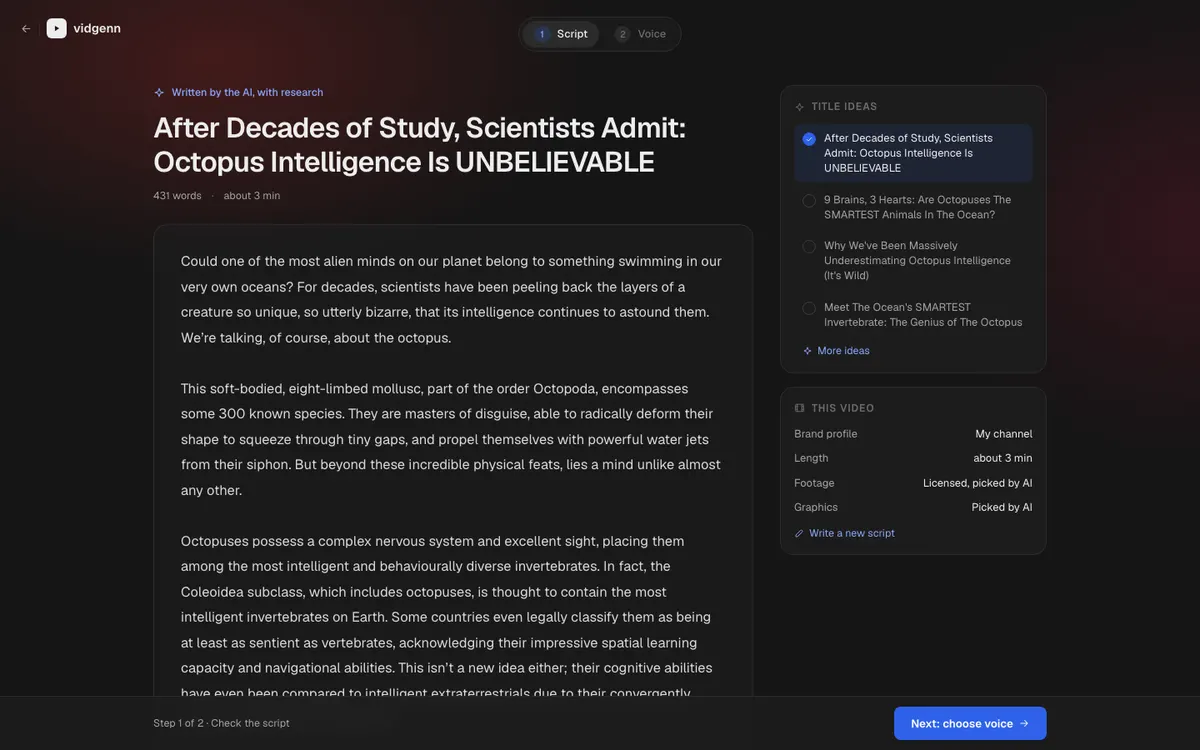
- Paste it and pick a length. In the studio, paste the script into the brief box. VidGenn reads it word for word; with a topic instead, it writes the script for you to edit.
- Check the title and script. Every line is editable. Fix anything the narrator might mispronounce (spell names the way they sound if needed).
- Choose a voice. Pick a narrator close to your channel's tone; most channels keep one voice for every video.
- Let it build the scenes. VidGenn plans the scenes, records the narration, times every word and finds footage for every sentence.
- Review in the editor. Swap any shot, change a graphic, then render. Edits and re-renders don't use minutes.
- Upload with credits. Paste the credits file into your YouTube description.
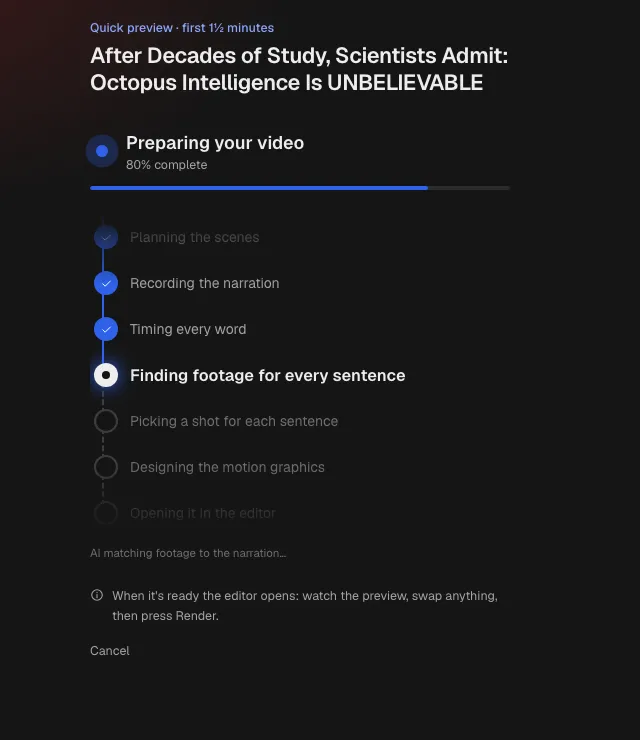
Paste your script into VidGenn
Which script to video tool should you use?
| If you want… | Use |
|---|---|
| A long faceless YouTube documentary with real footage | VidGenn (up to 20 min) or VidRush (up to 60 min) |
| To turn blog posts into videos | Pictory or Lumen5 |
| A presenter reading your script | HeyGen or Synthesia |
| Many languages and voices | Fliki |
| To spend nothing | Fliki, Lumen5 or Kapwing free plans (short, watermarked) |
| Help writing the script first | Subscribr, or VidGenn's topic mode |
Common questions
Is there a free script to video AI?
Yes, with limits. Fliki (5 minutes a month), Lumen5 (five 2-minute videos a month) and Kapwing (4-minute exports) have free plans, all at 720p with a watermark or branding. Pictory has a 14-day trial. Free plans often exclude commercial use, which includes a monetized YouTube channel.
Can AI turn a script into a long YouTube video?
Yes. Documentary tools handle long scripts: VidGenn up to 20 minutes, Pictory up to 30, VidRush up to 60 and Subscribr up to 3 hours. A 10-minute video needs a script of about 1,400 to 1,600 words.
How should I format my script for AI video?
Paste only the words to be spoken, with no headings, speaker names or stage directions. Write one illustratable idea per sentence, name people and places instead of saying "it", and start a new paragraph when the topic changes.
Will YouTube monetize a video made with script to video AI?
It can. YouTube refuses mass-produced and reused content, not AI tools. A video built from your own script, with licensed footage and real variety between videos, can be monetized. See how to get monetized on YouTube.
What's the difference between script to video and text to video?
Script to video takes a long script and builds a full narrated video from footage. "Text to video" often means a generative model that turns a short prompt into a few seconds of AI footage. Our free text-to-video guide explains both.