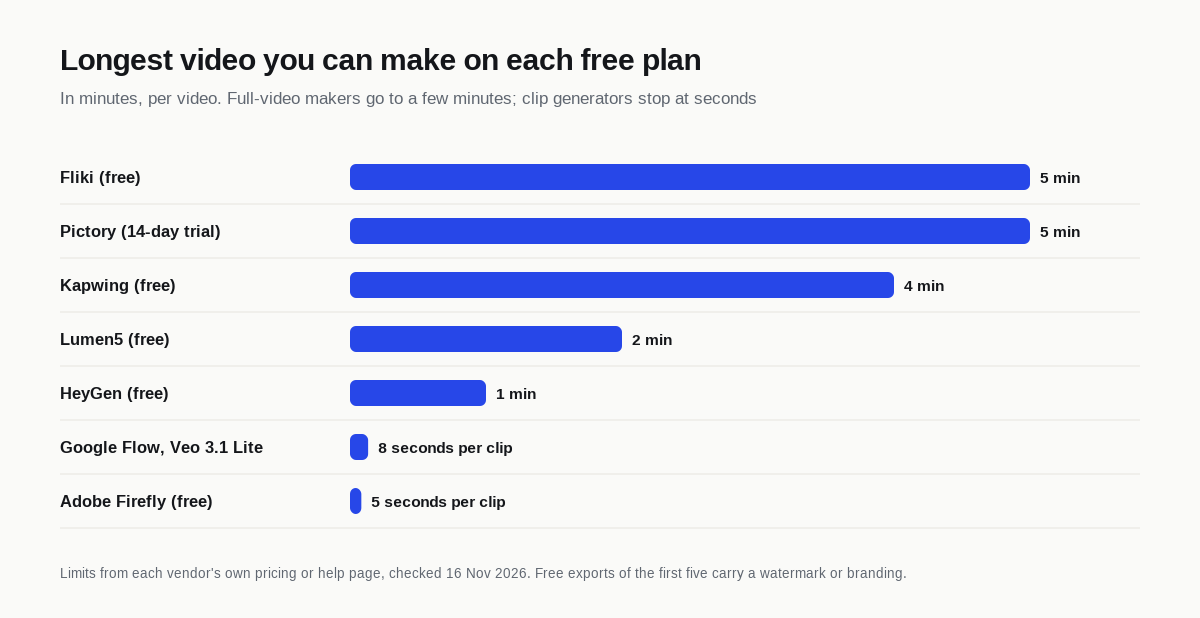
The best free text-to-video AI in 2026 depends on what you mean by "video". For short AI-generated clips, Google Flow gives the most for free: 50 credits a day, enough for about five 8-second Veo clips. For a full narrated video from text, Fliki (5 minutes a month), Kapwing (4-minute exports) and Lumen5 (five 2-minute videos a month) have real free plans. And Clipchamp is the only free tool here that exports without a watermark, though it is an editor rather than a generator.
"Free" has also shrunk a lot this year. Luma and InVideo AI no longer list a free plan, Pika's free plan includes 0 credits, and OpenAI discontinued its Sora app in 2026. Below is what each tool gives you for free today, what the catch is (watermarks, length caps, no commercial use), and how to make a full YouTube video for free by combining two of them.
How we checked: every free allowance, length limit and price comes from the vendor's own pricing or help page, read on 16 November 2026, in US dollars. Where a vendor's page didn't show a number, we say so instead of guessing. VidGenn, which publishes this guide, makes faceless documentary videos and has no free plan, so it isn't ranked here; it appears at the end as the paid option for longer videos.
Key takeaways: (1) There are two kinds of text-to-video AI: clip generators (seconds of AI footage) and video makers (a narrated video from a script). (2) Best free clips: Google Flow. Best free full videos: Fliki, Kapwing, Lumen5. (3) Almost every free plan watermarks its videos and caps them at 1 to 5 minutes. (4) Several free plans don't allow commercial use, which includes a monetized YouTube channel: read the terms before you publish.
Two kinds of text-to-video AI
Search for "text to video AI" and you get two different products under one name. Knowing which one you need saves hours:
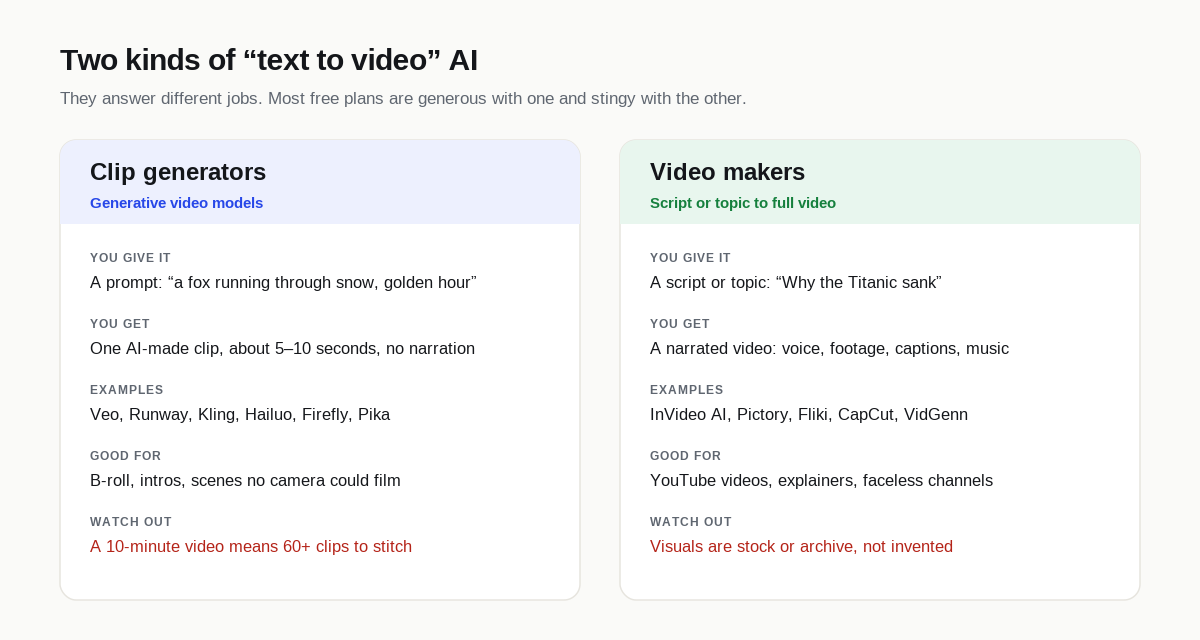
- Clip generators (generative video models) turn a prompt into a few seconds of brand-new AI footage. They're spectacular for a shot no camera could film, but a 10-minute YouTube video would need 60 or more clips, a voiceover and an edit.
- Video makers turn a script or a topic into a whole narrated video: they split the text into scenes, add an AI voice, pick stock footage or images for each scene, and add captions and music. This is what most people searching "free AI video generator from text" for YouTube actually need.
Free plans compared
| Tool | Kind | What's free | Watermark on free | Commercial use on free | Paid from |
|---|---|---|---|---|---|
| Google Flow (Veo) | Clips | 50 credits a day (≈5 Veo 3.1 Lite clips of 4–8 s, 720p) | Not stated | Not stated | $4.99/mo (Google AI Plus) |
| Adobe Firefly | Clips | Limited daily generations, 5 s video | Not stated | Yes, for Firefly-model output | $9.99/mo |
| Runway | Clips | 125 credits once (≈10 s of Gen-4.5) | Yes | Not stated | $12/mo, billed yearly |
| Kling AI | Clips | Daily free credits (amount not shown) | Yes | Not stated | Not shown |
| Hailuo (MiniMax) | Clips | Free plan with a queue | Yes | No (paid plans only) | $14.99/mo |
| Fliki | Video maker | 5 min of video a month, 720p, videos up to 5 min | Yes | No (subscriptions only) | Not shown on page |
| Kapwing | Editor + AI | 10 credits, exports up to 4 min, 720p | Yes | Not stated | $16/mo |
| Lumen5 | Video maker | 5 videos a month, up to 2 min, 720p | Branded outro | Not stated | $19/mo, billed yearly |
| HeyGen | Avatar video | 3 videos a month, up to 1 min | Yes | Not stated | $29/mo |
| Synthesia | Avatar video | 10 min a month (share by link) | Yes | Not stated | $19/mo |
| Pictory | Video maker | 14-day trial: 3 videos up to 5 min, 720p | Yes | Not stated | $14.50/mo (sale; normally $29) |
| CapCut | Clips + video maker | 7-day free trial of the AI video generator | Not stated | Not stated | Not shown |
| Clipchamp | Editor | Unlimited 1080p exports, AI voiceover, captions | No | Not stated | Microsoft 365 |
No free plan any more: InVideo AI (from $9 a month) and Luma Dream Machine (from $30 a month). Pika still has a free plan, but it comes with 0 credits and no commercial license, so you have to buy credit packs before you can generate anything (Pika pricing).
1. Google Flow (Veo): best free AI video clips
Google Flow is Google's AI filmmaking tool, built on its Veo models. Without any subscription you get 50 Flow credits a day, and unused credits don't roll over. A Veo 3.1 Lite clip (4, 6 or 8 seconds at 720p) costs 10 credits, so that's about five clips a day; the cheaper Omni Flash model costs 1 credit per second at 360p (Google Flow Help).
- Good: the most generous free allowance of any clip generator we checked, and it refreshes daily.
- Watch out: free users can be blocked from video generation at peak hours, extending and upscaling clips need a subscription, and Google's page doesn't state the commercial terms for free output.
- Paid: Google AI Plus is $4.99 a month with 200 Flow credits a month.
Also free from Google: in the YouTube app, you can generate AI clips of up to 10 seconds for Shorts from a text prompt (Create, then the sparkle icon). YouTube labels them as AI automatically. The feature isn't available in the EEA (YouTube Help).
2. Adobe Firefly: best free clips for commercial use
Adobe's free plan includes limited daily generations, including 5-second video clips. Its standout is the license: Adobe states that "outputs generated with Adobe Firefly AI models can be used for commercial purposes" (Adobe Firefly plans). Output from partner models inside Firefly is your responsibility. Adobe doesn't publish the exact daily number. Paid: Firefly Standard, $9.99 a month, is up to 20 five-second videos.
3. Runway, Kling and Hailuo: a taste of the top models
- Runway has a "free forever" plan with 125 credits once, which never expire. At Gen-4.5's 12 credits per second that's about 10 seconds of video. Watermark-free downloads are listed as a paid feature. Standard is $12 a month billed yearly (Runway pricing).
- Kling AI gives free credits when you sign in and refills a daily allowance, but its page doesn't show the amount. Free downloads carry a watermark and free users can generate one video at a time.
- Hailuo (MiniMax) keeps a free plan with a queue. Free videos carry a watermark, and Hailuo says only content made on a paid plan can be used commercially. Standard is $14.99 a month (Hailuo).
All three are worth trying for a single striking shot. None of them is a free way to make a whole YouTube video.
4. Fliki: best free text-to-video for voiceover videos
Fliki turns a script, an idea, a blog post or slides into a narrated video with stock footage. The free plan is "free forever" with no card: 5 minutes of video a month, exports up to 5 minutes at 720p, and 300 voices (Fliki pricing).
- Good: a real text-to-full-video workflow for free, with a big voice library.
- Watch out: free videos include a Fliki watermark, and Fliki gives a commercial license (which you need to monetize on YouTube) only with a paid subscription.
5. Kapwing: best free editor with AI built in
Kapwing's free plan gives you 10 credits, exports of up to 4 minutes at 720p, and unlimited exports with a Kapwing watermark. The credits cover auto-subtitles and a little text-to-speech. It's a good free place to put a short video together and caption it. Paid: Pro is $16 a month with 1,000 credits (Kapwing pricing).
6. Lumen5: best free blog-to-video
Lumen5 turns an article into a short video with licensed stock and captions. Free gives you 5 videos a month, up to 2 minutes, at 720p, with a Lumen5 branded outro and 24 minutes of AI voiceover a year. Paid: Basic is $19 a month billed yearly and removes the branding (Lumen5 pricing). Good for social posts; too short for most YouTube videos.
7. HeyGen and Synthesia: free AI presenter videos
If you want a talking AI presenter instead of footage, both have free plans. HeyGen: 3 videos a month, up to 1 minute each, with a watermark; Creator is $29 a month (HeyGen pricing). Synthesia: 10 minutes of video a month, watermarked and shared by link; Starter is $19 a month (Synthesia pricing). Both suit training and explainer videos better than documentaries.
8. Pictory and CapCut: free trials, not free plans
Pictory turns a script, a URL or slides into a stock-footage video. There's no free plan, but a 14-day trial gives you 3 videos of up to 5 minutes at 720p, with Pictory branding. Its Starter plan was on sale at $14.50 a month when we checked (normally $29) (Pictory pricing). CapCut calls its AI video generator free, but its own FAQ describes a 7-day free trial, with credits that vary by account and region (CapCut).
9. Clipchamp: the free, watermark-free finisher
Clipchamp doesn't generate video from text, but it's the missing piece of a free workflow: unlimited 1080p exports with no watermark, free AI voiceover (text to speech), AI subtitles and a free stock library (Clipchamp pricing). Put your AI clips and stock footage in Clipchamp, add a narration, and export.
How to make a full YouTube video from text for free
No single free plan makes a monetizable 8-minute YouTube video. Combining tools does:
- Write the script yourself, or draft it with a free chatbot and rewrite it in your own words. For structure, see how to write a documentary script.
- Gather footage for each sentence from free stock and archive libraries: Pexels, Pixabay, NASA, Wikimedia Commons. Our list of free stock footage sites for YouTube shows which licenses are safe on a monetized channel.
- Generate the few shots stock can't give you with Google Flow's daily credits or Adobe Firefly (the clearest commercial terms of the free clip tools).
- Add a voice and captions in Clipchamp, which has free text-to-speech and subtitles, then export in 1080p with no watermark.
- Keep a credits file: each clip, its source and its license, for your description and for any copyright claim later.
It works, and it costs nothing but time: expect a day or more per 10-minute video. That trade (time against money) is the real decision.
Worked example: a 10-minute video from free AI clips alone
Say you tried to fill a 10-minute video only with free AI clips. Ten minutes is 600 seconds. Google Flow's longest Veo 3.1 Lite clip is 8 seconds, so you'd need 75 clips. At about five clips a day on the free 50 credits, that's 15 days of generating before you edit anything, and every clip would need a prompt that matches its sentence. Runway's one-time 125 credits cover about 10 seconds in total. That's our arithmetic from each vendor's published limits, and it's why free AI clips work as a few hero shots inside a stock-footage video, not as the whole video.
Can you monetize videos made on a free plan?
Check two things. First, the tool's license: Fliki and Hailuo say commercial use needs a paid plan, and Pika's free plan includes no commercial license. A monetized YouTube channel is commercial use. Second, YouTube's rules: YouTube refuses to monetize mass-produced or template-made videos, and asks you to label realistic AI content when you upload. A watermark from a free plan isn't against YouTube's rules, but it looks unprofessional. We cover YouTube's side in how to get monetized on YouTube.
When a paid tool is cheaper than free
If you publish every week, the free workflow above costs you a day per video. A paid tool that does the research, script, voice, footage and edit together is often the cheaper option once you count hours. For long faceless videos, VidGenn makes a 3 to 20 minute documentary from one topic or your own script, with licensed real footage (not AI clips), a motion graphic on every fact, no watermark and a credits file. It costs $19 a month for 30 minutes of finished video, and there's no free plan or trial.
We compare the paid tools in best AI faceless video generators and explain the paste-a-script workflow in script to video AI.
Common questions
Is there a completely free text-to-video AI?
For short clips, yes: Google Flow gives 50 credits a day without a subscription, and Adobe Firefly has limited free daily generations. For full narrated videos, Fliki, Kapwing and Lumen5 have free plans, but they cap length at 2 to 5 minutes and add a watermark or branding.
Which free AI video generator has no watermark?
Of the tools we checked, Clipchamp exports without a watermark for free, but it's an editor with AI voiceover and captions, not a generator. Pika's free plan has no watermark but includes no credits. Most free generators watermark their output.
Is Sora free?
No. OpenAI announced in March 2026 that it was discontinuing the Sora app and API (Axios). Some other apps still offer Sora 2 as a model inside their paid plans.
What is the best free AI video generator for YouTube?
For a full video: Fliki or Kapwing, then Clipchamp to finish without a watermark. For B-roll shots: Google Flow. If you plan to monetize, check that the tool's free plan allows commercial use; several don't.
Can AI make a 10-minute video from text for free?
Not in one tool. The free video makers stop at 5 minutes. You can reach 10 minutes by building the video yourself in a free editor with stock footage, a few AI clips and a free AI voice.