Yes, vidIQ has an AI video generator, but it makes short AI clips, not full YouTube videos. Its Video Generator turns a text prompt into a clip of 1 to 15 seconds, in portrait or landscape. For longer videos, its help page says to generate several clips and stitch them together yourself. vidIQ's real strength is everything around the video: ideas, keyword research, scripts, titles, thumbnails, and clipping a long video into Shorts.
vidIQ is a YouTube growth tool that describes itself as "AI-powered ideas, optimization, and creator coaching" (vidIQ). This guide covers each vidIQ tool that touches video, what the plans cost, how far the credits go, and how creators pair vidIQ with a video maker to publish full videos. VidGenn, which publishes this guide, is one such video maker; it doesn't compete with vidIQ's research tools, and we say where it fits.
How we checked: every vidIQ feature, price and credit cost below comes from vidIQ's own website, pricing page and Help Center, read on 18 November 2026, in US dollars. We didn't buy a vidIQ plan; we read its pages. Where vidIQ doesn't publish a number, we say so.
Key takeaways: (1) vidIQ's Video Generator makes AI clips of 1 to 15 seconds; it doesn't make narrated 10-minute YouTube videos. (2) Its Shorts Generator costs 20 credits per second, so Boost's 2,000 monthly credits buy at most 100 seconds. (3) Clipping turns a long video into Shorts at 9 credits per input minute; MAX's 6,000 credits cover about 11 hours. (4) Boost is $19 a month and MAX $49; pair vidIQ's research with a long-video maker such as VidGenn ($19 for 30 minutes).
Does vidIQ have an AI video generator?
It does, and it's newer than most of vidIQ's tools. Its product page says you can "Create Shorts, landscape videos, or clips in seconds" from a text prompt (vidIQ AI Video Generator). Here is what the page and its help article say it does:
- Prompt to clip: you describe the scene, style, characters and any dialogue, and an AI model generates the clip.
- Length: "lengths vary by model, from 1 to 15 seconds", with choices such as 4, 8, 12 or 15 seconds (vidIQ Help: Video Generator).
- Resolution: the product page says downloads are 720p; the help article lists 720p and 1080p, portrait and landscape.
- Longer videos: you can generate several clips and join them. There's no editing inside the tool, and the help article says to "generate multiple clips and stitch them together yourself."
- Remix: upload one of your videos and tell the AI what to change.
- No watermark on exports, per the product page, and it works without a connected YouTube channel.
The product page doesn't name the AI models behind it. It also doesn't describe narration or a voiceover for generated clips, and the help article says it "works best in English". Prompts that impersonate real celebrities or use named copyrighted characters are blocked.
What it doesn't do
Put plainly: vidIQ doesn't take a topic and hand back a finished, narrated 8 to 20 minute YouTube video with footage matched to every line. Nothing on its pricing page or help articles describes that. If that's what you searched for, you need a long-form video maker alongside vidIQ, which we cover below.
| vidIQ Video Generator | A long-form video maker (VidGenn) | |
|---|---|---|
| What you give it | A prompt describing one scene | A topic, or your full script |
| What you get | One AI clip of 1 to 15 seconds | A narrated video of 3 to 20 minutes |
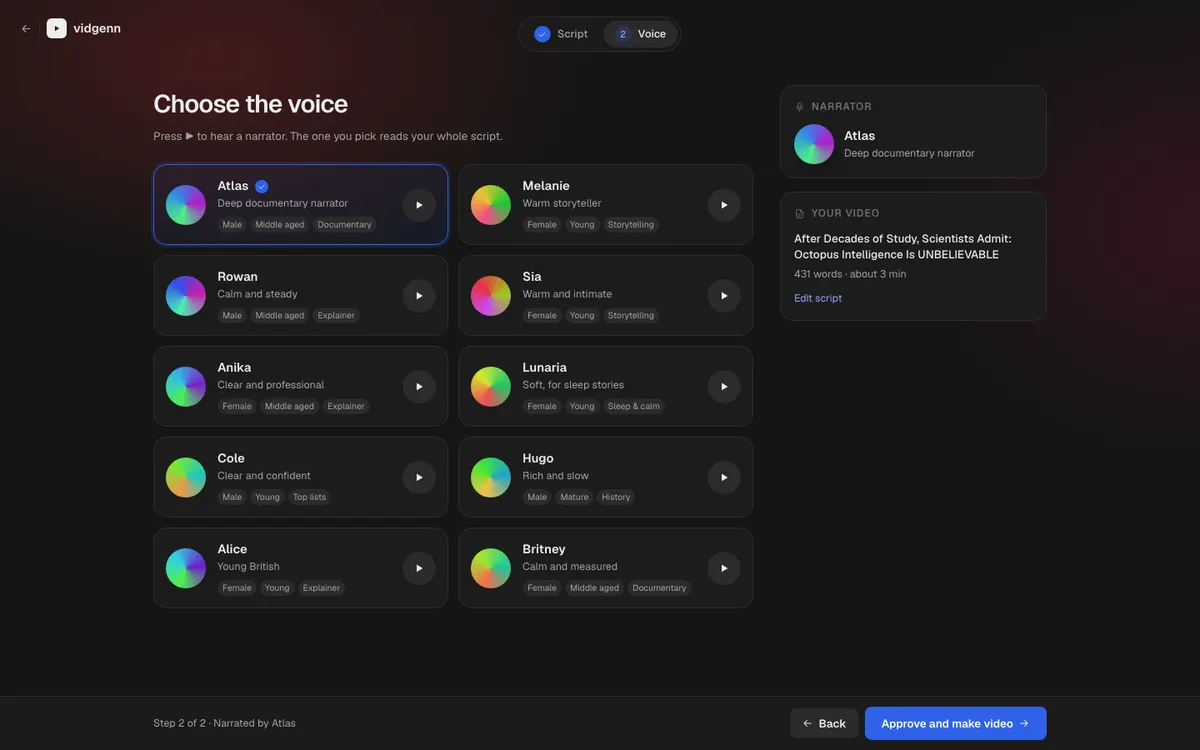
| Narration | Not described on its pages | 24 ElevenLabs voices, 6 languages |
| Pictures | AI-generated | Licensed real footage, plus motion graphics |
| Editing | None in the tool; stitch clips yourself | Editor to swap shots and graphics |
| Priced by | Credits: 20 per second (Shorts Generator) | Minutes of finished video, from $0.30 to $0.63 each |
The two tools answer different questions. vidIQ's generator is for a striking few seconds: an intro shot, a scene no camera could film, or a quick AI Short. A video maker is for the 10 minutes in between. If you only need clips, our guide to text-to-video AI tools compares the clip generators.
How far vidIQ's credits go on video
Every AI feature in vidIQ draws on one monthly pool of AI credits, shared across AI Coach, thumbnails, Script Writer, clipping and generation. Unused credits don't roll over (vidIQ pricing). vidIQ's "Features & credits by plan" article lists the cost of each action (vidIQ Help):
| Tool | What you pay in credits |
|---|---|
| Shorts Generator | 20 per second of output video |
| Clipping (long video to Shorts) | 9 per minute of input video |
| Script Writer | 1 per minute of script length |
| Thumbnails | 22 per generation, regeneration or edit |
| Title Generator | 3 per generation (up to 3 titles) |
| Description Generator | 1 per description |
| AI Coach | 10 per message (25 Deep Thinking, 50 Max Mode) |
Worked example: AI video on vidIQ's credits
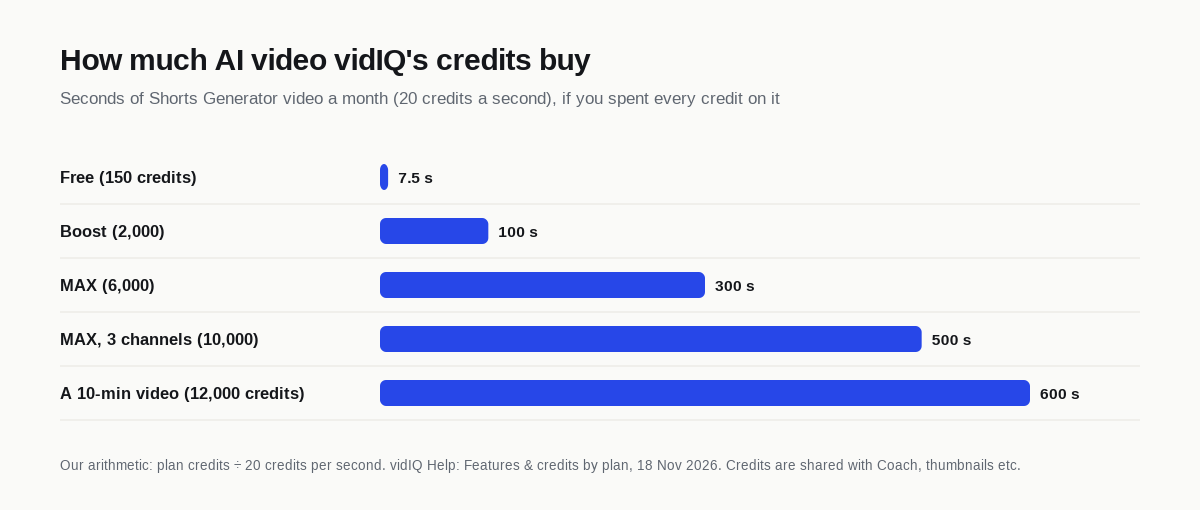
Our arithmetic, from vidIQ's published costs. Seconds of generated video = plan credits ÷ 20. On Boost that's 2,000 ÷ 20 = 100 seconds a month, if you spent nothing on thumbnails or AI Coach. One 60-second Short costs 60 × 20 = 1,200 credits, 60% of Boost's allowance. A 10-minute video would cost 600 × 20 = 12,000 credits, more than the 10,000 on MAX's three-channel tier.
Clipping is far cheaper per minute because it cuts video you already have. MAX's 6,000 credits ÷ 9 credits per minute = 667 minutes of input, about 11 hours. That's where MAX's "up to 11 hours of short clipping and generations" comes from.
vidIQ's Shorts and clipping tools
For most creators, vidIQ's most useful video feature is Clipping: it turns a long video into vertical Shorts. Paste a YouTube link or upload an MP4, and it finds strong moments, reframes them to vertical and adds captions (vidIQ Help: Clipping). Details from its help article:
- Input: up to 10 hours of video, up to 30 GB; private videos can't be processed.
- Output: 1080p vertical clips, in lengths you choose (20 to 45 seconds, 45 to 60, or over 60).
- Captions: on by default, with 18 style presets and word-by-word editing, in 11 languages.
- Publishing: download, or publish straight to YouTube Shorts or Instagram Reels.
- Limits: it needs spoken audio, it's "optimized for single-speaker, face-and-speech content", and free-plan clips carry a watermark.
That last point matters for faceless channels. A narrated documentary has spoken audio, so clipping can process it, but vidIQ says it's tuned for one person talking on camera. Try it on one of your videos before you count on it.
Ideas, scripts and SEO: what vidIQ does best
vidIQ built its name on research, and that's still where most of its plan value sits. Its home page lists the core tools (vidIQ):
- Ideas and Outliers: trending topics and "outlier videos in your niche", meaning videos with far more views than their channel usually gets. Boost gives 50 personalized ideas a day; Free gives 3.
- Keyword research: search volume and competition scores. Free shows 3 results per search; Boost and up are unlimited.
- Script Writer: studies similar videos on YouTube and drafts a script with an intro, sections and a call to action. Its help article says it's best for long-form videos (vidIQ Help: Script Writer).
- Titles, descriptions and thumbnails: AI drafts, plus thumbnail generation and A/B testing.
- AI Coach: an assistant that analyzes your channel and suggests a growth plan.
These are the jobs a long-form video maker usually doesn't do. Picking a topic people search for, and packaging the video so they click, decide most of a video's views. If you need help with ideas, our lists of easy YouTube video ideas and faceless YouTube channel ideas are a good start.
vidIQ is also reachable from AI assistants. Its MCP connects your vidIQ account to tools such as Claude and ChatGPT, on every plan including Free. The MCP price list includes voiceover (28 credits per 1,000 characters), music and "video composition / motion graphics" (1 credit per 4 seconds). vidIQ doesn't describe these as a long-video maker on its pricing page, so treat them as building blocks.
vidIQ plans and prices
| Plan | Monthly | Yearly | AI credits a month | Video-related extras |
|---|---|---|---|---|
| Free | $0 | $0 | 150 | Ideas, AI Coach tips, vidIQ MCP |
| Boost | $19 | $199 ($16.58/mo) | 2,000 (2,500 or 3,000 for 2 or 3 channels) | Thumbnails, Script Writer, unlimited research |
| MAX | $49 | $468 ($39/mo) | 6,000 (8,000 or 10,000 for 2 or 3 channels) | "Up to 11 hours of short clipping and generations", Max Mode AI Coach |
| Enterprise | Not shown | Not shown | Not shown | For more than 3 channels or larger teams |
The pricing page lists the extra credit tiers for more channels but not their prices. It also mentions a Coaching plan and a "Boost + Coaching" plan without listing a price. Paid plans "renew automatically. Cancel anytime." We didn't find a refund policy on the pricing page.
How creators pair vidIQ with a video maker
Since vidIQ covers research and packaging, and a video maker covers production, many creators use one of each. Here's how the steps split:
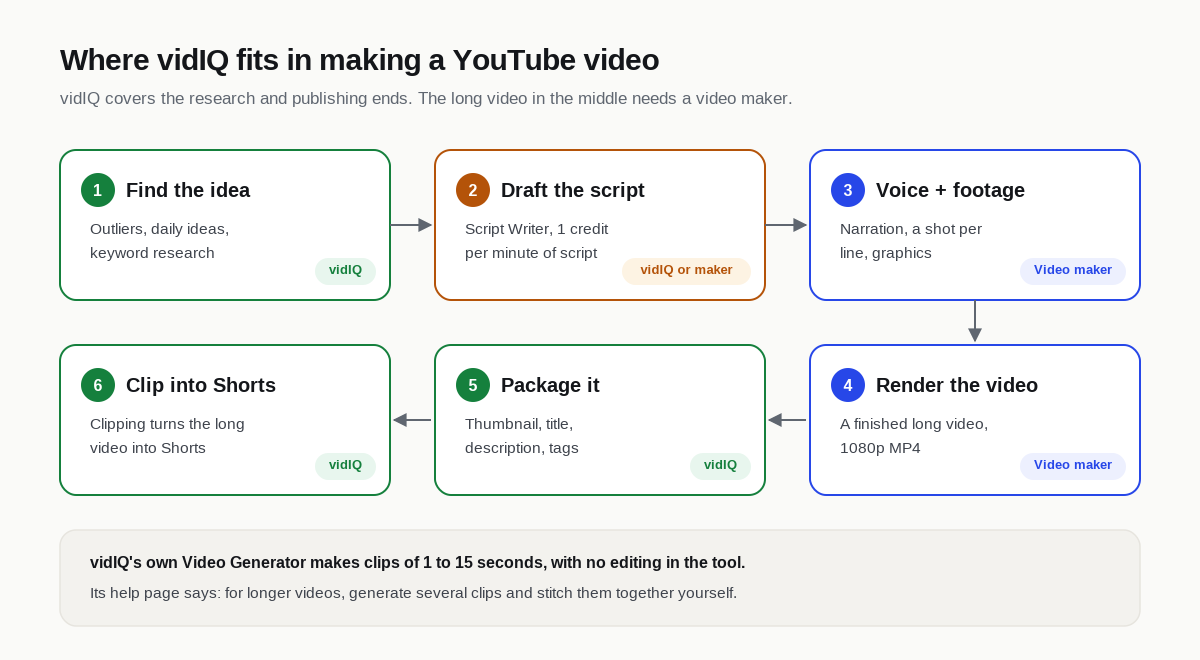
- Find the topic in vidIQ. Use Outliers and keyword research to pick a subject with demand in your niche.
- Draft or outline the script. Use vidIQ's Script Writer, or let the video maker write it. For documentaries, our guide on how to write a documentary script explains the structure that keeps people watching.
- Make the video in a video maker. Paste the script, or give it the topic, and get a narrated video with footage.
- Package it in vidIQ. Generate thumbnail options and title ideas, and write the description.
- Clip Shorts in vidIQ, if clipping works on your video style.
Where VidGenn fits
VidGenn covers steps 3 and 4 for documentary and explainer channels. Give it a topic, or paste your own script (including one drafted in vidIQ) to be read word for word. Pick 3, 5, 8, 10, 15 or 20 minutes, and you get a finished faceless documentary in 1080p. Every sentence gets licensed real footage from NASA, Wikimedia Commons, Internet Archive, Pexels and Pixabay, not AI-generated clips, plus a motion graphic on every fact.
VidGenn and vidIQ don't overlap much. VidGenn doesn't make thumbnails, doesn't upload to YouTube for you, and isn't a Shorts tool, which are things vidIQ helps with. vidIQ doesn't make long narrated videos, which is VidGenn's whole job.
Worked example: what the pair costs per video
Our arithmetic, monthly billing. vidIQ Boost ($19) plus VidGenn Creator ($38, 60 minutes) is $57 a month. That's enough for six 10-minute videos, so $57 ÷ 6 = $9.50 per video, with Boost's 2,000 credits left for thumbnails, titles and scripts. At 3 videos a week, about 130 minutes a month, swap in VidGenn Pro ($79, 180 minutes). That's $19 + $79 = $98 a month, or $98 ÷ 13 = about $7.54 per video.
If you'd rather have research and video in one subscription, Subscribr combines both, with AI-generated visuals; see VidGenn vs Subscribr. For the full tool stack of a faceless channel, read AI tools for a faceless YouTube channel.
Do vidIQ's AI clips need a label on YouTube?
If a generated clip looks realistic, probably yes. YouTube asks creators to disclose content that is "meaningfully altered or synthetically generated when it seems realistic" (YouTube Help). Using AI is allowed. Unlabeled realistic AI content, and channels that look mass-produced, are what cause problems (YouTube monetization policies).
Real archive footage, as in a VidGenn documentary, isn't synthetic, but an AI narrator voice can still be worth noting in your description. Our guide on whether AI documentaries can be monetized covers the details.
Verdict: should you use vidIQ to make videos?
Use vidIQ for what it does best: finding topics, writing titles and descriptions, making thumbnails, and turning long videos into Shorts. Its Video Generator is handy for a few seconds of AI B-roll or a short AI clip, within its credit limits. It isn't a way to produce a 10-minute YouTube video.
For the long video itself, pair vidIQ with a video maker built for your format. For documentaries and explainers, that's what VidGenn does. Our list of the best AI faceless video generators compares the others.
Common questions
Can vidIQ make a full YouTube video?
Not a full narrated long video. Its Video Generator makes clips of 1 to 15 seconds, and its help article says to stitch clips together yourself for longer videos. For a complete video from a script, use a script-to-video tool.
Is vidIQ's AI video generator free?
The Free plan includes 150 AI credits a month and "a limited number of generations". At 20 credits per second for the Shorts Generator, 150 credits is 7.5 seconds of video. Paid plans start at $19 a month.
How much does vidIQ cost?
Boost is $19 a month or $199 a year, and MAX is $49 a month or $468 a year, on vidIQ's US pricing page. Free is $0. Enterprise prices aren't shown.
Can vidIQ turn a long video into Shorts?
Yes. Clipping finds moments in a long video, reframes them to vertical 1080p, adds captions and can publish to YouTube Shorts. It costs 9 credits per minute of input and works best on one person speaking on camera.
What should I use with vidIQ to make documentaries?
A documentary maker for the video itself. VidGenn turns a topic or your script into a 3 to 20 minute documentary with real footage, from $19 a month for 30 minutes. See YouTube automation with AI for the full workflow.