A done-for-you YouTube channel is a service where a provider builds and runs a channel for you: niche research, scripts, voiceover, editing, thumbnails and uploads, usually faceless, for a monthly fee. Few sellers publish prices: ZAN starts at $499 a month, YT Wealth Media and most freelance listings say "contact us", and management alone at Tasty Edits costs $1,490 a month. The offer is only safe if your own Google account owns the channel and the AdSense account, and the provider works through a channel role.
This guide covers who sells these channels, what's included, what they cost and who owns what. Then come YouTube's policies on bought channels and fake engagement, a checklist for judging an offer, and the alternative of running the channel yourself with AI tools and one editor. VidGenn, which publishes this guide, is one of those AI tools, so we stick to what providers say on their own pages. If you're weighing a full agency, read our YouTube automation agency guide too.
How we checked: we read providers' own websites, listings and terms, plus YouTube Help and YouTube's Terms of Service, on 18 November 2026. We didn't buy a done-for-you channel. Where a seller hides a price, we say "not shown" rather than guess.
Key takeaways: (1) Published prices are rare: ZAN from $499 a month, Tasty Edits management $1,490 to $2,370 a month, editing extra. (2) You must own the channel and AdSense: the Owner role can't be transferred and AdSense ownership can't be either. (3) The linked AdSense account can change only once every 32 days. (4) Over 12 months, 8 ten-minute videos a month cost about $7,668 in-house with VidGenn Pro and an editor (our estimate), against $26,688 for an 8-video editing pack alone.
Who sells done-for-you YouTube channels?
Four kinds of seller use the phrase, and they sell very different things:
- Automation agencies such as ZAN and YT Wealth Media: a team produces and publishes a set number of videos a month on a channel.
- Freelancers on marketplaces such as Fiverr, Upwork and Contra: gigs that set up a channel and make the first videos, often with AI voice. One Contra listing promises research, scripts, AI voiceover, editing, thumbnails, SEO and uploads in a week, with price on request.
- Channel management services such as Tasty Edits: a manager runs uploads, community posts and strategy, while editing is sold separately.
- Channel sellers: marketplaces and individuals selling "aged" or already-monetized channels. This is the riskiest version, covered below.
The first three can all be legitimate, and the price usually tracks how much of the work a person does by hand. Human voiceover and custom editing cost more than AI voice and templates, but templates carry the policy risk explained later. The YouTube automation cost guide prices each step on its own.
What's included in a done-for-you channel?
The service list is similar everywhere. What differs is volume, length and who does the voice. Here is what the providers we read say they include:
| Provider | Included | Volume | Published price |
|---|---|---|---|
| ZAN | Research, scripting, voiceover, editing, thumbnails, channel management; faceless or talking-head; 5 languages | Set by written scope | From $499/month |
| YT Wealth Media | SEO research, scripts, human voiceover, editing, 2–3 thumbnails per video, scheduling, project manager | 8, 12 or 16 videos a month | Not shown on its site |
| Contra listing (one example) | Research, scripts, AI voiceover, editing, thumbnails, SEO, channel setup and uploads | Not stated | Contact for pricing |
| Tasty Edits management | Channel manager, up to 24 or 56 uploads, community posts, comment replies, calls | Uploads only; editing extra | $1,490 or $2,370/month (quarterly) |
Notice what's missing from most lists: video length. Eight 3-minute videos and eight 15-minute videos are very different jobs, and long videos are what build watch hours. Ask for length in minutes before you compare prices. Our guide to the cost per video breaks a video into its parts.
Who owns the channel and the AdSense?
This is the most important question in any done-for-you deal. YouTube's rules decide the answer for you, because two things can't be handed over later:
- The channel Owner role "can't transfer ownership to other users" (YouTube Help: channel permissions). If the provider creates the channel in its account, it stays the owner.
- AdSense: "The AdSense Terms and Conditions or AdSense for YouTube Terms of Service don't permit transfers of account ownership" (YouTube Help: AdSense for YouTube). You can have only one AdSense account per payee name, and you can change the linked account only once every 32 days.
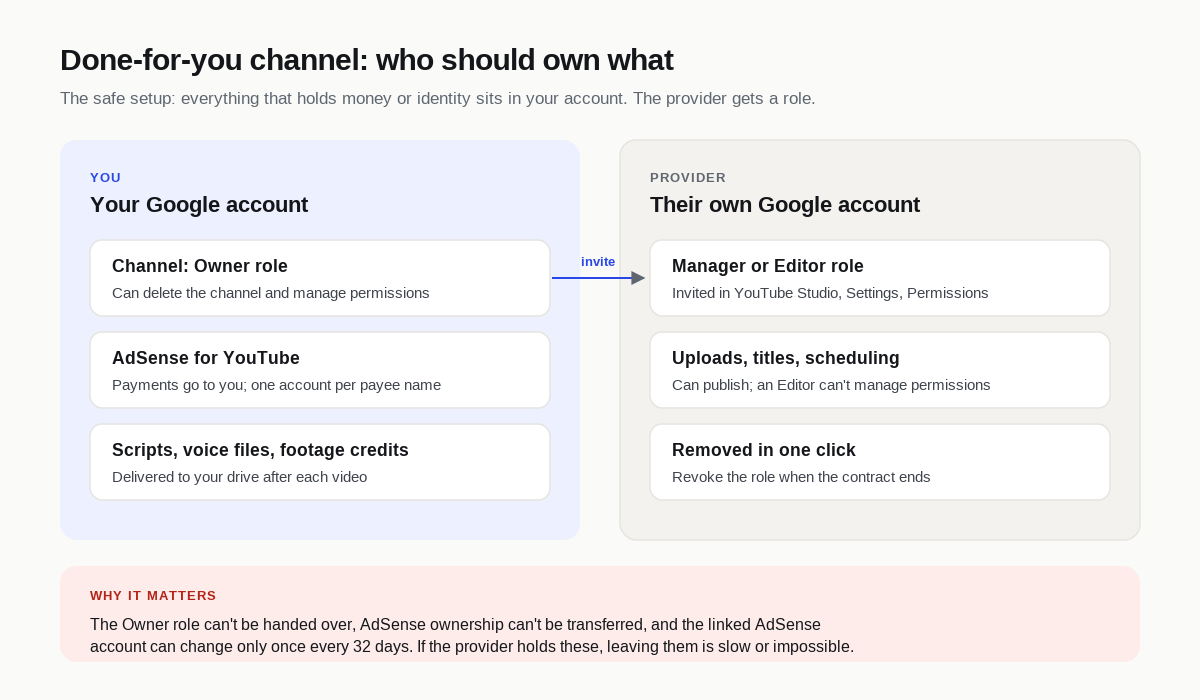
The safe setup takes ten minutes. Create the channel in your own Google account, set up AdSense in your name, then invite the provider in YouTube Studio under Settings, Permissions, as a Manager or Editor. YouTube says this is safer than sharing a password, and you can remove the role in one click. Tasty Edits, for example, says it works through YouTube Studio access and doesn't need your login. YT Wealth Media's FAQ says "You retain full ownership and control", and its terms say deliverables become yours on full payment.
What YouTube's policies say about bought and outsourced channels
Buying or selling a channel
YouTube's Terms of Service (dated 5 January 2022) contain no clause that explicitly allows or bans selling a channel. That gap isn't permission. The Owner role can't be transferred, AdSense can't be transferred, and a bought channel brings its strikes, audience and history with it. The monetization policies add that penalties "may apply to all of your existing channels", and that you shouldn't use other channels to get around a restriction.
Fake engagement
Some packages include "growth" in the form of bought views or subscribers. YouTube's fake engagement policy bans services that "artificially inflate metrics like views, likes, and subscribers". Artificial traffic isn't counted and "can lead to strikes", and three strikes in 90 days can end the channel.
Inauthentic and reused content
The biggest everyday risk is the content itself. YouTube doesn't monetize content that is "mass-produced, generic, repetitive", including AI content "made with generic or unoriginal templates", or channels that reuse other people's videos. Reused content is judged across the whole channel, and permission from the original creator doesn't fix it. AI is allowed, and realistic AI content needs a disclosure label. Our guide on monetizing AI documentaries explains what passes review.
None of this changes when a provider does the work. Providers' terms usually say so plainly: YT Wealth Media's terms say your channel's compliance with platform rules "remain[s] your responsibility" and exclude liability for demonetization or suspension.
How to evaluate a done-for-you offer: a checklist
Run every offer through these questions. A good provider answers all of them in writing without fuss.
- Is the channel in my Google account? If not, stop.
- Is AdSense in my name? It can't be moved later.
- Will you work through a channel role, not my password?
- How many videos a month, and how many minutes each?
- Who writes the scripts, and can I approve them before production?
- Where does the footage and music come from? Ask for a credits file per video and no reused YouTube clips.
- Do you use the same template across clients? Templated content is not monetizable.
- Do you buy views, subscribers or channels? The only safe answer is no.
- Is there an income claim? If so, ask for the written basis. Under the FTC's Business Opportunity Rule, sellers it covers must give buyers a disclosure document 7 days before payment and back any earnings claim in writing.
- What are the refund, cancellation and handover terms? Compare the sales page with the terms; they don't always match.
- Can I speak to two current clients? References are a standard request.
What you still do yourself, even with done-for-you
"Done for you" never means "nothing for you". Even the most complete package leaves the owner with jobs no provider can take over, because they're tied to your identity or your money.
- Account security: 2-Step Verification on your Google account, which YouTube requires for the Partner Program.
- The Partner Program application and AdSense: you apply under Earn in YouTube Studio and link your own AdSense account.
- Approving scripts: you're responsible for what the channel says. A wrong fact in a history video is your correction to make.
- AI disclosure: if a video shows realistic AI-made people, places or events, the upload needs YouTube's label.
- Copyright claims: disputes go through your channel, so keep the provider's credits file for each video.
- Reading analytics: at least monthly, so you can tell whether the money you spend is buying watch hours.
Budget two or three hours a week for this. If you can't, a done-for-you channel is a risky purchase, because nobody is checking the people you've hired. Our guide to copyright-safe documentary footage explains what a good credits file should contain, so you can check the provider's.
How to leave a done-for-you provider safely
Plan the exit before you sign. Most problems in these deals appear at the end, when work in progress, files and access all have to change hands at once. A clean exit has five steps:
- Give written notice as the terms require. YT Wealth Media, for example, ends a contract at the close of the current billing cycle or production round.
- Collect your files: scripts, voice recordings, project files, thumbnails and the credits file for every published video.
- Remove the provider's role in YouTube Studio under Settings, Permissions. It takes one click when they were never given your password.
- Check the AdSense link is still your own account, and that no payment details were changed.
- Publish one video yourself within two weeks, so the channel doesn't go quiet while you set up the next workflow.
If the provider owns the channel, none of these steps works. That's the strongest argument for the ownership setup above.
What does a done-for-you channel cost over a year?
A monthly price looks small until you multiply it by the 12 months or more a new channel often needs to reach the Partner Program thresholds. Those are 1,000 subscribers plus 4,000 watch hours in 12 months, or 10 million Shorts views in 90 days. From 1 February 2027, new applicants need 8,000 hours or 20 million Shorts views (YouTube Help).
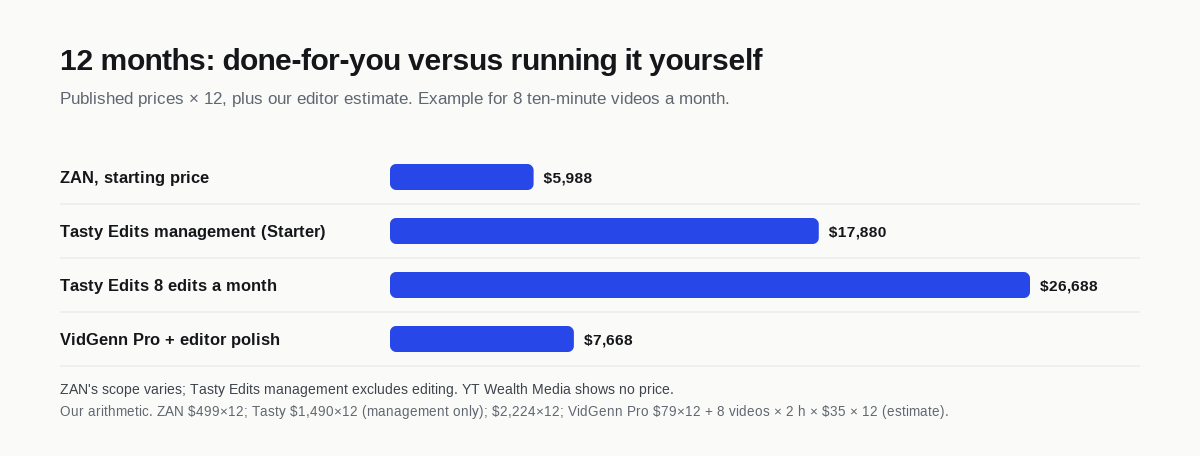
Worked example: 12 months, 8 ten-minute videos a month (our arithmetic)
- ZAN at its starting price: $499 × 12 = $5,988. What $499 buys isn't published, so treat it as a floor.
- Tasty Edits: an 8-video pack is 8 × $278 = $2,224 a month, so $2,224 × 12 = $26,688 for editing alone. Add Starter management ($1,490 × 12 = $17,880) and the year costs $44,568. Tasty Edits edits footage you supply; scripts and voice are separate.
- Running it yourself: VidGenn Pro is $79 a month for 180 minutes, enough for 80 minutes of video. An editor at Upwork's published median of $35 an hour, spending an estimated 2 hours per video on polish and thumbnails, costs 8 × 2 × $35 = $560. So ($79 + $560) × 12 = $7,668.
ZAN's starting price is lower than our in-house estimate, which is a fair point in its favour. The question is what it covers. Get the number of videos and minutes for that price, then compare like with like.
The alternative: run it yourself with AI and one editor
For faceless documentary and explainer channels, the slowest parts of a done-for-you package are research, script, voice and finding footage. That's the work VidGenn does. You give it a topic or your own script, approve every line, and pick one of 24 ElevenLabs narrators. It returns a finished 1080p documentary of 3, 5, 8, 10, 15 or 20 minutes, with licensed real footage on every sentence and a credits file.
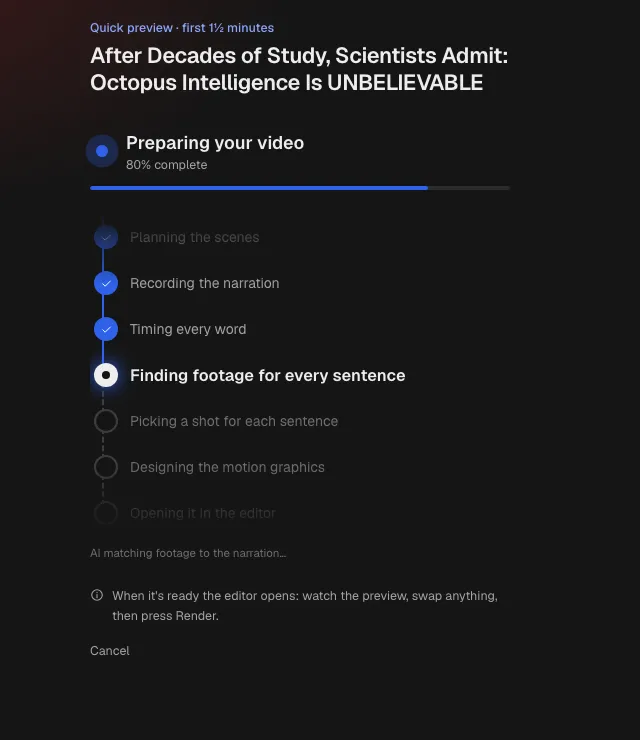
It won't do everything a done-for-you package does. VidGenn doesn't make thumbnails or Shorts, doesn't upload, and doesn't make talking-head or gaming videos. That's where one editor comes in: thumbnails, a tighter hook, Shorts cut from each video. Our guide to hiring a faceless YouTube video editor has a job post and test task, and how to start a faceless documentary channel covers the setup.
A done-for-you provider is the better choice in three cases. You have no time at all to review scripts. You need languages VidGenn doesn't narrate (it covers English, Portuguese, Spanish, French, German and Italian). Or your format needs a presenter on camera.
Common questions
Is a done-for-you YouTube channel worth it?
It can be if you own the channel and AdSense, the content is original, and you can afford 12 months or more of fees before income. It isn't if the offer leans on guaranteed income or bought growth. See whether faceless channels make money.
Can I buy a monetized YouTube channel?
YouTube's terms don't explicitly ban it, but the Owner role and AdSense can't be transferred, and the channel's history and strikes come with it. Starting your own channel is the safer path.
Who gets the AdSense money on a done-for-you channel?
Whoever owns the linked AdSense account. Make sure it's you: AdSense ownership can't be transferred, and the linked account can change only once every 32 days.
How long until a done-for-you channel is monetized?
No one can promise a date. You need 1,000 subscribers plus 4,000 watch hours or 10 million Shorts views, rising to 8,000 hours for new applicants from 1 February 2027. Our guide to getting monetized explains the steps.
What's cheaper than a done-for-you channel?
An AI documentary tool plus one editor. In our example that's about $639 a month for eight 10-minute videos. Compare tools in the best AI faceless video generators.